3 Best Gmail Tips: How to Use Custom Gmail Addresses | How to Use Gmail as a Hard Drive | How to access GMAIL without Internet
3 Best Tips before you do Google Searching again
Learn How to Create your own SMS channel on Google to update your latest posts through SMS
Step 1: Open this link on your browser http://labs.google.co.in/smschannels/browse
Google Search is only 18% Search: Is Google becoming a Yahoo?
My brain got used to filtering the ads out, so it never popped into my head before... We are used to this picture. I actually had to get up from my laptop, grab a coffee and then glance back at my monitor from across the room to notice this.
ADs vs Results: area size
Now, we're all technical people so let's do the math:
- The screenshot above is 1280x960 pixels (a typical resolution for a 13" wide-screen laptop and some older 15"s). My Mac has a 1920x1200 resolution, but still I prefer not to browse in full screen (actually, the only apps I run full-screen are the development ones - Sublime Text, Visual Studio, XCode etc.).
- The search results take up 535x425 pixels.
- Which makes it 18.5% of the window
I do understand that this stuff is resolution-dependent, but still... Only 18.5% of the screen is devoted to something that people are actually looking for.
Let me show you what "18.5% of the screen" really looks like:
ADs vs Results: UI elements count
Now, enough with the area size. Let's count the links - the clickable text UI elements.

The page has about 45 different links in total. Only 5 of them are the actual search results (I do not count the "sitelinks" - the sub-links shown under some results and ADs). Which makes it about 11%. Only 11% of the total links on the page are the actual search results.
(If we do include the "sitelinks", it makes 57 links, 10 of which are the results, which is 17.6%).
OK, let's be fair, some of the links are the tools ("Google Docs", "Gmail"), some are search modifiers ("Search near...", "Search images"), some are Google-Account utilities ("Sign in", "Settings") so let's drop these links and buttons... Let's count only the "blue stuff". I.e. links that "look like" the search results, not including the "sitelinks". We have 18 links in total. 5 are the results. Which is 27%.
The bottom-line is: even dropping all the "secondary" UI-elements, the Ad/Results ratio is almost 4-to-1.
Was it always like this?
Unfortunately, I was unable to find a screenshot of Google's result page back from the late 90s, but found some stuff from the 2000s. I did an image search for "large" images, dated "before 2008", searching for "google results", "serp page" etc. Obviously, I was not able to find a screenshot for these particular keywords ("saas help desk"), so I tried to find a screen with as many ads as possible. Since "saas help desk" turns out to be a pretty competitive term. Here's what I found.
The AD/Results ratio is 8 links to 7. Which is 47% of the links are the actual results.
Now, the area. The results are 779x595 pixels. The total size is 1108x790 (which is even smaller than my original screenshot). Which makes it 53% of the screen is taken by the results, more than a half (actually, even more, since it's a smaller screenshot and there are no more ADs below the fold).
What does this mean?
Google has cut down the results area by three times - from 53% to 18%. The company is obviously interested in people clicking more ADs (in fact, I believe that's also the true reason behind "Penguin" and "Panda") since it's the company's primary source of income...
But all I know is that in the early 2000s Google has become the #1 search engine because of the three things:
- Relevant results
- The speed at which they were served
- The simplicity of the UI
Google AdSense Secrets 5.0 Download Free Pdf Book

*How to Claim Your Share of The Multi-Billion Dollar AdSense Pie
*Ways to Build An Adsense Ready Website Without a Domain or Hosting
*Secrets to Tweaking and Optimizing your Ads for Maximum Revenue
*How to use Google's Custom Search engine to Catch Fickle Visitors
*Special Code to Influence Your Ads with Section Targeting and Keywords
*How to Understand your AdSense Stats, Channels and Split Testing
Download Depositifiles.com
Depositfiles
Search Google’s cache to look for vulnerabilities using SITEDIGGER V3.0 RELEASED 12/01/2009
- Improved user interface, signature update and results page.
- No longer requires Google API License Key.
- Support for Proxy and TOR.
- Provides results in real time.
- Configurable result set.
- Updated signatures.
- Ability to save signature selection and result set.
- Select the signatures from the tree
- Provide the license key at the bottom-right box on the tool.
- Enter the domain / sub-domain information.
- Hit the Scan Button.
- Save signatures and results for future analysis.
Google SERPS - Mystery search algorithm gets Speed criteria
Google has announced that it will be adding the site speed or loading time of a website as a criteria for its search rankings. this was indicated in Google’s last post in December and now its been formally announced by Amit Singhal, and Matt Cutts – Google's principal search quality team. Site speed as a new parameter reflects “how quickly a site responds to web requests" . This change is has been adopted to make this world a happier place
"Speeding up websites is important — not just to site owners, but to all Internet users. Faster sites create happy users and we've seen in our internal studies that when a site responds slowly, visitors spend less time there,"
Faster websites reduce operating costs, improve user experience and overall make internet a more habitable place. But as there are always two faces of a coin,some webmasters are just not finding site speed a solid idea. What about websites that have advertisements ? they will obviously load slower than websites with no advertisements and with plain html. What about websites with flash content ? Worse even,the Google Adsense and Google Adwords code is known to slow a website. Would that ultimately affect a website’s rankings ?
Google has provided a list of free tools to measure speed of a website. Tools like Google Pagespeed,Yahoo’s Yslow are provided to measure website’s speed. Google might use Google toolbar to measure website speed, but is it a reliable measure ? Further, the Google duo commented
“While site speed is a new signal, it doesn't carry as much weight as the relevance of a page. Currently, fewer than 1% of search queries are affected by the site speed signal in our implementation and the signal for site speed only applies for visitors searching in English on Google.com at this point. We launched this change a few weeks back after rigorous testing. If you haven't seen much change to your site rankings, then this site speed change possibly did not impact your site.”
Ah well…if this is true, then the current web design as we know it;is dead. Whatever the bets, a new competition of speed is being heralded in coming days.
In the mean time, you can check out the pagespeed addon from here
Google Search Engine most confusing Boolean operator is OR
Google Street View goof up – Privacy Invasion, data theft and Apologies
- We are not invading anyone’s privacy &
- Take a look around folks, other people have been collecting data even longer then we have.
Nevertheless, cars have been temporarily grounded and the data has been isolated till someone figures out what do do with it. Google intents to hire a third party to examine the software is "profoundly sorry for this error" and will try to learn from it. Quoting from the official blog post
The engineering team at Google works hard to earn your trust—and we are acutely aware that we failed badly here. We are profoundly sorry for this error and are determined to learn all the lessons we can from our mistake.
Inner thoughts -
I am glad German authorities are competent enough to sniff and dig facts and give an earful to Google.
Data collection is a scary thing anyways..we need to be paranoid of what data we are allowing to be public and private considering the vast attempts of world to catch us with our pants down :P Who knows that data might be jacked up with folks at CIA/FBI/NSA to track some sucker down (there's always a chance…remember FBI carnivore ? anyone ?).
Before the screw up, Google insisted what they were doing was nothing wrong. Frankly speaking, NO company ever admits to invading anyone's privacy. It's always "your privacy is important to us" blah blah blah…skepticism is the key to protect ourselves anyways.
In the end,
if privacy is outlawed, only outlaws will have privacy
(sorry if I sound corny.. but I couldn't think better)
From – PCWORLD
Advanced password hacking using Google – easy to learn, easy to apply
Google is your best friend when it comes to hacking. The search engine giant has crawled loads of data which was intended to be protected by webmasters, but is being exploited and mined by smart users using Google dorks. Today I will be discussing some practical dorks which will help you gain passwords, databases and vulnerable directories. The basic methodology remains the same, query Google using specialized dorks with precise parameters and you are good to go. I assume you have basic working knowledge of google dorks.
Lets start, shall we ?
FTP passwords
ws_ftp.ini is a configuration file for a popular win32 FTP client that stores usernames, (weakly) encoded passwords, sites and directories that the user can store for later reference.
intitle:index.of ws_ftp.ini
You can also this dork which uses "parent directory" to avoid results other than directory listings
filetype:ini ws_ftp pwd
Or
"index of/" "ws_ftp.ini" "parent directory"
even if the site or file has been taken offlline, you can still search the contents in the Google cache using the following dork
"cache:www.abc.com/ws_ftp.ini"
where
www.abc.com is the site you want to check the dork for.
The ws_ftp password uses quite weak encryption algorithm, hence once you get the password, you can break it using the decryptor provided here or from here.
PHP Hacking
Sites made in PHP have a file known as “config.php” which stores configuration and the username and password for the sql database the site is hosting. This password is required only once per transaction (i.e when ever admin logins or a transaction is committed at administrator level) and hence will be specified by the ‘require_once’ parameter in the config file or in index file.
intitle:index.of config.php
to view php file contents
intitle:"Index of" phpinfo.php
you can also try the directory traversal attack in php using the following dork
inurl:download.php?=filename
if you are lucky, substitute the filename with ‘index.php’, download it, read it and get the password (hint:if you are not able to find it, try looking for globals.php).
Since most websites today deny this trick, but you may get lucky with some :) You might also want to have a look at Hacking PHP 4.4 websites in 20 seconds
SQL Dumps
We will be hunting for SQL password dumps saved in database, here ext:sql specifies the type of password dump, e10adc3949ba59abbe56e057f20f883e is the md5 hash for 123456; one of the most common password people keep..and intext dork will allows to search inside the dump.
ext:sql intext:@gmail.com intext:e10adc3949ba59abbe56e057f20f883e
ext:sql intext:"INSERT INTO" intext:@somemail.com intext:password
Remember kids
- Use different email providers, substitute gmail/yahoomail instead of somemail ,or try custom domain mail providers.
- Use different file extensions.
- Use different type of hashes, some older ones might be using md4 and some others might be using other prominent encryption algorithms.
- just mix everything up and try different combinations :)
Its not over..Yet
A very flexible query can be used to hunt for WS_FTP.log which in turn can disclose valuable information about the server.
+htpasswd +WS_FTP.LOG filetype:log
You can substitute "+htpasswd" for "+FILENAME" & you may get several results not mentioned before using the normal search. You can further explore filenames by using keywords like
phpinfo, admin, MySQL, password, htdocs, root, Cisco, Oracle, IIS, resume, inc, sql, users, mdb, frontpage, CMS, backend, https, editor, intranet
The list goes on and on.. Also you cam try this dork to data mine information about the uploader
"allinurl: "some.host.com" WS_FTP.LOG filetype:log"
which tells you more about who's uploading files to a specific site, quite handy for some passive reconnaissance.
Also..if you are one hell of a lazy b**tard ,you can do it using some software like Google Hacks..but remember, manual way is the way to go. I may have included some software specific password mining, but that would cripple your imagination. My recco ? go postal by using your imagination and developing your own dorks and queries.
I guess that was enough for this time, will be coming with more tuts with time
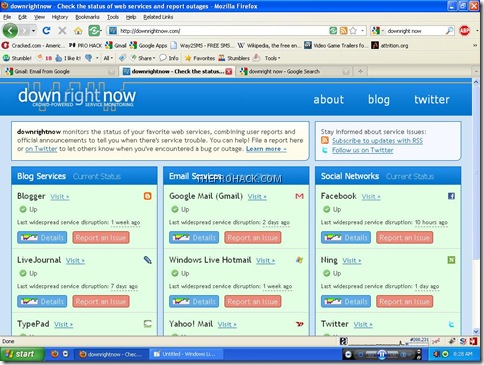
Downright now - Monitoring if your favorite website is down
- Reports from users who visit downrightnow
- Public messages on Twitter from users who are having service trouble
- Official company announcements and status reports
- Other third-party web sites that monitor service status
As soon as I opened the website, I came to know that Facebook was having some problems at that time
Mission Successful :P I guess you will find it interesting.
Like This post ? You can buy me a Beer :)
Gmail enables Nested labels and Message sneak-peek
Gmail is now even more customizable as folks at Google provided the facility to arrange labels hierarchically. Now emails can be arranged even more intuitively by making a label child of another label. This highly requested label setting can be enabled by going to
settings-> labs –> Nested labels –> enable it –> save
Once you enable it, you can then name your labels with slashes (/) to make it a child of another label.
For example, if you want to create a simple label hierarchy with a "Social networking" label, and inside it a "Digg" and a "Facebook" label,then you just need to create three labels with the following names:
Social networking
Social networking/Digg
Social networking/Facebook
You can then create “Social networking/twitter” etc to get something like the screenshot on the right. Also, if the parent label doesn't exists then you have to create it before hand.Here you can see above that I have even started to use it and have arranged my labels accordingly.
Another feature to preview emails have been added to Gmail. You can now preview messages by right clicking the mail. this feature is known as Message Sneak-Peek.
You can enable this feature by going to -
settings-> labs –> Message Sneak Peek –> enable it –> save
Experiment and get the max out of your gmail :)
Like This post ? You can buy me a coffee :)
Google GO – New programming front
Google Go is a new language developed by Google Inc which was first officially announced in November 2009. It’s a compiled, garbage collected concurrent programming language. Language veterans Robert Griesemer, Rob Pike, and Ken Thompson initially started to design Go based on previous work related to the Inferno operating system in September 2007. Go has been deployed to compile on UNIX and Linux platform however as of the launch, Go was not considered to be ready for adoption in production environments.
With ken co creating Go,it has a syntax closer to C except for the type declarations; other syntactical differences are the missing parentheses around for and if expressions. Go has been designed with an aim to have exceptionally fast compilation times, even on modest hardware. Some of the features missing in Go as of now are exception handling, type inheritance, generic programming, assertions, method overloading and pointer arithmetic.
Here is an example of a Hello world program in Go -
package main
import "fmt"
func main()
{
fmt.Printf("Hello, World\n")
}
Go can be compiled using 2 compilers as of now - 6g (and its supporting tools, collectively known as gc) are in C, using yacc/Bison for the parser and Gccgo,a compiler with a C++ front-end with a recursive descent parser coupled to the standard GCC backend.
The industry reaction for Go has been mixed, with some veterans raising its fast compilation and others who criticized lack of features in it. judging by the reaction,one can simply say that Go is just not mature enough to be deployed to industry ready environments and has some rough edges to smooth out.
PS : Like this article ? You can always support me by buying me a coffee or You can always try some of the cool merchandize from PROHACK
Google Hacks: How to use Google Web Search Basics
How To Get Free Backlinks from EDU and GOV sites
Detect Invisible Users on Instant Messengers
TRACK INVISIBLE USERS ON YAHOO
Yahoo Messenger is a bit cryptic when it comes to tracking users,so we can track their status by these 2 methods -
- Yahoo Invisibility Detection sites
- Using Yahoo’s URL Resources
I’ve found many sites which helps you to see which of your buddies are hiding online,some of these sites are:
YDetector.comThese site are very easy to use and self explain themselves. Just enter the ID you want to trace and get the status.
Invisible-Scanner.com
DetectInvisible.com
YahooScan.net
Invisible.ir
Yahoo URL Resources
Here are a bunch of URLs that can be used to detect invisible users, just replace “[username]” with the username you want to detect :
http://mail.opi.yahoo.com/online?u=[username]&m=g&t=0remember,You have to replace the text in RED color in the given URL with the Yahoo ID you want to detect,
(Shows up a yellow smiley if the person is online and gray if the person is offline or invisible)
http://mail.opi.yahoo.com/online?u=[username]&m=g&t=1
(Shows up a button with “Online Now” or “Not Online”)
http://mail.opi.yahoo.com/online?u=[username]&m=g&t=2
(Shows an image with “I am Online send me a message” or “Not Online right now”)
http://mail.opi.yahoo.com/online?u=[username]&m=a&t=0
(Shows a text with “[username] is ONLINE or NOT ONLINE”)
http://mail.opi.yahoo.com/online?u=[username]&m=a&t=1
(Shows “00” if person is offline and “01” if he is online)
for eg - my YahooID is “iamrdx” ,the first URL is :
http://mail.opi.yahoo.com/online?u=[username]&m=g&t=0After the replacement it would appear as :
http://mail.opi.yahoo.com/online?u=iamrdx&m=g&t=0
TRACE INVISIBLE USERS ON GTALK
Tracing Gtalk users is rather easy,you only have to use the following method -
- Login to Gtalk using your Google id.
- Go to IM window of user you want to trace for invisible.
- You will see a drop-down list on right top side,click on it.
- Click on "go off the record".
- Now give any message.
- If the "xyz@gmail.com is offline and can't receive messages right now" message appears in red color it means your friend is really offline.
- If no message comes means your friend is online and invisible for all.
Good Luck :)
Improve Google Page Rank and Alexa Ranking
Showing up on search engines is one of the most critical ways to increase website traffic and expose your content, product or service to people who might be interested in what you have to offer. Most of the major search engines utilize an algorithm to determine where a website ranks.Google uses Pagerank system and Alexa uses various criteria’s to rank your position in related searches.A proven but little-known way to improve your page rank with Google and your Alexa ranking for new web authors is here for you.
Steps
- Build a website. NVU is an easy free WYSIWYG html editor or use a simple blogging platform like blogger,typepad or wordpress.
- Make sure that your site is optimized for the search engines and that all meta tags and robot tags are constructed properly.
- Focus building your site on original and unique content. Once Internet users start to appreciate and see the value in your website, they will begin linking to it.
- Submit your site map to Google to have all of your pages indexed.
- Submit to the main search engines, Yahoo, Google, MSN and any others that you prefer.
- Go to your favorite search engines and type in "social bookmark sites".
- Submit your site and any other favorite sites to as many social bookmark sites that you like.
- Submit your site to as many directories as you can, specially to those with high page rank like DMOZ or yahoo directory or to any smaller directory with lower page rank.
- Update your site frequently adding new content that keeps users returning to your site.
This method is two-pronged because not only will you get better positions in searches for your keywords, you are also going to receive one way inbound links for your website which will improve your search engine rankings.Add your website address sparingly to social bookmarking and wiki sites. Users who over-indulge in self-promotion will be perceived as spammers which may result in your website being added to blacklists or, even worse, your efforts to be simply ignored.Beware of duplicate content. Always make sure to check the content that you get by searching for the content on Google, Yahoo, and MSN.Be original and blog original. And just in case if you are copying from other blogs or websites,then do give a reference or link to the original source.
Good luck and
Offline Email - Gmail
Gmail Labs have introduced a new concept of Ofline email which uses Google Gears to download a local cache of your mail. As long as you're connected to the network, that cache is synchronized with Gmail's servers. This feature will be very useful to users who have less internet connectivity but use emails extensively.When you lose your connection, Gmail automatically switches to offline mode, and uses the data stored on your computer's hard drive instead of the information sent across the network.And if you're on an unreliable or slow connection (like when you're "borrowing" your neighbor's wireless), you can choose to use "flaky connection mode", which is somewhere in between: it uses the local cache as if you were disconnected, but still synchronizes your mail with the server in the background.
Offline Gmail is an experimental lab feature,which is made available to everyone who uses Gmail in US or UK English over the next couple of days, so if you don't see it under the Labs tab yet, it should be there soon. Once you see it, just follow these steps to get started:
- Click Settings and click the Labs tab.
- Select Enable next to Offline Gmail.
- Click Save Changes.
- After your browser reloads, you'll see a new "Offline0.1" link in the upper righthand corner of your account, next to your username. Click this link to start the offline set up process and download Gears if you don't already have it.
Google secrets - Some Cool Google Dorks
put this string in google search:
?ww.google.com
"parent directory " /appz/ -xxx -html -htm -php -shtml -opendivx -md5 -md5sumsNotice that i am only changing the word after the parent directory, change it to what you want and you will get a lot of stuff.
"parent directory " DVDRip -xxx -html -htm -php -shtml -opendivx -md5 -md5sums
"parent directory "Xvid -xxx -html -htm -php -shtml -opendivx -md5 -md5sums
"parent directory " Gamez -xxx -html -htm -php -shtml -opendivx -md5 -md5sums
"parent directory " MP3 -xxx -ht
ml -htm -php -shtml -opendivx -md5 -md5sums
"parent directory " Name of Singer or album -xxx -html -htm -php -shtml -opendivx -md5 -md5sums
voila!
Method 2
put this string in google search:
?ww.google.com
?intitle:index.of? mp3You only need add the name of the song/artist/singer.
Example: ?intitle:index.of? mp3
Google Chrome Easter Eggs
Google Chrome,the flagship Google developed browser,has changed the stats of the browser wars.Fast JavaScript and page rendering,absolutely intuitive interface and minimalistic design has propelled it to the likes of mainstream user.Like most other browsers, Google Chrome has some special pages that show information about memory usage, cached files, plug-ins and more. However,some of the users dubbed them as Google chrome easter eggs,a noteworthy buzzword roaming on internet.Here's a list of the most interesting about: pages available in Google Chrome (you can open them by dragging about:name to the address bar).
about:memory - this pages compares the memory used by all the active browsers and by Google Chrome's tabs.
about:stats - a list of internal counters and timers that has a funny subtitle "Shhh! This page is secret!".
about:network - this page could be used for I/O tracking and it's a partial replacement for the Live HTTP Headers extension. Click on "Start I/O tracking", open a web page in a new tab and you'll get a list of all the images, scripts and objects loaded from that web page.
about:internets - this is an Easter egg that references two popular Internet memes: Internets and Series of tubes. Google Chrome embeds the 3D Pipes screensaver from Windows, so you'll see it only if you have the file sspipes.scr in C:\Windows\System32.
about:hang - type this in the address bar of a tab when there's already an active web page to hang the process (this means that the process no longer accepts any signal, but it's still running). The other tabs will continue to work and the active tab can be closed.
about:histograms - a list of histograms for Google Chrome's internal metrics.
about:version - Google Chrome shows the version number the browser, WebKit and V8 (JavaScript engine). You can also find the user-agent used by Google Chrome.
about:dns - Google Chrome prefetches the DNS records for 10 frequently visited hostnames. This feature can be disabled in Options > Under the Hood by unchecking "Use DNS pre-fetching to improve page load performance".
about:cache - files currently in the Chrome cache
about:crash - crash the active tab. Google Chrome displays the "sad tab" image, followed by this message: "Something went wrong while displaying this webpage. To continue, press Reload or go to another page".
about:plugins - the list of plug-ins that are available in Google Chrome: Shockwave Flash, RealPlayer etc.
I hope that was informative.
Cheers and keep reading