Latest News

Showing posts with label Popup Windows. Show all posts

Blogger Magic - Enabling Cookies, In Your Browser

The Blogger dashboard, and blog displays, is less of a pair of websites - and more of an application with code that runs on our computers.

The Blogger code on our computers requires cookies and scripts, which are installed as we use the various Blogger dashboard pages. The cookies and scripts are susceptible to interference, from overly restrictive layered security.

If you have a problem with Blogger - either accessing / using the dashboard, or using / viewing a blog - one of the simplest things to check, complementing script filter settings, is the browser cookie filter settings.

The browser is the most important component, when setting up security - and cookies are a common challenge.

Cookie filters are adjusted differently, for each browser. Consider the multiple domains used by Blogger / Google - and layered security, on any computer, used by the owner and readers of any blog.

  • Chrome.
  • Firefox.
  • Edge / Internet Explorer.
  • Opera.
  • Safari.

Setting the cookie filters in Chrome.

With Chrome, you enable cookies, using Settings ("Customize and control Google Chrome") - aka the 3 bar toolbar icon.

In Settings, if necessary, click on "Show advanced settings" at the very bottom of the page. Under Privacy, click on "Content settings", which gives you the "Content Settings" wizard.

Here, you have selections for Cookies and Javascript - including "Manage exceptions" for each section. Select the recommendation.

  • Cookies: Allow local data to be set

Hit "Done" - and close the Settings tab.


From "Privacy", hit "Content settings".
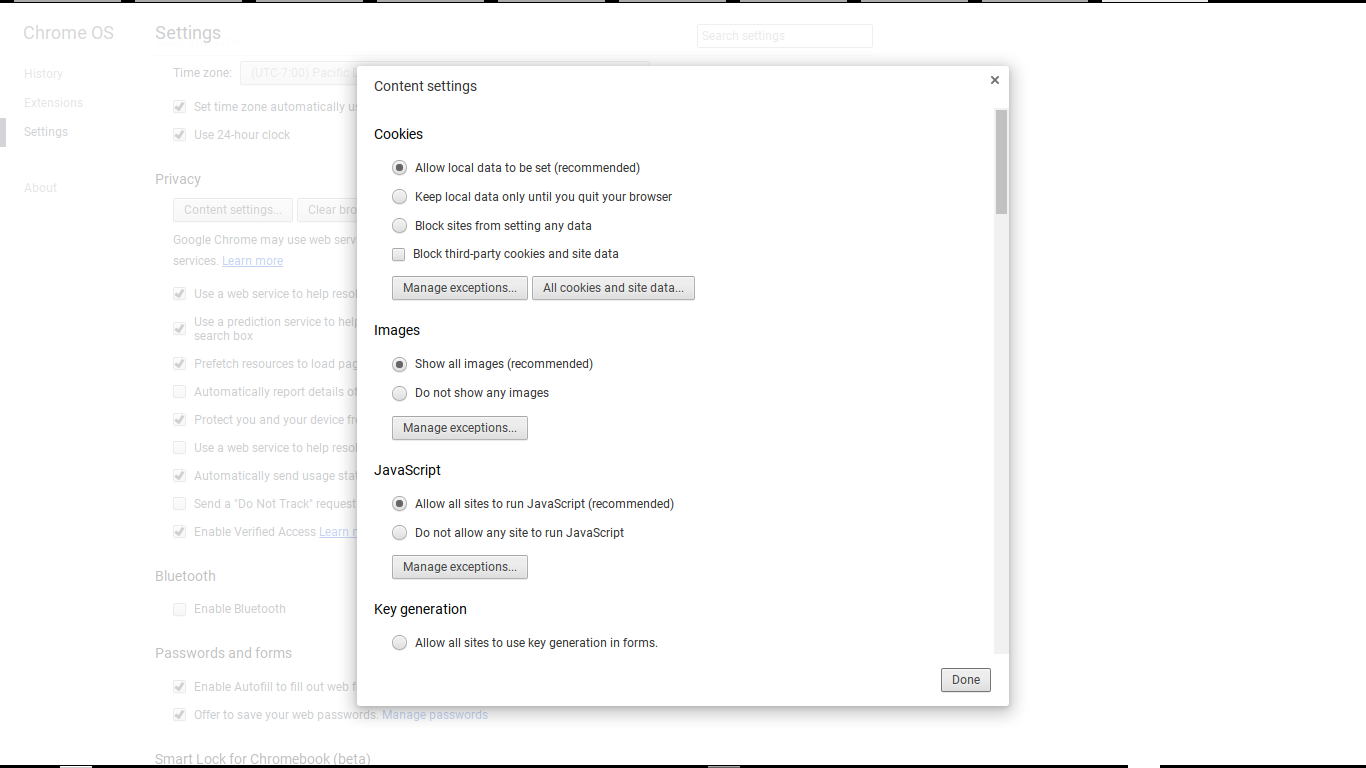


Under "Cookies", select "Allow local data to be set".


If you want to enable cookies selectively, select "Block third-party cookies and site data". Then use "Manage exceptions", and add "blogger.com", "google.com", and any addresses which apply to your blog.

Setting the cookie filters in Firefox.

With Firefox, you enable cookies, from the browser menu - aka the 3 bar toolbar icon, using Preferences - Privacy.

  • Under History, select that "Firefox will:" is set to "Remember history" then "Use custom settings for history". That will give you an array of settings.
  • Check "Accept cookies from sites".
  • Close Preferences. Settings will be saved.
  • Note that any Firefox add-ons which filter cookies, and offer more detailed options, will have to be dealt with, separately.


Select "Remember history", then "Use custom settings for history".


Check "Accept cookies from sites".


If you want to enable cookies selectively, change "Always" to "Never". Then use "Exceptions", and add "blogger.com", "google.com", and any addresses which apply to your blog.

Setting the cookie filters in Edge / Internet Explorer.

With Edge / Internet Explorer, you enable cookies, using the browser menu, selecting Tools - Internet Options. Optionally, you may access the "Internet Options" applet directly from the Windows Control Panel.

  • Edge / IE uses a zone defense setting, where you designate "blogger.com" and "google.com", in Security, as being in the Trusted zone. Please note that "blogspot.com" should not be in the Trusted zone.
  • Default settings for the Trusted zone will allow proper filtering of scripts.
  • Verify proper settings, with "Trusted sites" selected, and the Security level slider control set to "Medium". Hit "Custom level", and examine the Settings list.
  • You enable Cookies under the "Privacy" tab.
  • Move the Privacy slider to the bottom, to allow all cookies.
  • Click "OK".

Setting the cookie filters in Opera.

With Opera, you enable cookies, using the Advanced tab, in the Preferences wizard. Select "Accept", to accept cookies from all sites.

Setting the cookie filters in Safari.

With Safari, you enable cookies, using the Preferences wizard. The Privacy wizard, in Preferences, contains selections for cookies ("Cookies and website data”). Select "Always allow", to enable third party cookie access.

Cookie filters cause half of the problems reported, with many Blogger features.

Maybe 50% of the problems, reported in Blogger Help Forum: Get Help with an Issue, with many Blogger features involve cookie filters.

  • Comments.
  • The Cookie Advice Banner.
  • Post/Page/Template Preview.
  • Reading List.
  • Template Designer.

Stats and the "Don't track ..." option used to involve third party cookies, for many years. In March 2016, "Don't track" was rewritten to run under the URL of the blog, when being set - and now requires enabling scripts from the blog URL.

Consider how your blog is published.

If your blog is published to "blogspot.com", consider the non "blogspot.com" alias that may be relevant to your country. If your blog is published to a custom domain, consider the custom domain URL.

Many computers have other relevant settings, which block cookies.

Many blog owners and readers will have computers, and networks, with additional protection. Cookies, in the browser, may not be the only filter that needs to be checked - but this is a start, to learning how to control the cookie filters.

Having checked and corrected your cookie filters, continue by checking browser script filters - then check cookie and script filters, outside the browser. Be aware that many settings may not be obvious - and that both obvious and obscure settings may be updated, without your intention or knowledge.

Learn more.


Many #Blogger problems are cause by overly restrictive cookie filters. If you, a blog owner or reader, are going to use Blogger successfully, you need to configure your browser properly.

Some Blogger Blogs Being Locked As Malware Hosts

For a long time, we've been dealing with various malware / spam mitigation issues, in Blogger Help Forum: Something Is Broken.

Recently, malware detections, long simply identified as "Malicious JavaScript" in the well known Spam Appeal Guidelines, was given its own identity, and a separate classification / appeal process. We're now seeing several common types of JavaScript, included in blogs which are typically mentioned in forum reports.

It may be helpful to describe some examples of JavaScript code being seen, so blog owners can avoid making the same mistakes, by not including these scripts in their blogs.

There are several common types of JavaScript applications, found in many blogs with the owners requesting review / unlock action.
  1. CPA / Cost Per Action.
  2. Multiple popups, such as a generic "Welcome!", followed by "Like my blog, before you read it!".
  3. Password protection, on a page basis.
  4. Security warning popups, suggesting that you need to install a recommended security software.
  5. Social networking popups, demanding "Like my blog, before you read it!".
  6. Traffic Redirection, targeting other blogs / websites.
  7. Traffic redirection, targeting the canonical URL for the host blog.


CPA / CPALeads / Cost Per Action, and similar online marketing terminology, involves providing a reward for viewing a blog, or for subscribing to the blog feed. Some CPA scripts may be used to collect email addresses, also known as "email address mining", later used for hacking activity or spam distribution.

CPA scripts present another problem. Since Blogger blogs are intended to reward the readers by providing interesting and unique content, blogs which use CPA may be improperly designed or maintained. Blogger wants the blog owners to publish blogs which entertain or inform their readers - not blogs which require artificial or ingenious techniques to generate traffic, and visitor activity.

Multiple popups, such as an initial "Welcome to my blog!" greeting, followed by the well known FaceBook "Like my blog, to read my blog!" demand. If multiple popups should become an established practice, it's possible that malware producers could enjoy this technique, to conceal a malware installation.

Password protection, on a page basis, is an attempt to make a blog (or blog portion) private, by using a password. This protection is easily defeated, as the password is provided in the page (post / template) code, as plain text - and can easily be identified by anybody knowing how to view page source as text.

Besides the "protection" being easily bypassed, this is a problem because security scanning programs - such as the malicious scripting bot - can't pass through JavaScript code easily. When encountering this JavaScript application, your blog will be righteously classified, as a malicious script host.

Security warning popups, suggesting that your computer is infected - and offering, for immediate installation, the perfect tool to remove the claimed malware. Security experts know that this is similarly a favourite malware installation technique, where the computer owner would give permission to have the offered software installed - and the installed software would later install a botnet client or similar malicious trash.

Social networking popups are an arrogant way of wasting your readers time, and guaranteeing eventual malware classification of your blog. Popular among some WordPress blogs, the circular FaceBook "Like my blog, to read my blog!" demand is a good way to make genuine readers go elsewhere.

If you want genuine readers, who read a Blogger blog because of thoughtful, unique content, you will not get them by demanding that they boost your FaceBook popularity, before reading your blog. This is just another way of buying "Likes" - and it belongs in WordPress, not in Blogger.

Traffic Redirection, targeting other blogs / websites is a technique attempted by many hackers and spammers. The use of some blogs as gateways, leading to redistributors, which in turn lead to payload blogs or non Google websites, is part of many hacking / spam attacks. Google is trying to restrict the use of Blogger blogs as malware / spam hosts - and actively prevents scripts, which only shuffle readers from one blog to another, without choice.

Even though Blogger will not encourage you to move your blog, to Tumblr, Weebly, WordPress, or wherever, you are allowed to do this - if you feel the need.
Hello, faithful readers:

This blog is now hosted at my new blogging host. Please update your blog lists and bookmarks!
If you must do this, it's OK to post a notice, in your Blogger blog. You can even put a link, to the new blog, in the notice. You just can't use JavaScript, to automatically redirect the reader to the new blog.

Traffic redirection, targeting the canonical URL for the host blog, is a technique used by some blog owners who perceive Country Code Alias Redirection to present a problem. Some accessories installed on their blogs, and various non Google services which may be used to provide activity on their blogs, may not properly reference the canonical URL tag included in all Blogger blogs.

Since Blogger / Google wants all Blogger blog owners to benefit from improved world wide access to Blogger blogs, blogs which employ automatic canonical URL redirection may damage the effect of CC alias redirection. Blogs which host scripts which immediately redirect readers to the canonical URL, and are considered undesirable by any host government, may force an offended host government to block the entire Blogger service, in their country.

To prevent malicious misuse of Blogger by hackers and spammers, and to encourage effective long term use of Blogger by legitimate blog owners, Blogger / Google may detect any blogs which use these types of scripts as part of their general malware / spam classification strategy. Given the ability and willingness of the blog owner, to remove the JavaScript code in question, most blogs can be returned to service - but each blog will remain offline, until the removal is verified.

It's to everybody's benefit to identify, and to avoid use of, these scripts in our blogs, before it's too late. If your blog contains one of these scripts, why not remove the problem now, instead of waiting until you too have to post your problem report, in the forum
Help me! My blog was just locked for
MALICIOUS JAVASCRIPT
What do I do, now?

Contact Us

24x7 online , we happy to answer you
tamilcypc@gmail.com

Disclaimer

This Blog and its TUT's are intended for educational purposes only, no-one involved in the creation of this TuT may be held responsible for any illegal acts brought about by this Blog or TuT.


Featured Post

Custom Domains And HTTPS Redirection Code