
Some blog owners have reported in Blogger Help Forum: Get Help with an Issue, about broken email distribution.
There are various ways to distribute Blogger blog content, to email. For those unable or unwilling to use FeedBurner Email Distribution, one popular alternative is Google Groups.
One drawback of FeedBurner based distribution is that FeedBurner uses the blog newsfeed - and is unusable for private blogs.
Google Groups is the best content distribution medium, for private blogs.
The only scalable distribution medium, for private blogs, is Google Groups. Right now, Google Groups, for some owners, is not accepting incoming email.
This problem may not be unique to Blogger blogs. There are other reports of this problem, in the Google Groups Support Forum.
We are asking for details, in a previously posted forum Problem Rollup topic.
We have a previously discussed article, and a Problem Rollup topic, in Blogger Help Forum: Get Help with an Issue - where we are requesting details, as phrased above, about the problems. If you have details to contribute, solution to this problem may result from your contribution.
Please help Blogger Engineering to help you - and make your responses polite, relevant, and responsive. If this problem is to be identified, and you are affected, resolution depends upon you. And also report your problem in Google Groups Support.
Some #Blogger blog owners are reporting that distribution of private blog content, using Google Groups, is not operational. This problem may not be unique to Blogger blogs, as there is some discussion in Google Groups Support.
Showing posts with label Feed. Show all posts
Showing posts with label Feed. Show all posts
Verifying Blog Ownership, In BlogLovin
In BlogLovin, the ownership verification process is termed "claiming your blog".
Claiming your blog involves installing a BlogLovin link, with embedded token, on your blog where it can be seen, by the BlogLovin claim verification process. Getting the claim link, from the BlogLovin dashboard, is not an obvious process.
Not every blog owner is able to get the BlogLovin blog claiming link, for their blog.
If you have either problem, you end up unable to "claim your blog".
Finding the "Claim" button is not obvious.
You start the Claim process from the "Blog analytics" display. In some instructions, this is referred to as "My blogs". There is no menu selection to "Claim your blog".

From the home page, click "View all in Analytics".

From "Blog Analytics", click on "Edit blog settings".
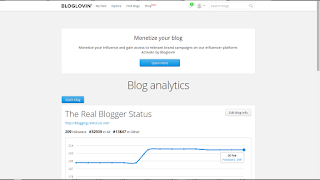
Find the blue "Claim blog" button.
BlogLovin needs the blog published URL - not the blog feed URL.
Observe the caption in the "Claim blog" window.
When you provide the URL, only provide the published URL - not the blog feed. This works best if the blog publishes a feed, and if the blog has a standard Blogger header. BlogLovin gets the feed URL from the blog header - when the URL is there.

Paste the published URL of the blog - not the blog feed - into the window, and hit "Search".

Select your blog.

And, there is the BlogLovin link, with an embedded token.
Now, you install the token on your blog - and that is another source of confusion.
Not every #Blogger blog owner is able to verify ownership of their blog, to BlogLovin. Some folks can't find the "Claim blog" button - and others don't know what URL to provide, in the "Claim blog" process.
And the term "claim blog" is not obvious, to everybody, either.
Claiming your blog involves installing a BlogLovin link, with embedded token, on your blog where it can be seen, by the BlogLovin claim verification process. Getting the claim link, from the BlogLovin dashboard, is not an obvious process.
Not every blog owner is able to get the BlogLovin blog claiming link, for their blog.
- Some folks can't find the "Claim blog" button.
- Others don't provide the right URL, into the "Claim blog" window.
If you have either problem, you end up unable to "claim your blog".
Finding the "Claim" button is not obvious.
You start the Claim process from the "Blog analytics" display. In some instructions, this is referred to as "My blogs". There is no menu selection to "Claim your blog".

From the home page, click "View all in Analytics".

From "Blog Analytics", click on "Edit blog settings".

Find the blue "Claim blog" button.
BlogLovin needs the blog published URL - not the blog feed URL.
Observe the caption in the "Claim blog" window.
When you provide the URL, only provide the published URL - not the blog feed. This works best if the blog publishes a feed, and if the blog has a standard Blogger header. BlogLovin gets the feed URL from the blog header - when the URL is there.

Paste the published URL of the blog - not the blog feed - into the window, and hit "Search".

Select your blog.

And, there is the BlogLovin link, with an embedded token.
Now, you install the token on your blog - and that is another source of confusion.
Not every #Blogger blog owner is able to verify ownership of their blog, to BlogLovin. Some folks can't find the "Claim blog" button - and others don't know what URL to provide, in the "Claim blog" process.
And the term "claim blog" is not obvious, to everybody, either.
Claiming Your Blog, In BlogLovin
When you use the BlogLovin supplied instructions to claim your blog, you will get a BlogLovin link, with an embedded token, which you install in your blog.
BlogLovin would have you publish a new post, and put the link / token at the top of the post. This ensures that the claim link displays at the top of the page, in the blog.
I'm not going to publish a new post, for joining yet one more non Blogger service.
I try not to clutter the blog feed, with posts that are only needed, to host a link - particularly a link for verifying a new service connection. With Blogger blogs, you may be able to use a gadget, in the sidebar. The sidebar is static - so what you position in one place stays in that place.
First, get the BlogLovin blog claim token, using "Claim blog".
You start, by getting the BlogLovin link, and embedded token, from the "Claim blog" wizard in "Blog analytics".
Either publish a new post, or position an HTML gadget properly.
You will probably have to position the gadget, containing the BlogLovin link, near the top of the sidebar. Apparently BlogLovin claiming verification only reads the top of the blog content - whether posts or template objects.
Maybe, BlogLovin only reads content above the fold. BlogLovin is allowing for blogs with activity, where new posts would push the post containing the claim link token, down the page - before the BlogLovin claim verification can find and read the claim token. Or maybe they want the new link so it's visible - and advertises their service.
The uncertainty about claim link location, combined with the need for a valid feed - but criteria for valid feed being itself uncertain - will make claiming some blogs, in BlogLovin, a bit of trial and error.
Then replace the claim link / token with a properly decorative button.
Once your blog is claimed, you can replace the ugly claim link with a semi decorative BlogLovin button ("Get the Bloglovin button"). I was able to consolidate two BlogLovin claims, for this blog - so I removed the two ugly links, from the sidebar.

My sidebar HTML gadget, with two ugly links. They are now gone.
I used the "Move Followers to" option, so I can have one page for this blog.
Why they had two entries, for this one blog, I don't know. Their advice here is a bit vague.
Anyway, BlogLovin lets you move Followers, from one blog to another - and I now have one BlogLovin page for this blog.
---
Some #Blogger blog owners use the BlogLovin social sharing service, to provide access to their blog. The BlogLovin "Claim your blog" process uses a BlogLovin link with an embedded token, to verify blog ownership.
The claiming process requires proper positioning of the claim link - plus (as previously noted) proper blog feed availability. This combination of requirements makes a BlogLovin claim somewhat unpredictable.
Paste this text into a new blog post ... In some blogs, it's necessary to put the code at the top of the blog post.
BlogLovin would have you publish a new post, and put the link / token at the top of the post. This ensures that the claim link displays at the top of the page, in the blog.
I'm not going to publish a new post, for joining yet one more non Blogger service.
I try not to clutter the blog feed, with posts that are only needed, to host a link - particularly a link for verifying a new service connection. With Blogger blogs, you may be able to use a gadget, in the sidebar. The sidebar is static - so what you position in one place stays in that place.
First, get the BlogLovin blog claim token, using "Claim blog".
You start, by getting the BlogLovin link, and embedded token, from the "Claim blog" wizard in "Blog analytics".
Either publish a new post, or position an HTML gadget properly.
You will probably have to position the gadget, containing the BlogLovin link, near the top of the sidebar. Apparently BlogLovin claiming verification only reads the top of the blog content - whether posts or template objects.
- Get the claim link / token, from BlogLovin.
- Add the link / token to a post, or an HTML gadget.
- Publish the post, or position the HTML gadget, near the top of the sidebar.
- Return to BlogLovin, and click "Claim".
- Wait, anxiously.
Maybe, BlogLovin only reads content above the fold. BlogLovin is allowing for blogs with activity, where new posts would push the post containing the claim link token, down the page - before the BlogLovin claim verification can find and read the claim token. Or maybe they want the new link so it's visible - and advertises their service.
The uncertainty about claim link location, combined with the need for a valid feed - but criteria for valid feed being itself uncertain - will make claiming some blogs, in BlogLovin, a bit of trial and error.
Then replace the claim link / token with a properly decorative button.
Once your blog is claimed, you can replace the ugly claim link with a semi decorative BlogLovin button ("Get the Bloglovin button"). I was able to consolidate two BlogLovin claims, for this blog - so I removed the two ugly links, from the sidebar.

My sidebar HTML gadget, with two ugly links. They are now gone.
I used the "Move Followers to" option, so I can have one page for this blog.
Why they had two entries, for this one blog, I don't know. Their advice here is a bit vague.
All Blogger blogs, publishing a blog feed, have at least two diffeent feed addresses. Does BlogLovin only use RSS, specifically? Or are they unaware that Blogger publishes one feed, in two flavours - Atom and RSS?This might happen when a blog have two or more different addresses to its RSS feed.
Anyway, BlogLovin lets you move Followers, from one blog to another - and I now have one BlogLovin page for this blog.
---
Some #Blogger blog owners use the BlogLovin social sharing service, to provide access to their blog. The BlogLovin "Claim your blog" process uses a BlogLovin link with an embedded token, to verify blog ownership.
The claiming process requires proper positioning of the claim link - plus (as previously noted) proper blog feed availability. This combination of requirements makes a BlogLovin claim somewhat unpredictable.
BlogLovin Has Problems With Some Blog Feeds
We see occasional reports, in Blogger Help Forum: Get Help with an Issue, from Blogger blog owners who want to share their blogs using BlogLovin.
Some blog feeds can be validated, yet not be found by BlogLovin. And other feeds won't validate.
Blog owners have reported several common problems, when trying to claim their blog with BlogLovin.
Start with the published blog URL.
Even though BlogLovin uses the blog posts newsfeed for content source, when you claim your blog, you need to use the published URL. You do not specify the feed URL. BlogLovin finds the feed URL from the blog header - after you give it the published URL of the blog.
Feeds can be validated, using either the W3C Feed Validator, or the FeedValidator.org Feed Validator. You have to use the right W3C validator, though.
If the blog is published to a custom domain, the published URL - and the feed - will be most consistently accessible to BlogLovin when the domain is properly setup. Bogus DNS addressing, or poorly setup domains, will cause feed access issues - and BlogLovin won't process your claim.
Empty / very short feeds.
An empty or very short feed just does not contain enough material, for BlogLovin to reliably claim a blog.
It's best to let your blog mature slightly, before trying to use it with BlogLovin. Half a dozen good posts are better than just one or two, when claiming a blog.
Redirected feeds, generally involving FeedBurner.
A FeedBurner redirected feed looks completely different from a native Blogger feed. If you're going to use a Blogger blog in BlogLovin, it's best to use a non redirected version of the feed for your blog.
Feeds containing GeoRSS datapoints.
A feed from a blog that includes a GeoRSS datapoint will fail validation.
GeoRSS will disrupt BlogLovin, and cause problems with FeedBurner. If you want to use either service, you have to edit any post using GeoRSS, and remove the GeoLocation element.
Feeds with content formatted in Microsoft Office.
A Microsoft Office formatted blog will produce a validated feed - yet BlogLovin and FeedBurner will both have problems, when using the feed.
We've been dealing with Microsoft Office generated problems, in various Blogger features, for years. BlogLovin is one more service where Microsoft Office formatted posts just don't work.

Both the W3C and FeedValidator.org feed validators are generally used, to diagnose non claimable blogs.
But neither is 100% useful, when there's a problem. Some blogs with valid feeds still can't be claimed.
Use the right validator.
You do need to use the right W3C validator, when checking the feed for your blog. Some BlogLovin diagnostic instructions may mention the wrong validator.
W3C provides 2 validator services.
This is for HTML / XML Markup Validation:
This is for Feed Validation:
If you use the Markup Validator, with a blog feed, you're going to see a lot of irrelevant errors. You have to use the Feed Validator.
Use a properly coded template.
Some blogs cannot be claimed, because BlogLovin cannot detect a feed. If your blog lacks the necessary header records in the template, your blog cannot be claimed.
This problem is not caused by BlogLovin. This is a problem caused by you, using a custom template that lacks the necessary template content.

BlogLovin does have a good Help contact page, though.
Positioning the claim verification link / token.
BlogLovin suggests publishing a new post, with the claim link / token at the top of the post - or alone. I found that the link, added to an HTML gadget, and positioned in the sidebar, works - and makes more sense than cluttering the blog posts newsfeed with a gratuitous post containing a claim link.
Proper positioning of the claim link - whether in a post or the sidebar - is also essential to the success of the claim process.
As last resort, contact BlogLovin Support for help.
If you just can't get your blog claimed, you can contact BlogLovin Support - or you can read the BlogLovin Help database.
---
Some #Blogger blog owners use BlogLovin as a social sharing platform. Unfortunately, not every blog owner can successfully claim their blog, in BlogLovin, immediately.
BlogLovin has several possible problems with Blogger blogs - and not all problems are well known.
BlogLovin is somewhat monolithic. They use the blog feed, and a BlogLovin URL with embedded token, to process / validate blog claims - and their diagnostics, when a claim is a problem, are not always effective.Why can't I claim my blog?
Some blog feeds can be validated, yet not be found by BlogLovin. And other feeds won't validate.
Blog owners have reported several common problems, when trying to claim their blog with BlogLovin.
- Start with the published blog URL.
- Empty / very short feeds.
- Redirected feeds, generally involving FeedBurner.
- Feeds containing GeoRSS datapoints.
- Feeds with content formatted in Microsoft Office.
- Positioning the claim verification link / token.
Start with the published blog URL.
Even though BlogLovin uses the blog posts newsfeed for content source, when you claim your blog, you need to use the published URL. You do not specify the feed URL. BlogLovin finds the feed URL from the blog header - after you give it the published URL of the blog.
Feeds can be validated, using either the W3C Feed Validator, or the FeedValidator.org Feed Validator. You have to use the right W3C validator, though.
If the blog is published to a custom domain, the published URL - and the feed - will be most consistently accessible to BlogLovin when the domain is properly setup. Bogus DNS addressing, or poorly setup domains, will cause feed access issues - and BlogLovin won't process your claim.
Empty / very short feeds.
An empty or very short feed just does not contain enough material, for BlogLovin to reliably claim a blog.
It's best to let your blog mature slightly, before trying to use it with BlogLovin. Half a dozen good posts are better than just one or two, when claiming a blog.
Redirected feeds, generally involving FeedBurner.
A FeedBurner redirected feed looks completely different from a native Blogger feed. If you're going to use a Blogger blog in BlogLovin, it's best to use a non redirected version of the feed for your blog.
Feeds containing GeoRSS datapoints.
A feed from a blog that includes a GeoRSS datapoint will fail validation.
GeoRSS will disrupt BlogLovin, and cause problems with FeedBurner. If you want to use either service, you have to edit any post using GeoRSS, and remove the GeoLocation element.
Feeds with content formatted in Microsoft Office.
A Microsoft Office formatted blog will produce a validated feed - yet BlogLovin and FeedBurner will both have problems, when using the feed.
We've been dealing with Microsoft Office generated problems, in various Blogger features, for years. BlogLovin is one more service where Microsoft Office formatted posts just don't work.

Both the W3C and FeedValidator.org feed validators are generally used, to diagnose non claimable blogs.
But neither is 100% useful, when there's a problem. Some blogs with valid feeds still can't be claimed.
Use the right validator.
You do need to use the right W3C validator, when checking the feed for your blog. Some BlogLovin diagnostic instructions may mention the wrong validator.
W3C provides 2 validator services.
This is for HTML / XML Markup Validation:
This is for Feed Validation:
If you use the Markup Validator, with a blog feed, you're going to see a lot of irrelevant errors. You have to use the Feed Validator.
Use a properly coded template.
Some blogs cannot be claimed, because BlogLovin cannot detect a feed. If your blog lacks the necessary header records in the template, your blog cannot be claimed.
This problem is not caused by BlogLovin. This is a problem caused by you, using a custom template that lacks the necessary template content.

BlogLovin does have a good Help contact page, though.
Positioning the claim verification link / token.
BlogLovin suggests publishing a new post, with the claim link / token at the top of the post - or alone. I found that the link, added to an HTML gadget, and positioned in the sidebar, works - and makes more sense than cluttering the blog posts newsfeed with a gratuitous post containing a claim link.
Proper positioning of the claim link - whether in a post or the sidebar - is also essential to the success of the claim process.
As last resort, contact BlogLovin Support for help.
If you just can't get your blog claimed, you can contact BlogLovin Support - or you can read the BlogLovin Help database.
---
Some #Blogger blog owners use BlogLovin as a social sharing platform. Unfortunately, not every blog owner can successfully claim their blog, in BlogLovin, immediately.
BlogLovin has several possible problems with Blogger blogs - and not all problems are well known.

 Posts
Posts


![SQL Injection Basics - Union Based [Detailed Tutorial]](https://blogger.googleusercontent.com/img/b/R29vZ2xl/AVvXsEjjQpa2wuMB-m5CXPVf71GUOkfiIOQA8KTyQ-_zfAl0SZa23UBN1QJaO2ZMGRDZlmDJTYf2jJ4ik3Xnj1locc38Yv9l6VMxTWt32s86JtXtLABDn20DRuAcbLPKMb9m2hc6PDmjIjvU-us/s72-c/SQL-Injection-Attack.jpg)

