Latest News

Showing posts with label Blog Address. Show all posts

Reader Zoom Level Affects Screen Space Needed

I have suggested that properly sizing the Jump Break and Title sections of each post is an important decision, when publishing a post in your blog.

Publishing this blog, using carefully sized post title and jump break sections, allows me to consistently publish posts, with maximum detail visible in main page view - and with the "Read more" link visible.

Potential readers may read a post in this blog - instead of returning to a SERP, and reading another blog. This affects a key reader retention metric, the "bounce rate".

All of that considered, sizing of the introductory post sections won't always produce predictable results.

Reader zoom level is a semi random factor, which makes blog section sizing less predictable than one would wish, when trying to increase reader retention.

I size my posts using "100%" zoom, in the Chrome browser. This may, or may not, produce the same effect, for readers using Edge / Internet Explorer, Firefox, or any other browser. And the differing browser will not be the only varying factor.

All of these details can affect zoom level, screen space requirements, and reader retention - for any different blog. Here it is helpful for the blog owner to know about the typical reader.

  • Display screen size.
  • Reader age.
  • Multi tasking activity.
  • Tech interest level.

Display screen size will affect how the blog sections look, to each reader.

Browser choice is not the only variation, that can affect screen space and blog section display sizes.

Reader display screen size used is a detail, that I cannot control. The computer on which I compose most posts has a 6" high screen. A second computer, that I use from time to time, has an 8" high screen. The second computer, even at a 125% zoom level, still displays more post content in one screen page.


This post (in main page view) displayed, at 100% zoom, on an 6" vertical display.


Let's compare this post, displayed at several zoom levels.

Here's this post, in the individual post page display - without Jump Break. See how it looks, zoomed in various font sizes. Note that here I use a maximised browser window, though some readers will resize the browser window to fit the blog content.
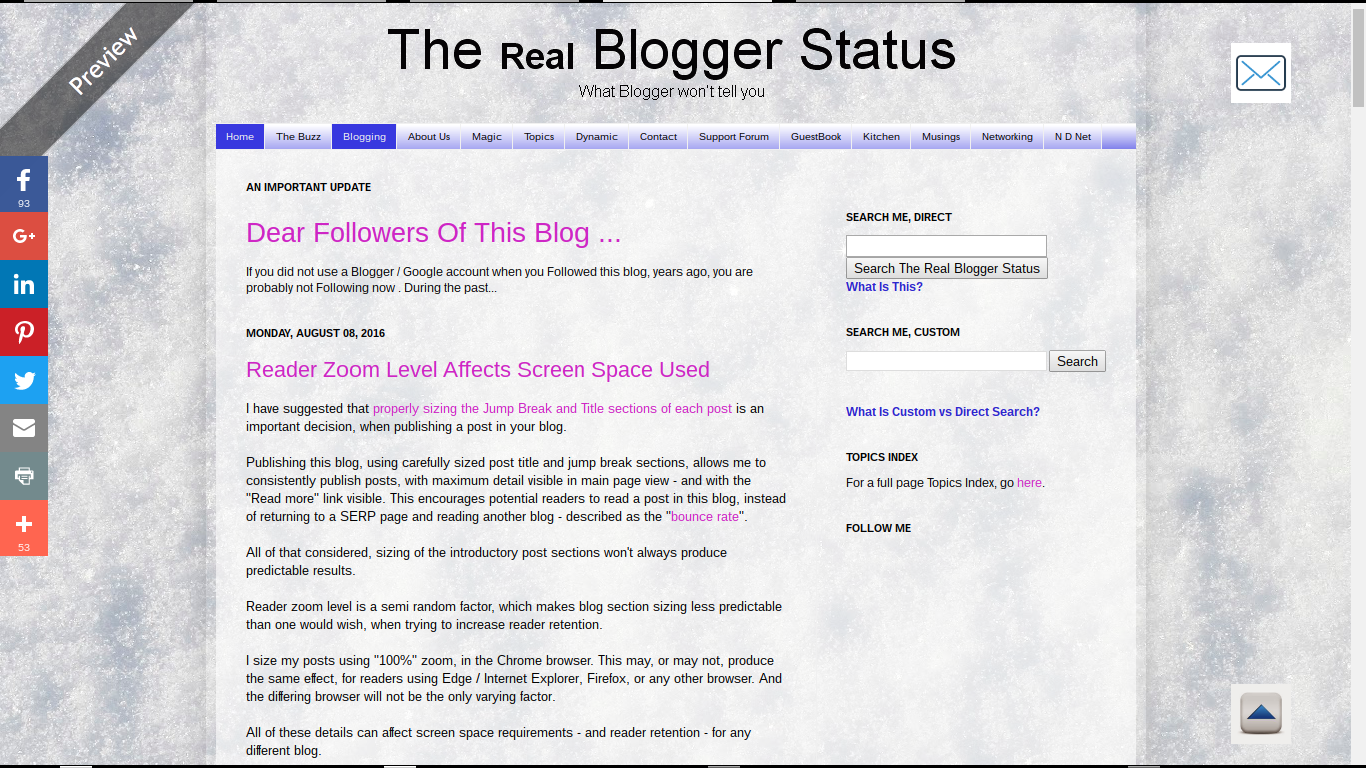

This post (in Preview mode) displayed, at 100% zoom, on an 6" vertical display.


This post (in Preview mode) displayed, at 100% zoom, on an 10" vertical display.


This post (in Preview mode) displayed, at 75% zoom level.


Smaller zoom is more likely to be used by people with better eyesight - using better resolution and more expensive computers, and smaller browser windows.


This post (in Preview mode) displayed, at 125% zoom level.


Larger zoom is more likely to be used by people with marginally worse eyesight. This will frequently involve older people.

Older readers will be more likely to use higher zoom levels.

Reader age is another detail which each blog author may consider, in blog design.

Blogs which attract older readers should be designed for displays which use higher zoom levels - or use larger fonts, to begin. Older readers, with marginal eyesight, will be more likely to surf the web with their browsers zoomed higher.

Multi tasking encourages smaller browser windows - and lower zoom levels.

Younger readers, who like to multi task, will probably use low zoom - and size the browser window smaller, so they can have multiple windows, simultaneously visible in large computer displays. Older readers will be more likely to focus on one task at a time - and will maximise the browser window, with higher zoom.

Blog subject may produce readers of differing age and tech interest.

Each blog, depending upon its content, may be more or less likely to interest readers of a given age and / or and tech interest level. People of different tech interest levels may also be more or less likely to use computers with higher resolution, and may multi task using smaller browser windows.

The bottom line.

Each blog owner will have to consider the various issues mentioned above - for each post published - and decide what screen sizes and zoom levels might be preferred by the target reader audience.

Only a blog owner can decide what reader audience may be more interested in each individual post - and may benefit from a specific zoom level. And this affects the proper sizing of the jump break and title section of each post.


Several details of a #Blogger blog audience affect what post title and jump break section will be more appropriate, for each individual blog. These details, in turn, can affect bounce rate / retention rate.

Wording The Blog Title And URL - Same or Unique?

Some blog owners setup a new blog - and want to know if the blog title and URL may - or (alternately) should - be the same.

There is no policy for Blogger, about blog title and URL - either that the "words" in each can, or cannot, be the same. Some SEO experts suggest benefits from having relevant words, in the URL - and some blog owners confuse this advice, as suggesting having identical titles and URLs.

Be wary of advice that references websites, in discussions about blogs. There are subtle, but real, differences between dynamic blogs, and static websites. Rules that may be important for websites may not be relevant, for blogs.

The most obvious differences, between blogs and websites, are found in content - but blog design may have similar differences.


SEO strategies, for a dynamic blog, and a static website, will be different. Dynamic blogs have many exciting opportunities.


I have suggested that it may not be possible to make the blog title and URL the same, in all cases.

  • Most subjects won't be unique. Many blogs will share a subject.
  • The blog URL must be unique. Two blogs cannot share a URL.
  • The blog URL will have restrictions, in characters allowed.

Most subjects won't be unique.

Any popular subject will have many blogs published to that subject. Every blog, about the same subject, will have a different URL.

If a blog is published, to a subject which has no competition, it will be a subject which interests nobody. A blog with no competition will likely have no readers.

The blog URL must be unique.

Two blogs cannot share a URL. One URL == one blog.

That does not mean that title and URL cannot share "words" - just that it's not possible that they will be identical, for all blogs.

There can be only so many ways to mention your favourite, top level movie star, in the title - and there will be even less ways to construct a unique URL. A less famous celebrity, on the other hand, will have less blogs to compete - and less readers also.

The blog URL will have restrictions, in characters allowed.

URLs can use only certain characters.

a sequence of characters beginning with a letter and followed by any combination of letters, digits, plus (+), period (.), or hyphen (-)

That syntax is somewhat limited, compared to characters that may be used in blog titles - and in the blog description and content. Less choice of syntax leads to less possibilities for uniqueness, while providing some clue as to the purpose of the blog.

A Blogger blog is dynamic - and you SEO using content.

Blogger blog content is dynamic. You get more performance, from a blog with regularly published, unique content, that's informative and interesting.

You get less performance, from imaginative naming strategies. Acme does not make an "SEO Kit", for Blogger blogs.


Some #Blogger blog owners worry about the need to publish a blog with the Title and URL containing the same words. Some suggest that having identical words is necessary, others that having identical words is not permitted.

Fortunately, neither possibility is relevant to Blogger / Google Content or TOS regulation. Blogger and Google care about content quality - and prohibit scraping and spam.

Verify BlogSpot And Domain URLs

Whenever dealing with any problem with a blog, you should verify the URLs involved.

Some of the most baffling problems, with blog connectivity, identity, or ownership, can start from simple typographical errors. This possibility will involve both native "blogspot.com" and custom domain URLs.

The Publishing wizard window, in the Blogger dashboard Settings - Basic page, is essential for identifying errors. Whether you paste or type a URL into the registrar's zone editor, the Publishing wizard, or the browser address window, you can make a mistake. Checking the Publishing wizard is as important as examining a Dig log extract - or as viewing an HTTP trace.

Verifying the URLs involved, in the dashboard Publishing wizard, is as important as examining a Dig log extract, or an HTTP trace.

This will be the case, when dealing with various "blogspot.com" connectivity problems, researching a custom domain problem, or a dashboard or ownership problem.

Both screen prints, and text copies, are very useful - and not redundant.

Both a screen print, and a text copy, of the Publishing window (and / or the browser address window) is very useful, when diagnosing connectivity problems - or possibly, researching ownership issues, or similarly vanished blogs. And with a custom domain, similar detail from the registrar zone editor is useful.

A text copy of the contents is needed, to avoid having to re type the URL - and maybe cause a different problem when comparing the URL. And a visual copy of the Publishing wizard is good, to identify the context of any problem.

Let's look at two blogs - and what we need to examine / verify.

My test blog, published as "nitecruzr-test-ssl.blogspot.com".


Here, we see a "blogspot.com" URL, in the browser address window.


http://nitecruzr-test-ssl.blogspot.com


Here, we see the Blogger dashboard Settings - Basic page, for a "blogspot.com" published blog.


And the Publishing display, for a "blogspot.com" published blog.


And essential text details, from Publishing, for a "blogspot.com" published blog:

nitecruzr-test-ssl.blogspot.com                                 Edit

If you are requesting assistance with your native Blogger blog, the latter details, in both a screen print and text copy, will be useful.

My blog, published as "blogging.nitecruzr.net".


Here, we see a custom domain URL, in the browser address window.


http://blogging.nitecruzr.net


Here, we see the Blogger dashboard Settings - Basic page. for a custom domain published blog.


And the Publishing display, for a custom domain published blog.


And essential text details, for a custom domain published blog:

blogging.nitecruzr.net                                                 Edit
bloggerstatusforreal.blogspot.com                               redirects

With a custom domain published blog, always click on "Edit", and make a second screen print.


The second page of the Publishing display - which only applies to a custom domain published blog.

You maybe have seen this display, similarly formatted, in an infamous "Error 12" or similar display.


The latter display is seen, frequently, in an "Error 12" et al domain ownership verification demand.


And the domain root redirection, properly selected.


More essential details, for a custom domain published blog:

Third party domain settings
http:// blogging.nitecruzr.net
  X   Redirect nitecruzr.net to blogging.nitecruzr.net.

If you are requesting assistance with your custom domain published Blogger blog, the latter details, in both a screen print and text copy, will be useful.

And a zone editor display, for my domain "nitecruzr.co.uk".


A zone editor display, from GoDaddy. Every registrar will have a different display.


Comparing the URLs in the browser window, and in the Publishing window - and in Dig logs and zone editor displays (for custom domains) - we can identify typographical errors, and other mistakes. Typographical errors can be a cause of various problems, when publishing blogs to custom domains - and to "blogspot.com".

Some problems result from failure to copy and paste, properly. They can be as challenging to diagnose, as failure to observe registrar name server syntax.

Having verified the URLs, in some cases, you will continue with an affinity diagnosis, and with a differential diagnosis. This is all part of my simple 12 link test set.

You, the blog owner, may consider "duplicate" and "redundant" to be synonyms. When we research a blog problem, "duplicate" != "redundant". Many confusing problems have been solved, by comparing combinations of various above details - and by finding inequality, in one or more displays.


Diagnosing problems with #Blogger blogs can require careful diagnostics, using details found in dashboard screen prints and detail text copies, in Dig logs, and in HTTP traces. All details must be carefully compared, both visually and using text extracts, to diagnose some problems.

Much of this may seem superficial, to experienced support analysts - yet be obscure to some blog owners.

You Cannot Have The BlogSpot URL With Your Business Name, If That URL Is In Use

This summary is not available. Please click here to view the post.

Contact Us

24x7 online , we happy to answer you
tamilcypc@gmail.com

Disclaimer

This Blog and its TUT's are intended for educational purposes only, no-one involved in the creation of this TuT may be held responsible for any illegal acts brought about by this Blog or TuT.


Featured Post

Custom Domains And HTTPS Redirection Code