Latest News

Showing posts with label Blog Name. Show all posts

Reader Zoom Level Affects Screen Space Needed

I have suggested that properly sizing the Jump Break and Title sections of each post is an important decision, when publishing a post in your blog.

Publishing this blog, using carefully sized post title and jump break sections, allows me to consistently publish posts, with maximum detail visible in main page view - and with the "Read more" link visible.

Potential readers may read a post in this blog - instead of returning to a SERP, and reading another blog. This affects a key reader retention metric, the "bounce rate".

All of that considered, sizing of the introductory post sections won't always produce predictable results.

Reader zoom level is a semi random factor, which makes blog section sizing less predictable than one would wish, when trying to increase reader retention.

I size my posts using "100%" zoom, in the Chrome browser. This may, or may not, produce the same effect, for readers using Edge / Internet Explorer, Firefox, or any other browser. And the differing browser will not be the only varying factor.

All of these details can affect zoom level, screen space requirements, and reader retention - for any different blog. Here it is helpful for the blog owner to know about the typical reader.

  • Display screen size.
  • Reader age.
  • Multi tasking activity.
  • Tech interest level.

Display screen size will affect how the blog sections look, to each reader.

Browser choice is not the only variation, that can affect screen space and blog section display sizes.

Reader display screen size used is a detail, that I cannot control. The computer on which I compose most posts has a 6" high screen. A second computer, that I use from time to time, has an 8" high screen. The second computer, even at a 125% zoom level, still displays more post content in one screen page.


This post (in main page view) displayed, at 100% zoom, on an 6" vertical display.


Let's compare this post, displayed at several zoom levels.

Here's this post, in the individual post page display - without Jump Break. See how it looks, zoomed in various font sizes. Note that here I use a maximised browser window, though some readers will resize the browser window to fit the blog content.
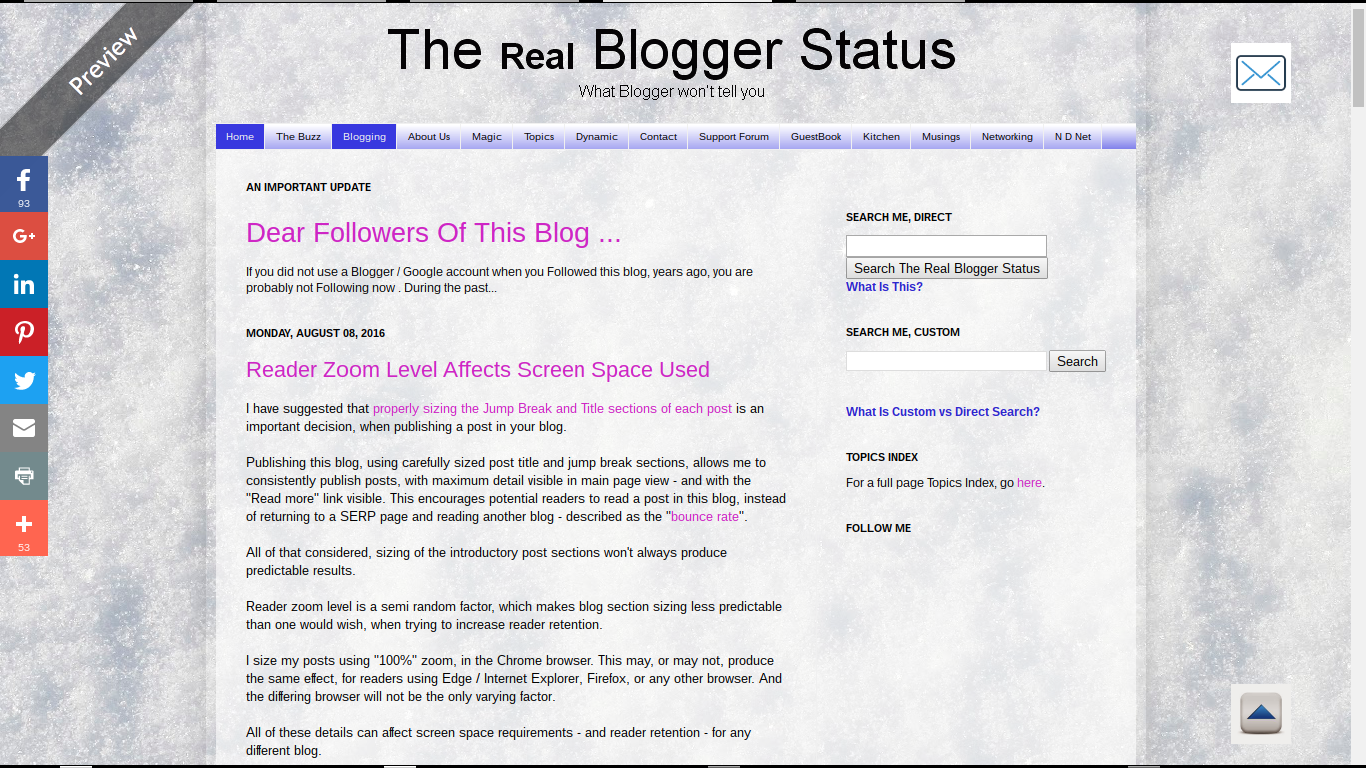

This post (in Preview mode) displayed, at 100% zoom, on an 6" vertical display.


This post (in Preview mode) displayed, at 100% zoom, on an 10" vertical display.


This post (in Preview mode) displayed, at 75% zoom level.


Smaller zoom is more likely to be used by people with better eyesight - using better resolution and more expensive computers, and smaller browser windows.


This post (in Preview mode) displayed, at 125% zoom level.


Larger zoom is more likely to be used by people with marginally worse eyesight. This will frequently involve older people.

Older readers will be more likely to use higher zoom levels.

Reader age is another detail which each blog author may consider, in blog design.

Blogs which attract older readers should be designed for displays which use higher zoom levels - or use larger fonts, to begin. Older readers, with marginal eyesight, will be more likely to surf the web with their browsers zoomed higher.

Multi tasking encourages smaller browser windows - and lower zoom levels.

Younger readers, who like to multi task, will probably use low zoom - and size the browser window smaller, so they can have multiple windows, simultaneously visible in large computer displays. Older readers will be more likely to focus on one task at a time - and will maximise the browser window, with higher zoom.

Blog subject may produce readers of differing age and tech interest.

Each blog, depending upon its content, may be more or less likely to interest readers of a given age and / or and tech interest level. People of different tech interest levels may also be more or less likely to use computers with higher resolution, and may multi task using smaller browser windows.

The bottom line.

Each blog owner will have to consider the various issues mentioned above - for each post published - and decide what screen sizes and zoom levels might be preferred by the target reader audience.

Only a blog owner can decide what reader audience may be more interested in each individual post - and may benefit from a specific zoom level. And this affects the proper sizing of the jump break and title section of each post.


Several details of a #Blogger blog audience affect what post title and jump break section will be more appropriate, for each individual blog. These details, in turn, can affect bounce rate / retention rate.

Verify BlogSpot And Domain URLs

Whenever dealing with any problem with a blog, you should verify the URLs involved.

Some of the most baffling problems, with blog connectivity, identity, or ownership, can start from simple typographical errors. This possibility will involve both native "blogspot.com" and custom domain URLs.

The Publishing wizard window, in the Blogger dashboard Settings - Basic page, is essential for identifying errors. Whether you paste or type a URL into the registrar's zone editor, the Publishing wizard, or the browser address window, you can make a mistake. Checking the Publishing wizard is as important as examining a Dig log extract - or as viewing an HTTP trace.

Verifying the URLs involved, in the dashboard Publishing wizard, is as important as examining a Dig log extract, or an HTTP trace.

This will be the case, when dealing with various "blogspot.com" connectivity problems, researching a custom domain problem, or a dashboard or ownership problem.

Both screen prints, and text copies, are very useful - and not redundant.

Both a screen print, and a text copy, of the Publishing window (and / or the browser address window) is very useful, when diagnosing connectivity problems - or possibly, researching ownership issues, or similarly vanished blogs. And with a custom domain, similar detail from the registrar zone editor is useful.

A text copy of the contents is needed, to avoid having to re type the URL - and maybe cause a different problem when comparing the URL. And a visual copy of the Publishing wizard is good, to identify the context of any problem.

Let's look at two blogs - and what we need to examine / verify.

My test blog, published as "nitecruzr-test-ssl.blogspot.com".


Here, we see a "blogspot.com" URL, in the browser address window.


http://nitecruzr-test-ssl.blogspot.com


Here, we see the Blogger dashboard Settings - Basic page, for a "blogspot.com" published blog.


And the Publishing display, for a "blogspot.com" published blog.


And essential text details, from Publishing, for a "blogspot.com" published blog:

nitecruzr-test-ssl.blogspot.com                                 Edit

If you are requesting assistance with your native Blogger blog, the latter details, in both a screen print and text copy, will be useful.

My blog, published as "blogging.nitecruzr.net".


Here, we see a custom domain URL, in the browser address window.


http://blogging.nitecruzr.net


Here, we see the Blogger dashboard Settings - Basic page. for a custom domain published blog.


And the Publishing display, for a custom domain published blog.


And essential text details, for a custom domain published blog:

blogging.nitecruzr.net                                                 Edit
bloggerstatusforreal.blogspot.com                               redirects

With a custom domain published blog, always click on "Edit", and make a second screen print.


The second page of the Publishing display - which only applies to a custom domain published blog.

You maybe have seen this display, similarly formatted, in an infamous "Error 12" or similar display.


The latter display is seen, frequently, in an "Error 12" et al domain ownership verification demand.


And the domain root redirection, properly selected.


More essential details, for a custom domain published blog:

Third party domain settings
http:// blogging.nitecruzr.net
  X   Redirect nitecruzr.net to blogging.nitecruzr.net.

If you are requesting assistance with your custom domain published Blogger blog, the latter details, in both a screen print and text copy, will be useful.

And a zone editor display, for my domain "nitecruzr.co.uk".


A zone editor display, from GoDaddy. Every registrar will have a different display.


Comparing the URLs in the browser window, and in the Publishing window - and in Dig logs and zone editor displays (for custom domains) - we can identify typographical errors, and other mistakes. Typographical errors can be a cause of various problems, when publishing blogs to custom domains - and to "blogspot.com".

Some problems result from failure to copy and paste, properly. They can be as challenging to diagnose, as failure to observe registrar name server syntax.

Having verified the URLs, in some cases, you will continue with an affinity diagnosis, and with a differential diagnosis. This is all part of my simple 12 link test set.

You, the blog owner, may consider "duplicate" and "redundant" to be synonyms. When we research a blog problem, "duplicate" != "redundant". Many confusing problems have been solved, by comparing combinations of various above details - and by finding inequality, in one or more displays.


Diagnosing problems with #Blogger blogs can require careful diagnostics, using details found in dashboard screen prints and detail text copies, in Dig logs, and in HTTP traces. All details must be carefully compared, both visually and using text extracts, to diagnose some problems.

Much of this may seem superficial, to experienced support analysts - yet be obscure to some blog owners.

Buyer Beware - Don't Buy Pre Published Blogs

Don't develop a blog, that's simply designed to host AdSense ads - and avoid pre published blogs, in general.

Blogs and websites that are blatantly designed as ad hosts are classified as "MFA" ("Made For Ads") - and are never accepted as AdSense hosts. AdSense, and Blogger, want blogs with quality content - informative, interesting, and unique.

Legitimate and useful blogs start with content that is important to the blog owner.

Blogger, some time ago, explicitly prohibited sale of blogs.

Either Blogger will delete the blog as spam - or AdSense will classify it as "MFA".

If you buy a blog, "blogspot.com" or custom domain, with content already in place, it will probably contain copyrighted material. If Blogger does not delete / lock it as spam, AdSense will probably classify it as "MFA" - and the blog will never display ads.

Blogger blogs are based on personal interest. When you buy a pre published blog / domain, you're buying somebody else's discarded personal interest.

Most people who sell blogs do so after learning that what they have won't host ads or get traffic. Pre used blogs are frequently subject to disapproval, by AdSense - or DMCA / Spam classification, by Blogger.

If you do the research, you'll find out why the previous owner sold it to you.

You'll probably end up with a disabled AdSense or Blogger account - and doing the research, you'll find out why the previous owner sold it. It's like a "lemon law" car. If the price seems too good to be true, it probably is just that.

You would never, knowingly, buy pre worn underpants. Why would you buy a pre published blog? Start with an available URL, and add your own content. That's how you get content, reputation, and traffic.


#Blogger blogs are supposed to be based on personal experience or interest - using content that's informative, interesting, and unique. Purchasing a previously published blog, with content left in place, violates that principle.

A smart blog owner starts with an empty blog - using an available URL, and adds content.


Search Engine Reputation, And Vanity Domains

One hot Internet topic, these days, involves specialised ("vanity") domains.

The hot names seem to change, by the week. This week, enom is hyping ".family", ".live", ".rocks", and ".social". Other registrars may have other recommendations.

The blog Address (Name) is a key blog identity element, in a well designed blog. It's visible both to people, and to search engine crawlers.

The requirement that addresses must be unique is a supposed benefit of vanity top level domains - but vanity TLDs, alone, will not provide blog uniqueness. There will always be competition for some names, in any useful Top Level Domain.

My suspicion is that the shinier the TLD, the more competition you may see, between people who plan their uniqueness around choosing the perfect name.

Any popular blog / website subject will have name competition.

I could publish this blog as "chucksblog.com" - and that would be a shiny and unique name. Until another "Chuck" registered "chucksblog.us", or maybe "chucksblog.name". How unique would "chucksblog" be, then? How many readers could I expect, if they know "chucksblog" - but can't remember if it is "chucksblog.com", "chucksblog.info", or "chucksblog.name"?

If your blog has a popular subject, you won't have a unique name - unless you register your name, in every possible TLD that might be relevant to your name. And that will be a financial limitation, for many blog owners.


What name would you want your blog to have? For a truly shiny domain, you'll have competition.

Complete uniqueness == No competition == No interest == No readers.


McDonalds, for instance, may be able to register "mcdonalds.com", "mcdonalds.franchises", "mcdonalds.hamburgers", "mcdonalds.smallbusiness", etc (as each hypothetical TLD comes online) - and local domains "mcdonalds.co.uk", "mcdonalds.de", "mcdonalds.us", and so on.

Very few of the readers of this blog will be in a financial position to do all of that.


enom is hyping ".family", ".live", ".rocks", and ".social" - this week.


Your uniqueness strategy should include content.

You will have to develop a "uniqueness" strategy based on content - not solely on the address. You will need to understand that your blog may lose traffic, from people who know the blog "name" - but may not remember if "yourname" is a ".com", ".net", or ".us".

Of course, if you publish only to "blogspot", you will automatically have "yourname.blogspot.com", "yourname.blogspot.co.uk", "yourname.blogspot.de", and so on. You won't have "yourname.com", "yourname.net", and "yourname.us", however - unless you pay for the privilege.

Are you getting a feeling for the complexity of the branding issue? Good. Concentrate on content. The search engines index your blog - and provide you traffic - based on informative, interesting, and unique content.

Google denies the value of vanity domains, for raw SEO.

AdWeek weighs the issue, in What’s in a Name on Social?.

When it comes to vanity domains, Google has long denied that they affect search rankings. Their in-house tech team advised way back that registering a vanity domain for the sheer, hopeful sake of page rankings would be a fool’s errand. But there’s a solid number of marketers that disagree, and they watch these things very closely. Chalk it up to wishful thinking, if you like, but time will tell. And there are only so many .com domains available.

Only time will tell. I suggest that you keep your traffic and uniqueness strategy diverse. Don't depend upon a vanity domain, alone, for search reputation and traffic.

For best results, keep it in perspective.

Consider the name issue, if you want. But keep it in perspective. Blogger blogs will benefit from well written and unique content - as much as from a carefully chosen name / URL.


Some #Blogger blog owners are intent on publishing a blog to a custom domain, using a top level domain that relates to the blog subject. They do this, hoping to have a unique blog name.

They may overlook the idea that Blogger blogs benefit from well written and unique content, as much as from a shiny and unique URL.

When You Create A Blog, Only Type The Blog Name!

Too many would be blog owners are unable to create a blog, because they don't understand how to check for availability.
I can't seem to type in a URL, without it saying it's not available.
Some people don't understand that you do not type a URL - you just type a blog name, when checking for availability.

This is the (BlogSpot) URL of this blog.
http://bloggerstatusforreal.blogspot.com

This is the (BlogSpot) name of this blog.

bloggerstatusforreal

If I was going to use the "Create a blog" wizard, and create this blog, I would type the name - "bloggerstatusforreal".

If I typed the entire URL "http://bloggerstatusforreal.blogspot.com" - even if "bloggerstatusforreal" was available (and no, it is not ever going to be available), I should expect to see

Sorry, this blog address is not available.

or

This blog address is invalid or not supported.

It's that simple - only type the name, to create a blog. And - only create a blog once - then spend your time creating "New Posts".

Your Blog Address Is Unique - Some Details Are Not

Occasionally, in Blogger Help Forum: Something Is Broken, we see signs of people who don't understand the concept of unique Blogger identities - or contrarily, Blogger identities which won't be unique.

I can't publish my blog to the name that I want.
or

Another blog is using the same name as mine!
or

Someone is impersonating me!!

Some of these complaints are reasonable - and could keep a team of judges and lawyers very busy, for a while, when properly reported.

Other complaints come from people who don't quite understand what identities in our Blogger blogs are uniquely our property - and what identities are not uniquely ours.

When you first setup your blog, choose the address with care.

When you setup a Blogger blog, one of the first things that you must choose - and choose carefully - is the blog Address. Once you have chosen the Address for your blog - and until you successfully give up this Address, the chosen Address is yours, for eternity. Nobody else can use this Address, in publishing their blog.

You can change the Address (also known as the URL) of your blog, whenever convenient to you - but any change that you make is subject to availability, based on Addresses which may have been chosen by other people. And it is worth your while to plan any Address change, carefully.

Your address will be unique - your template and title may not be.

When you setup a Blogger blog, and choose the Address, you also choose a blog Title, and Template. Anybody else, setting up their blog, may choose the same Title, and / or Template.

Many people will choose the same Template as you do (and later customise their template, using the Template Designer). Similarly, anybody is free to choose any Title (and later change the title, whenever convenient to them).

A blog which simply uses the same Title as yours is probably not Impersonating you. A blog which contains content scraped from your blog, and with the same Title, may constitute Impersonation.

Contrarily, a blog which simply contains content scraped from your blog, without impersonating, may constitute a copyright, or DMCA, Violation.

Conflict, between you and other blog owners, is not impossible.

The Internet, in its ability to bring people together, is going to cause conflict. Some conflict will come from many different people, simply not understanding other peoples lifestyles and traditions. Other conflict will come from people intentionally abusing you.

You need to understand the differences between the various abuses, before attempting to report any perceived offense. You are responsible for reporting any offense to the right agency.

It's up to you to report impersonation, copyright violation, or other abusive content to the right agency - and it's up to each individual agency to decide whether or not to act upon your complaint. You must report any problems properly, for any action to be taken.

Comments are your responsibility to allow / approve - or not.

Comments, posted to various blogs, are handled differently. Blogger / Google considers comments published to blogs (and not dismissed as spam) to be a freedom of speech issue. Comments are jointly the property of the blog owner, and the publisher of each comment.

If someone else, publishing a comment, offends you, that is a concern which can be handled only by the blog owner. Blogger / Google, without a court order, will not get involved.

If the blog owner permits anonymous comments, anybody can use any identity that pleases them. This may lead to apparent impersonation - but any impersonation conflicts will be up to the blog owner to resolve.

The bottom line here is that some Blogger / Google hosted problem content may require discretion and patience by you, for you and other people to receive appropriate treatment.

---

Your Blog Address Is Unique - Though Many Other Identities Are Not
http://blogging.nitecruzr.net/2012/11/your-blog-address-is-unique-though-many.html
Your Blog Address Is Unique - Other Details Are Not

Contact Us

24x7 online , we happy to answer you
tamilcypc@gmail.com

Disclaimer

This Blog and its TUT's are intended for educational purposes only, no-one involved in the creation of this TuT may be held responsible for any illegal acts brought about by this Blog or TuT.


Featured Post

Custom Domains And HTTPS Redirection Code