
What is "3600"? Why do I see "7200" in my Dig log?and
Why do I have to wait 8 hours, after changing my DNS addresses?DNS latency (aka "TTL") is not understood, by many blog owners. A mistake in setting TTL can cause anger and frustration.
"Time To Live" aka "TTL" is a registrar individual setting, that is used for providing proper performance from the registrars name servers and network.
TTL controls caching of the DNS addresses, used to access your domain.
TTL indicates how long a DNS address will remain in cache, on a computer, before that computer requests an updated value. It's an essential (but obscure) component, in setting up a custom domain.
Since you're reading this blog, your computer has the address of this blog in cache - and won't be requesting an update, until "TTL" for "blogging.nitecruzr.net" expires. GoDaddy, the registrar for "nitecruzr.net", uses "3600" seconds, or 1 hour TTL.
Your computer probably uses the nameservers provided by your ISP - and your ISPs nameservers get updates from the nameservers provided by GoDaddy. Changes to "nitecruzr.net" go from Google, to GoDaddy, to your ISP, to your computer - and TTL applies to each DNS cache.
A typical Dig log, for a domain with a low TTL value.
Look at a Dig log extract, for "nitecruzr.net".
http://www.digwebinterface.com/?hostnames=nitecruzr.net%0D%0Ablogging.nitecruzr.net&type=A&useresolver=8.8.4.4&ns=auth&nameservers=
nitecruzr.net. 3600 IN A 216.239.32.21
nitecruzr.net. 3600 IN A 216.239.34.21
nitecruzr.net. 3600 IN A 216.239.36.21
nitecruzr.net. 3600 IN A 216.239.38.21
blogging.nitecruzr.net. 3600 IN CNAME ghs.google.com.
You set the TTL, for each individual DNS address, when you setup your domain. The registrar provides a recommended TTL - but most registrars let you select a different setting, within a given range.
A lower TTL ("600" seconds or 10 minutes) provides faster refresh after a change is made - but puts more load on the registrars name servers, and requires a more responsive network.
A higher TTL ("7200" or 2 hours) provides slower refresh - and puts less load on the registrars name servers. And when a change is made, by Google, a higher TTL can cause problems.
If you don't understand DNS, you will be better off not changing from the registrar recommended setting. Some registrars won't even have a TTL setting, in their zone editor - and others may hide it, behind an "Advanced" menu or similar.
If you generate a Dig log for your domain, you'll see the TTL settings for your addresses.
A typical Dig log, for a domain with a high TTL value.
Look at a Dig log, for "rockchickenz.com".
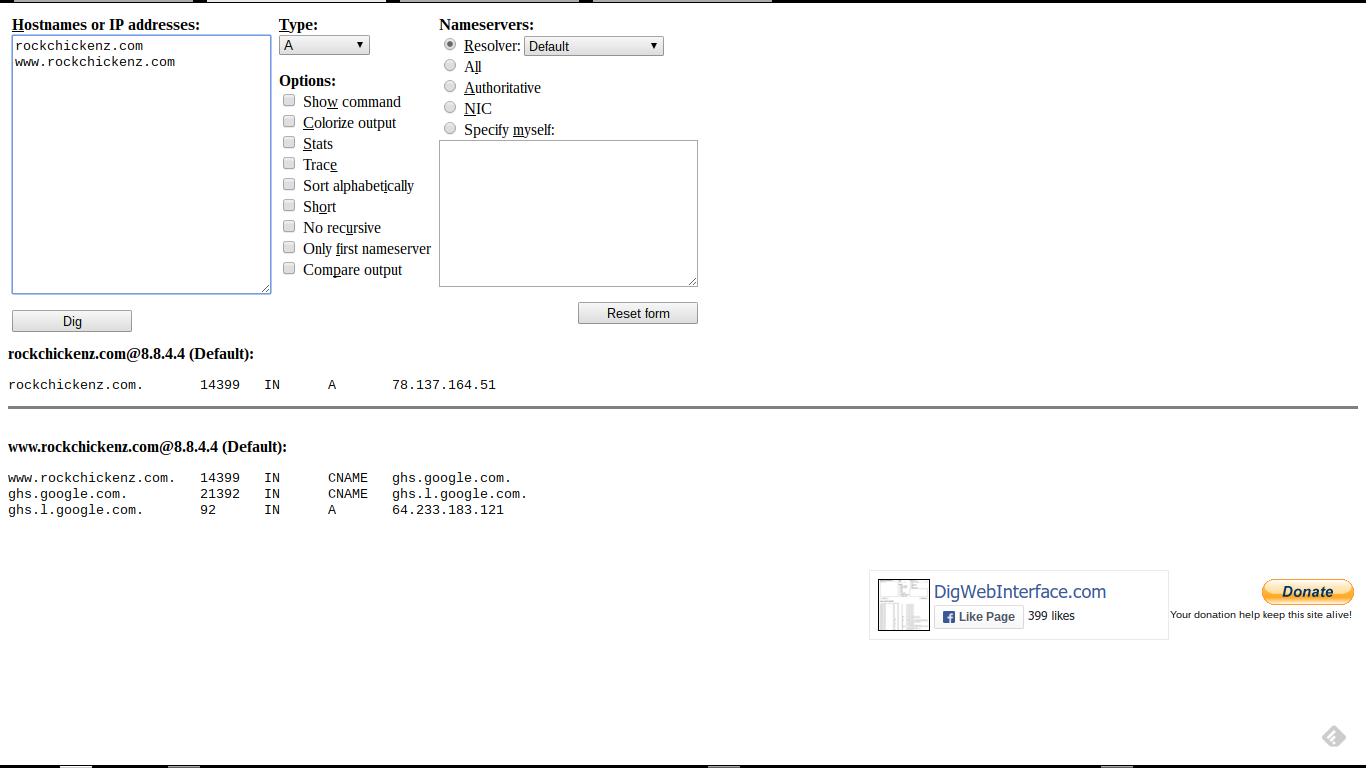
Here, the current DNS addresses (correction pending).

Here, we see a TTL of "14400" (displayed as "14399") - or 4 hours.
rockchickenz.com. 14399 IN A 78.137.164.51
www.rockchickenz.com. 14399 IN CNAME ghs.google.com.
For best results, we suggest that you wait 2 x TTL, after making DNS changes.
I recommend waiting 2 x "TTL", after making any DNS changes, before acting from those changes. Having diagnosed the painful "Another blog ..." domain database corruption, too many times, I suggest this whenever possible.
After you correct the addresses, please wait 8 full hours (2 x "14400" seconds) before continuing. This will let all DNS servers on the Internet receive the corrected addresses.
In many cases, TTL will be "3600" or "1 hour" - and with a typical forum diagnostic session taking several hours between posts, a one or two hour TTL is transparent to the forum discussion.
With domains using 4 hour TTL, suggesting that the blog owner wait 8 full hours after making the change, before re publishing the blog to the domain, makes sense. And a 2 full days, for "86400" seconds, makes even more sense.
And getting a righteous DNS address complement verified - before re publishing - makes the most sense.
DNS TTL latency, which affects accessibility of every #Blogger custom domain published blog, is not understood by many blog owners. To provide a stable domain - and a more visible blog after it's published to a custom domain - every blog owner should understand this obscure detail.


 Posts
Posts


![SQL Injection Basics - Union Based [Detailed Tutorial]](https://blogger.googleusercontent.com/img/b/R29vZ2xl/AVvXsEjjQpa2wuMB-m5CXPVf71GUOkfiIOQA8KTyQ-_zfAl0SZa23UBN1QJaO2ZMGRDZlmDJTYf2jJ4ik3Xnj1locc38Yv9l6VMxTWt32s86JtXtLABDn20DRuAcbLPKMb9m2hc6PDmjIjvU-us/s72-c/SQL-Injection-Attack.jpg)

