Latest News

Showing posts with label Custom Domains Forwarding. Show all posts

Custom Domain Migration, And Redirection Blocking

We see occasional frustration, in Blogger Help Forum: Get Help with an Issue, involving broken or unreliable custom domains.
I setup the Custom Domain properly, following the Google directions.

For some of my readers, my custom domain is not opening. I can see it is going in an infinite loop in the browser - and after a long time, it's throwing errors. My domain is setup, properly. Why do I have to deal with this?
And we will investigate - and in many cases, we find the domain is setup properly.

Some custom domain published blogs have problems, which have nothing to do with the domain setup.

Some custom domain problems involve custom code, added to the template, long ago.

Not everybody is in favour of the ongoing Blogger efforts to convince blog owners to force their readers to use HTTPS / SSL, in blog access.

A number of hackers are making their websites popular, by providing code that lets blogs block forced HTTPS access - just as they provided code that blocked local country domain redirection. Some blog owners add this dodgy code, to their blogs.

This hacking lets blog owners publish their blogs, and use accessories and gadgets that only support HTTP access. Unfortunately, with third party code, you get what you get.

Some third party code, which blocks HTTPS blog access, works OK - for a while.

When a blog is published to a custom domain, redirection to "blogspot.com" causes a redirect loop - or a security check.

<script type='text/javascript'>
var blog = document.location.href.toLowerCase();
if (!blog.match(/\.blogspot\.com/)) {
  blog = blog.replace(/\.blogspot\..*?\//, ".blogspot.com/ncr/");
  window.location.replace(blog);
  }
</script>

This is clever code, seen some time ago when used to block country local domain redirection. Then, as now, some blogs might be deleted or locked as malware hosts - or the blogs would become intermittently inaccessible.

Is the unreliability appropriate? You can add what code you like, to your blog. Eventually, what you add may cause you problems.


Some #Blogger blog owners add clever code, to block HTTPS Redirection, to their blogs. This is the same hacker provided code, used long ago to block local country domain redirection.

Like country domain redirection, the code added may work fine, for a while. Eventually, the blog will be deleted / locked for malware hosting - or will start throwing 404 errors and similar confusion.


https://productforums.google.com/forum/#!category-topic/blogger/71k8xOXxByI

Changing Your Custom Domain - The Next Chapter

We see some blog owners deciding to change their custom domain URLs - and discovering an unexpected limitation, in re indexing the blog, under the new URL
I received email from Google, advising that my previous domain is pulling up a number of 404 errors. I've noticed that these are for individual blog posts.
When you change one custom domain to another, you may not see the domain re indexed, transparently.

Changing a Blogger blog, from one custom domain to another, is a reasonably simple project - if you're able to plan the change.

A domain change should involve simply re indexing the blog.

A simple custom domain name change involves republishing the blog, under a new domain. Retaining readers, and search engine access, requires slightly more work.

Renaming a custom domain - if it involves a BlogSpot rename - becomes significantly more complicated.

Renaming a custom domain - and having the individual post URLs in the old domain working, after the change - will require slightly more effort, than any of the above requirements.

With GoDaddy, using specific settings, you may be able to forward post URLs.

In one forum topic, a domain owner was able to forward a domain, using instructions provided by GoDaddy - so individual post URLs redirect properly.

In the GoDaddy domain settings for the old (original) custom domain, activate Domain Forwarding.

  1. Set the "Forward to:" address to the new custom domain.
  2. Choose the Redirect Type as "301 Permanent".
  3. Choose the Forward Settings as "Forward only".

This may not be the effect seen, by all blog owners. Not all registrars will provide this ability.


This is the GoDaddy DNS wizard, as of 2016.

If your domain was not registered by GoDaddy, you will have a different wizard - and most likely, ""Forward only" will be a different option. Maybe, "Forward without masking" will be a useful description.


Blogger does not support redirection, from blog URL to blog URL.

Blogger does not support redirection, between BlogSpot or custom domain URLs - as transparent redirection would simply encourage spam activity. Any redirection, from the old custom domain, has to be provided by the domain registrar.

Most registrars provide simple DNS forwarding, from one domain to another - if you are able to pay for both domains, simultaneously. Generally, most registrars will setup forwarding, from the old domain to the new published blog URL.

Not all blog owners may get the redirection, for their domain, correct.

With a domain forwarded to the published URL - using most registrar provided instructions - readers who click on the URL to a specific post, using the old domain URL, will find themselves unexpectedly viewing the blog home page, under the new domain. This will cause some confusion.

Search engine bots won't find a specific blog post, under the new domain.

A search engine bot, indexing a specific post, using the old domain URL, will be redirected to the blog home page, under the new domain URL. This will not enhance indexing of the blog.

Some search engine bots may report this as a "404 Not Found" - and blog reputation will suffer.

Here's an example of the problem.


The specific post URL ("www.chloellio.co.uk/2016/05/ fashion-river-island-plus.html") redirects to the main page ("www.chloeincurve.com").


For most obvious benefit, "www.chloellio.co.uk/2016/05/fashion-river-island-plus.html" should redirect to "www.chloeincurve.com/2016/05/fashion-river-island-plus.html" - not to the blog main page "www.chloeincurve.com".

Let's look at an HTTP trace. This shows an individual post in the blog, with forwarding provided by GoDaddy.

http://www.rexswain.com/cgi-bin/httpview.cgi?url=http://www.chloellio.co.uk/2016/05/fashion-river-island-plus.html&uag=Mozilla/5.0+(X11%3B+CrOS+armv7l+7978.66.0)+AppleWebKit/537.36+(KHTML,+like+Gecko)+Chrome/50.0.2661.91+Safari/537.36&ref=http://www.rexswain.com/httpview.html&aen=&req=GET&ver=1.1&fmt=AUTO

Sending request:

GET /2016/05/fashion-river-island-plus.html HTTP/1.1
Host: www.chloellio.co.uk
User-Agent: Mozilla/5.0 (X11; CrOS armv7l 7978.66.0) AppleWebKit/537.36 (KHTML, like Gecko) Chrome/50.0.2661.91 Safari/537.36
Referer: http://www.rexswain.com/httpview.html
Connection: close
• Finding host IP address...
• Host IP address = 79.170.40.4
• Finding TCP protocol...
• Binding to local socket...
• Connecting to host...
• Sending request...
• Waiting for response...
Receiving Header:

HTTP/1.1·302·Found
Date:·Sun,·15·May·2016·17:17:57·GMT
Server:·Apache/2.2.24·(Red·Hat)
Location:·http://chloellio.co.uk/2016/05/fashion-river-island-plus.html

http://www.rexswain.com/cgi-bin/httpview.cgi?url=http://chloellio.co.uk/2016/05/fashion-river-island-plus.html&uag=Mozilla/5.0+(X11%3B+CrOS+armv7l+7978.66.0)+AppleWebKit/537.36+(KHTML,+like+Gecko)+Chrome/50.0.2661.91+Safari/537.36&ref=http://www.rexswain.com/httpview.html&aen=&req=GET&ver=1.1&fmt=TXT

Sending request:

GET /2016/05/fashion-river-island-plus.html HTTP/1.1
Host: chloellio.co.uk
User-Agent: Mozilla/5.0 (X11; CrOS armv7l 7978.66.0) AppleWebKit/537.36 (KHTML, like Gecko) Chrome/50.0.2661.91 Safari/537.36
Referer: http://www.rexswain.com/httpview.html
Connection: close
• Finding host IP address...
• Host IP address = 79.170.40.4
• Finding TCP protocol...
• Binding to local socket...
• Connecting to host...
• Sending request...
• Waiting for response...
Receiving Header:

HTTP/1.1·302·Found
Date:·Sun,·15·May·2016·17:17:58·GMT
Server:·Apache/2.2.24·(Red·Hat)
Location:·http://www.ChloeInCurve.com

http://www.rexswain.com/cgi-bin/httpview.cgi?url=http://www.ChloeInCurve.com&uag=Mozilla/5.0+(X11%3B+CrOS+armv7l+7978.66.0)+AppleWebKit/537.36+(KHTML,+like+Gecko)+Chrome/50.0.2661.91+Safari/537.36&ref=http://www.rexswain.com/httpview.html&aen=&req=GET&ver=1.1&fmt=TXT

Sending request:

GET / HTTP/1.1
Host: www.ChloeInCurve.com
User-Agent: Mozilla/5.0 (X11; CrOS armv7l 7978.66.0) AppleWebKit/537.36 (KHTML, like Gecko) Chrome/50.0.2661.91 Safari/537.36
Referer: http://www.rexswain.com/httpview.html
Connection: close
• Finding host IP address...
• Host IP address = 74.125.28.121
• Finding TCP protocol...
• Binding to local socket...
• Connecting to host...
• Sending request...
• Waiting for response...
Receiving Header:

HTTP/1.1·200·OK(CR)

<meta·content='blogger'·name='generator'/>
<link·href='http://www.chloeincurve.com/favicon.ico'·rel='icon'·type='image/x-icon'/>
<link·href='http://www.chloeincurve.com/'·rel='canonical'/>
<link·rel="alternate"·type="application/atom+xml"·title="ChloeInCurve·-·Atom"·href="http://www.chloeincurve.com/feeds/posts/default"·/>
<link·rel="alternate"·type="application/rss+xml"·title="ChloeInCurve·-·RSS"·href="http://www.chloeincurve.com/feeds/posts/default?alt=rss"·/>
<link·rel="service.post"·type="application/atom+xml"·title="ChloeInCurve·-·Atom"·href="https://www.blogger.com/feeds/5573572064729110417/posts/default"·/>
<link·rel="me"·href="https://www.blogger.com/profile/03895481660022671513"·/>
<link·rel="openid.server"·href="https://www.blogger.com/openid-server.g"·/>
<link·rel="openid.delegate"·href="http://www.chloeincurve.com/"·/>

Even if the domain, redirected to the new domain home page, does not generate a "404", blog reputation will not benefit. An individual post, will not be indexed immediately, when hidden behind the home page.

Not all registrars will help you change domain URLs - and retain post URLs.

If you are going to change custom domain names - and transparently redirect readers and search engines, you will need the extra effort, as described above.

Alternately, simply forward the domain, to the published Blogger URL (generally, the "www" domain host) - then concentrate on getting the blog re indexed, under the new URL. Once the blog is completely indexed under the new domain URL, people won't bookmark the old domain - and the new domain URL will be the reference, for the blog. That's what you want, at the end of the day.

Your readers will see the home page of the blog, when clicking on individual posts, indexed under the old domain URL. Then add a Featured Post, mentioning the domain change - and maybe setup one or both blog searches, for reader convenience.


It's possible to redirect a #Blogger blog, as published under a custom domain, to a new domain. It's not always possible to transparently redirect an individual post URL, to the new domain, however.

If you change your custom domain, you may have to expect some problems from readers and search engines.

https://productforums.google.com/d/topic/blogger/ZiozKZOS07Q/discussion

https://productforums.google.com/d/topic/blogger/9rTL7U2ZMvU/discussion

https://productforums.google.com/d/topic/blogger/Yd5qUg77wUw/discussion

Blogger Magic - The Custom Domain Root Redirect

When you setup a custom domain, for a Blogger blog, the DNS addresses are the most important issue.

A close second in importance, to righteous DNS addressing, is redirecting the domain root to the published URL. We see frequent problem reports, in Blogger Help Forum: Get Help with an Issue.
Why does my domain only work, with the "www" in the address?
The domain root provides a backup to the published URL, in many domain setups. If the domain root is not redirected, and DNS for the "www" or other published alias is down, the domain is down.

With the proper DNS addresses in place, redirecting the domain root is a very simple process.

Start from Settings - Basic.


Start from the dashboard Settings - Basic page.


Click on "Edit" in the Publishing "Blog Address" wizard.


With this blog, I have the option to select "Redirect nitecruzr.net to blogging.nitecruzr.net."


You can only redirect the domain root - no virtual hosts.

Generally, you would publish to "www.mydomain.com" - then you would have the option to "Redirect mydomain.com to www.mydomain.com".

Note that you can only redirect the domain root - even if you publish to a virtual host, such as "www.blog.mydomain.com". "blog.mydomain.com" and www.blog.mydomain.com" are separate hosts - and cannot be aliased.

Whatever you have, the option will work best, when you start with righteous DNS addresses.


Given righteous DNS addresses, publishing a #Blogger blog to a custom domain will produce a more stable blog, with the domain root redirected to the published URL. As the blog owner, you need to be sure to select the redirect option.

Blogger Magic - Reading A Dig Log

Whether you're setting up or troubleshooting a custom domain, knowing how to read a Dig log is a useful skill.

There are hundreds of registrars, serving the Internet community, each with their own dashboard. Blog owners, setting up their domains for their Blogger blogs, must deal with the syntax and terminology used by each different dashboard.

A Dig log lets the blog owner identify the DNS addresses for the domain, using a consistent display.

By identifying the DNS addresses used in a given domain, a blog owner or an experienced forum helper can diagnose many custom domain DNS related problems.

Here is an example of Dig log use, showing an excerpted Dig log, in a typical forum topic. For more detail, see my earlier post, Diagnosing Problems With Custom Domains: Dig.

I have a domain (www.rockchickenz.com) - and want to link my blog (rockchickenz.blogspot.com).

  • Start by verifying URLs involved.
  • Continue with Dig Web Interface.
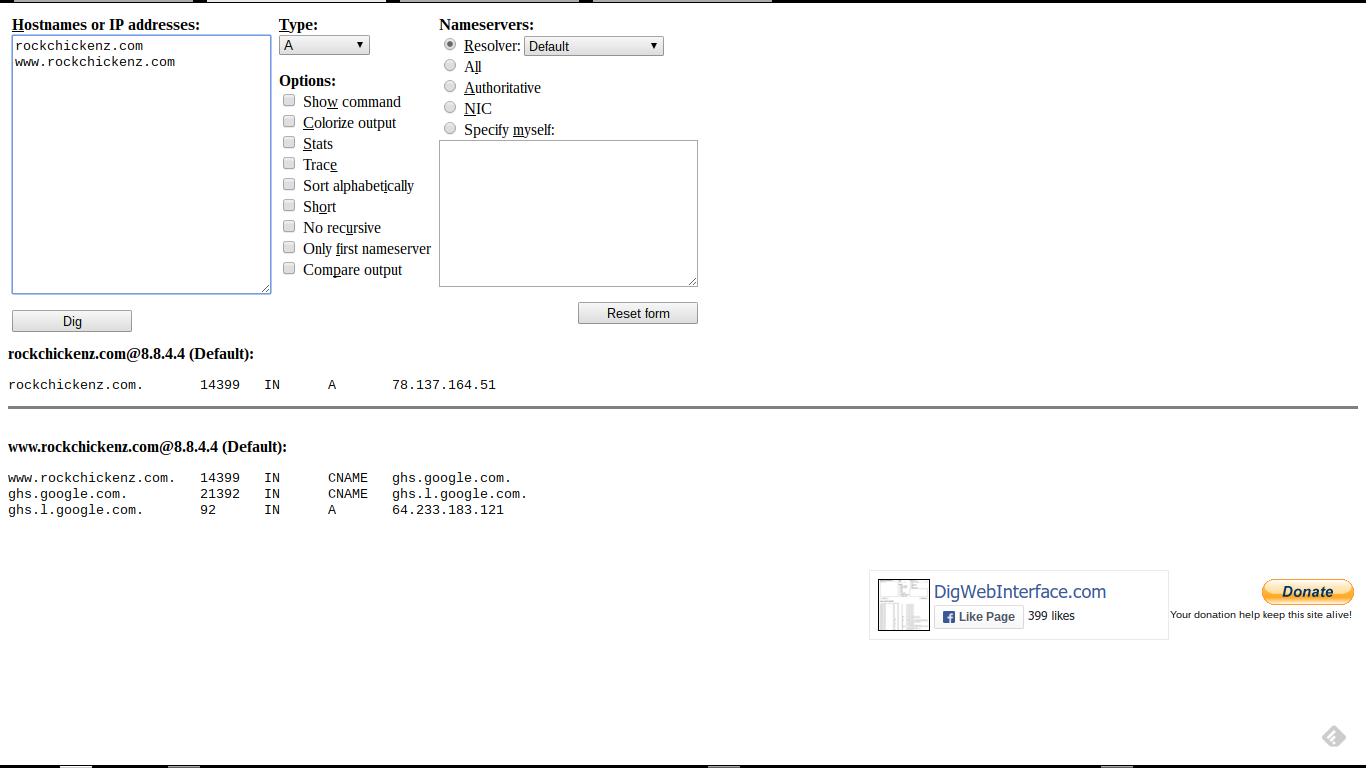
  • A full screen print of the Dig log.
  • The relevant portion of the Dig log, from the screen print.
  • The relevant portion of the Dig log, as text.
  • The advice provided, to the blog owner.
  • Alternate / complementary tools used.

Start by verifying URLs involved.

Whenever possible, make a screen print, and a text copy, of the Blogger dashboard Publishing wizard, at Settings - Basic. Knowing the status of the blog and domain - and the exact URLs involved - can go a long way to diagnosing many custom domain publishing problems.

Continue with a Dig Web Interface log.

The best tool for generating a Dig log is Dig Web Interface. Alternate / complementary tools are listed below.

I use DWI, for this purpose, by preference. DWI lets you:

  • Package the URLs in the Dig target, in the reference URL.
  • Include multiple target URLs, in one reference URL.
  • Both capabilities are very useful, in diagnosing Blogger custom domain publishing problems.


Start from the Dig Web Interface page.


Add the domain root and "www" alias, under "Hostnames or IP addresses:".

I select Type: "A", and Nameservers: "Authoritative", for my actual diagnoses.

Click "Dig".


The Dig Log reference URL, for "rockchickenz.com", generated from DWI. Target URLs are "rockchickenz.com" and "www.rockchickenz.com".

http://www.digwebinterface.com/?hostnames=rockchickenz.com%0D%0Awww.rockchickenz.com&type=A&ns=resolver&useresolver=8.8.4.4&nameservers=

A full screen print of the Dig log.

This is the complete Dig log, resulting from the Dig Log URL (above), and containing the relevant portion (below).


This is the Dig log, for "rockchickenz.com".


The relevant portion of the Dig log, from the screen print.

This is the important portion of the screen print (above), and showing the text (below).


This is the relevant portion of the Dig log, for "rockchickenz.com".


Note the TTL value of "14399" - which is a typical Dig log display for TTL set as "14400" (14400 seconds or 4 hours), in the registrar's zone editor. TTL is a setting which is used to adjust name server performance.

Unless you are experienced with DNS setup (and probably don't need to read this advice), you should use the default TTL provided by the registrar, for your domain. Your registrar wants to provide a stable domain for you - and the TTL value affects domain stability.

The relevant portion of the Dig log, as text.

These are the important details from the screen print (above), with colour highlights corresponding to domain specific details (below).

rockchickenz.com@8.8.4.4 (Default):
rockchickenz.com. 14399 IN A 78.137.164.51

www.rockchickenz.com@8.8.4.4 (Default):
www.rockchickenz.com. 14399 IN CNAME ghs.google.com.
ghs.google.com. 21392 IN CNAME ghs.l.google.com.
ghs.l.google.com. 92 IN A 64.233.183.121

The latter is typically seen, with a blog owner having received bogus advice - and reporting an inconsistently accessible blog.

The advice provided, to the blog owner.

The typical advice, provided to the blog owner, would include domain specific details - accompanied by a link to Setting Up DNS Addresses For Custom Domains.

First, generic advice:

Remove the addresses highlighted in red - and add the addresses highlighted in green - and keep the addresses highlighted in yellow.

Then, specific advice:

This is what you have:

rockchickenz.com. 14400 IN A 78.137.164.51
www.rockchickenz.com. 14400 IN CNAME ghs.google.com.

This is what you need:

rockchickenz.com. 14400 IN A 216.239.32.21
rockchickenz.com. 14400 IN A 216.239.34.21
rockchickenz.com. 14400 IN A 216.239.36.21
rockchickenz.com. 14400 IN A 216.239.38.21

www.rockchickenz.com. 14400 IN CNAME ghs.google.com.

The advice references a typical ASymmetrical DNS custom domain setup - the address set used in 99% of all custom domain setups. Note here, the specified TTL of "14400" (4 hours).

Using the above advice, the blog owner can then, if necessary, research the syntax used by the registrar's dashboard (aka "zone editor") - and make the necessary changes.

Alternate / complementary tools used.

Alternate tools, which can be used to generate a Dig log, are the Kloth.Net Dig DNS Lookup, and the Who.Is DNS display. Neither alternate is as compact and complete - but they can be used to verify results.

Complementary tools include the Global DNS Propagation Checker, the intoDNS domain DNS health checker, the Rex Swain HTTP Viewer, and the Whois Lookup.

In some cases, my 12 link affinity / differential connectivity test may be useful.

For more information.

See WikiPedia: dig (command).


One of the most useful tools, for diagnosing #Blogger custom domain problems, is a Dig Log. Learning how to read a Dig Log is a useful skill, for any blog owner wishing to publish a blog to a custom domain.

Forwarding A Domain Requires Experience

I constantly advise Blogger blog owners to avoid forwarding, when setting up custom domain publishing.

In the rare cases where forwarding is actually required, not every blog owner reports success.
My blog now displays a non Google search page!
or worse
My blog now displays
404 Not Found
What did I do wrong??
Depending upon what setup work was done by the blog / domain owner, and what effort is required by the registrar, one may expect to see, quite predictably, either of the above errors.

When you just publish your blog to the primary domain, you're using the Blogger Publishing wizard.

Many domains will require two settings, to forward a domain.

When you forward a secondary domain to the primary domain, you're using the DNS Manager wizard provided by the registrar, for that secondary domain. Frequently, this is a 2 step process.

  1. You use the DNS Manager for the secondary domain, and designate the primary domain as the forwarding target for this domain.
  2. You setup a DNS address for the secondary domain URL, and target the redirection server - as provided by the DNS host.

Some domains may make one setting, for you, automatically.

Some wizards will handle one step for you automatically, while others will require that you do both steps separately. I have had both experiences, when forwarding different domains using the GoDaddy DNS manager. You may need to experiment, here - or ask an experienced technician at the registrar, for advice.

If both settings are not made, the domain will not forward properly.

If your zone editor requires that you perform both steps separately, and you only do the first, your domain gets redirected to the redirection server. If you don't define a redirection target, you have a parked domain, similar to an expired domain - and your domain will serve the ads display page provided by the registrar.

If your zone editor requires that you perform both steps separately, and you only do the second, your domain will be properly redirected from the redirection server - but the redirection server will not be defined, for your domain. If the redirection server isn't defined, the domain will be "404".

You may need to contact your registrar, for detailed instructions.

If your registrar does not provide explicit instructions - or if you use the domain manager wizard and get either of the above results, it may be time to contact a registrar customer service representative - and possibly, insist on support from a senior technician. Using a third party registrar, or a third party DNS hosting service, you may have to improvise.

Forwarding a domain - when you must serve two domains (or more) from one blog - is simply not a task for the inexperienced.

The Task Of Forwarding A Domain Requires Experience, Persistence, And Research

I constantly advise Blogger blog owners to avoid forwarding, when setting up custom domain publishing.

In the rare cases where forwarding is actually required, not every blog owner reports success.
My blog now displays a non Google search page!
or worse
My blog now displays
404 Not Found
What did I do wrong??
Depending upon what setup work was done by the blog / domain owner, and what effort is required by the registrar, one may expect to see, quite predictably, either of the above errors.

When you just publish your blog to the primary domain, you're using the Blogger Publishing wizard.

Domain forwarding frequently requires two steps.

When you forward a secondary domain to the primary domain, you're using the DNS Manager wizard provided by the registrar, for that secondary domain. Frequently, this is a 2 step process.

  1. You use the DNS Manager for the secondary domain, and designate the primary domain as the forwarding target for this domain.
  2. You setup a DNS address for the secondary domain URL, and target the redirection server - as provided by the DNS host.

Some wizards will handle both steps for you automatically, while others will require that you do both steps separately. I have had both experiences, when forwarding different domains using the GoDaddy DNS manager. You may need to experiment, here - or ask an experienced technician at the registrar, for advice.

The registrar may require both steps, done by you separately.

If your registrar requires that you perform both steps separately, and you only do the first, your domain gets redirected to the redirection server. If you don't define a redirection target, you have a parked domain, similar to an expired domain - and your domain will serve the ads display page provided by the registrar.

If your registrar requires that you perform both steps separately, and you only do the second, your domain will be properly redirected from the redirection server - but the redirection server will not be defined, for your domain. If the redirection server isn't defined, the domain will be "404".

With no instructions provided, contact the registrar customer care group.

If your registrar does not provide explicit instructions - or if you use the domain manager wizard and get either of the above results, it may be time to contact a customer service representative. Using a third party registrar, or a third party DNS hosting service, you may have to improvise.

Forwarding a domain - when you must serve two domains (or more) from one blog - is simply not a task for the inexperienced.

Contact Us

24x7 online , we happy to answer you
tamilcypc@gmail.com

Disclaimer

This Blog and its TUT's are intended for educational purposes only, no-one involved in the creation of this TuT may be held responsible for any illegal acts brought about by this Blog or TuT.


Featured Post

Custom Domains And HTTPS Redirection Code