Latest News

Showing posts with label FaceBook. Show all posts

FaceBook Popularity, And URL Changes

Not every blog owner understands the effect of a Blogger URL change, in FaceBook - and the resulting popularity of the blog.
I am planning on changing my blog name and redirecting my blogger blog to a custom domain. Why would that affect my Facebook followers?
A Blogger URL change won't affect your FaceBook Followers directly. Your existing Followers can continue to Follow your blog, under the BlogSpot URL - and under the custom domain URL - as it is Liked, and shared, in FaceBook.

The Likes count affects the possibility of a share, of a post in your blog, to attract new Followers.

URL changes, as permitted and provided by Blogger and / or FaceBook, are easy enough to make.

If you change the URL of the blog, when it's later shared in FaceBook, you will have a different blog. If you redirect your Blogger blog to a properly setup custom domain, you will have a blog that is shared under a different URL - and you'll have a new Likes counter.

A Like will be counted against the URL of the post that is Liked.

If someone Likes your blog in FaceBook, the Like will be counted against the URL used to address the blog, in the FaceBook post being shared.


You can either count your Likes under the current BlogSpot URL - or the new URL. Just choose the URL that's used, when it's shared.


If you publicise the blog, in FaceBook, using the current BlogSpot URL, the Like will be applied against that URL. This will not contribute to popularity of the custom domain URL - and the new blog identity. The custom domain will get no Likes - and the blog will continue to be seen, in Facebook, under the BlogSpot URL.

If you publicise the blog, in FaceBook, using the custom domain URL, the Like will be applied against the custom domain URL. The blog will not benefit from popularity of the BlogSpot URL - and the current blog identity. The BlogSpot URL will get no Likes - and the blog will be seen, in Facebook, under the custom domain URL.

You are allowed to change the blog URL, by both Blogger and FaceBook.

You are allowed to change the URL of the blog, in Blogger. You can change the BlogSpot URL, to a different BlogSpot name. You can change the domain URL, to a custom domain. You can change both the BlogSpot and domain URLs, if you wish.

Either way you change the URL, you will end up with a different URL, when shared in FaceBook. And with your posts shared using a different URL, you will have Likes counted using a different counter. This isn't a question of what FaceBook lets you do - it's a question of how they count the Likes, that apply to your blog.

You will need to move forward, using your new custom domain URL, and starting with 0 Likes - or stay where you are, using the current BlogSpot URL, and continuing with the current Likes counter. FaceBook will let you do either. They just won't be able to help you do both, at the same time.

This is really just one more detail, in re indexing a blog, after a URL change.


If you change the URL of a #Blogger blog, #FaceBook popularity will be affected. You (or any reader) can share the blog using either the current or new URL - and any Likes received for a share will apply to the URL used.

The blog will appear under two (or more) different URLs - a known effect of republishing.

Social Sharing Popularity, And URL Changes

As both custom domain publishing, and social sharing networks, become normal with many blogs, we see anguish when blog owners change the URLs of their blogs, without planning for the effects of the change.
What happened to my Likes?
This blog owner - and many others - do not realise that FaceBook counts Likes, based on the URL, not the blog.

FaceBook Likes, and Google+ +1s, are counted by URL - and are not controlled by DNS redirection, or simple name changes. If you rename your blog, you get a new URL with a new popularity counter, in FaceBook and Google+.

Some social sharing services allow for URL changes.

BlogLovin lets you transfer Followers from one URL to another.

BlogLovin, for instance, provides for transfer of Followers, to a new URL - as long as the blog owner owns both the old and new URL.

First, make sure that you've claimed both of your blogs.

Once both blogs are claimed, navigate to "My blog" and select the "Edit Blog Info" option next to your original blog.

From the "Move Followers" dropdown menu, select the blog you'd like to move your followers to and click "Move". This will remove your original blog and move your followers to your new blog of choice.


Start from any BlogLovin page.


Select "Blog analytics" from the drop down menu.


Click "Edit blog info".


Select a blog, from the drop down blog menu, in the "Edit blog info" wizard - and click on "Move Followers".


Whether you have a blog with a new URL, or a blog with multiple feeds and groups of Followers, BlogLovin lets you consolidate / move Followers so you can address your Followers, conveniently.

Blogger Followers stay with the blog, automatically.

With a Blogger blog, and Blogger Following / Google Friend Connect, your Followers Follow the blog - not the URL. You can rename the blog, and change the URL - but as long as you don't change the BlogID, your Followers remain with your blog.

FaceBook and Google+ give you a new counter, for each URL.

Neither FaceBook or Google+ provide a similar option. To both FaceBook and Google+, if you change the URL of the blog, you have a new blog. Google+ Followers - unlike Blogger Followers - Follow the URL.

With custom domain publishing, and the BlogSpot to domain redirect, the attention of your Followers may end up on your redirected blog - but the +1 counter that was based on the BlogSpot URL stays with the BlogSpot URL. With the blog published to the domain, your blog gets a counter for the domain URL - and starts over.

With a BlogSpot to BlogSpot URL change, and a domain to BlogSpot URL change, everything starts over.

FaceBook Likes are counted, within FaceBook - and Google+ +1s are counted, within Google+. Both are based on the URL of the blog which accrues the Likes and +1s. If you change the URL of the blog, you get a new counter.

A URL change is effective for different changes, to a Blogger blog.

  • BlogSpot to BlogSpot name change.
  • BlogSpot to custom domain republishing.
  • Custom domain to custom domain change.
  • Custom domain to BlogSpot republishing.

All of these are URL changes - and are treated as a different blog, for most social sharing services.

BlogLovin supports URL changes. Neither FaceBook, Google+, or LinkedIn provides this ability. You change the URL, you start over with +1 / Like count, and sharing reputation.


With most social sharing services, if you change the URL of a #Blogger blog, you start over accumulating +1s, Followers, and Likes. BlogLovin appears to be alone, in letting you transfer Followers from one blog to another - if you create a new blog, or change the URL of an existing blog.

https://productforums.google.com/forum/#!category-topic/blogger/ZiozKZOS07Q

https://productforums.google.com/forum/#!category-topic/blogger/gkmBV6s03Ck

Add A FaceBook Gadget With FaceBook SDK Code

Some blog owners can't get their new FaceBook gadgets to work, on their blogs.

We see the occasional report, in Blogger Help Forum: Get Help with an Issue.

The blog won't accept the code that Facebook Developer generated for me.

Adding HTML gadgets - and HTML gadgets using FaceBook code - can be frustrating. But, it's possible.

Adding a FaceBook gadget, to your blog, is not difficult - but success is found, in the details.

  • Add the gadget as a new HTML gadget.
  • Add the FaceBook SDK code, to the first FaceBook gadget.

Add the gadget as a new HTML gadget.

Blog maintenance is far easier, with a FaceBook gadget - or any other HTML / JavaScript based accessory - added as content, in a new HTML gadget - far smarter than using Template Editor.

Add the FaceBook SDK code, to the first FaceBook gadget.

FaceBook instructs us to add SDK code to each page which will display a FaceBook gadget - but advises that we should only add the SDK code once / page.

Gadget code, as provided by FaceBook Developers:

<div class="fb-comments" data-href="http://ourladyofoutrage.blogspot.com/" data-numposts="5">
</div>

Gadget code, as added to a new HTML gadget:

<div id="fb-root">
</div>
<script>(function(d, s, id) {
var js, fjs = d.getElementsByTagName(s)[0];
if (d.getElementById(id)) return;
js = d.createElement(s); js.id = id;
js.src = "//connect.facebook.net/en_US/sdk.js#xfbml=1&version=v2.5&appId=528167400699401";
fjs.parentNode.insertBefore(js, fjs);
}(document, 'script', 'facebook-jssdk'));</script>

<div class="fb-comments" data-href="http://ourladyofoutrage.blogspot.com/" data-numposts="5">
</div>


A new FaceBook gadget, being added.


Just pay attention to the details, for best results.


Some #Blogger blog owners try to add accessories provided by FaceBook Developers, without success. They don't realise the importance of the details involved.

Blogger Resolves The FaceBook Photo Sharing Issue

Blogger Engineers recently added Blogger template code, to provide images in shares to FaceBook.

The added code is included in the standard template header. If you have a custom template, you may need to verify template header content.

If you have added the previously recommended Open Graph Code to your blog, to allow Open Graph based post / photo sharing - and you use the FaceBook Developers Debugger tool, you may see a new diagnostic suggestion.

Given newly added template code, blogs with added OG code may generate ominous warnings in the FaceBook Developers Debugger tool.

Looking at my blog, and the blog main page.

Object at URL 'http://blogging.nitecruzr.net/' of type 'article' is invalid because it specifies multiple 'og:url' values: http://blogging.nitecruzr.net/, http://blogging.nitecruzr.net/.

Looking at my blog, and a FaceBook Debug log, for this post.

Object at URL 'http://blogging.nitecruzr.net/2016/03/blogger-resolves-facebook-photo-sharing.html' of type 'article' is invalid because it specifies multiple 'og:url' values: http://blogging.nitecruzr.net/2016/03/blogger-resolves-facebook-photo-sharing.html, http://blogging.nitecruzr.net/2016/03/blogger-resolves-facebook-photo-sharing.html.

With Blogger now providing a properly resized image, automatically, from each post, the image provided in the previously suggested Open Graph code is now redundant - and causes duplication.


The browser source listing, for this post.


The FaceBook Debugger log, for this post.


Here's what I see now, in the standard template header.

<meta content='Blogger recently added template code, to properly share content to FaceBook. Learn how this affects your blog.' name='description'/>
<meta content='http://blogging.nitecruzr.net/2016/03/blogger-resolves-facebook-photo-sharing.html' property='og:url'/>
<meta content='https://blogger.googleusercontent.com/img/b/R29vZ2xl/AVvXsEgqAwPngF8wVHKBg-4CTrKgEOUXfgtPIjSzp0sFgOqkFhMJhTKHaqT_qX06vE2Ib1fDdOMkwKs6Y17_XlYoZJxTQPoGHh_HerSMTCcWUT4O0JfV77PPXC3hkE6qypiqpqK69lBuQW6wOA-6/w1200-h630-p-nu/Screenshot+2016-03-13+at+14.35.32.png' property='og:image'/>

So, what do we have?

<meta content='https://blogger.googleusercontent.com/img/b/R29vZ2xl/AVvXsEgqAwPngF8wVHKBg-4CTrKgEOUXfgtPIjSzp0sFgOqkFhMJhTKHaqT_qX06vE2Ib1fDdOMkwKs6Y17_XlYoZJxTQPoGHh_HerSMTCcWUT4O0JfV77PPXC3hkE6qypiqpqK69lBuQW6wOA-6/w1200-h630-p-nu/Screenshot%2B2016-03-13%2Bat%2B14.35.32.png' property='og:image'/>

The chosen image - resized to 1200 x 630, to suit the FaceBook recommended 1.9 aspect ratio - and large, to suit the FaceBook recommended size.

Now, 3 data elements (2 Open Graph) may be redundant.

  • description
  • og:image
  • og:url

This makes the immediately previous advice unnecessary.

If one wishes to provide author information, that also becomes slightly simpler.

<!-- BEGIN Open Graph tags -->
<meta expr:content='data:blog.metaDescription' name='description' property='og:description'/>
<meta expr:content='data:blog.pageTitle' name='keywords'/>
<b:if cond='data:blog.pageType == "item"'>
<meta content='article' property='og:type'/>
<meta content='https://plus.google.com/nnnnnnnnnnnnnnnnnnnnn/about' property='article:author'/>
<meta expr:content='data:blog.pageName' property='og:title'/>
<b:else/>
<meta expr:content='data:blog.title' property='og:title'/>
<meta content='blog' property='og:type'/>
</b:if>
<meta expr:content='"en_US"' property='og:locale'/>
<!-- END Open Graph tags -->

If you truly want to share author details, you still have some work to do - but photos should now be shared, automatically, if your blog has a template with a standard header.


Recently, Blogger Engineering added OG code to the standard template header, to allow us to share posts with images to FaceBook, without having to add special code. This should help, for owners of blogs which have standard headers.

Base64 Photo Hosting, And Open Graph Code

Some blog owners make photos an important part of blog content.

When sharing a post to FaceBook, problems are seen with photo content. In some cases, this is because of how the photos were added into the post, when using Post Editor.

We've known about problems with photos installed using drag and drop, and post editor, for a few years. Drag and Drop photos, in some cases, are stored as "Base64" content - with the photo content hosted in the post, instead of Google Photos (or Picasa).

Photos added to posts in post editor, using "drag and drop", have been a problem for many years.

Base64 hosted photos make posts abnormally large.

Posts containing "Base64" encoded photos are abnormally large - and will cause problems with the index pages, and auto pagination. That is a nuisance - but just that.

With posts shared to social media, such as FaceBook and Twitter, photos hosted using Base64 become more than a nuisance. When normal posts are shared to FaceBook, OpenGraph code is used to identify key post content - such as a photo to accompany the shared post.

Open Graph code uses URLs to reference photos.

OG code uses HTML / XML tags, in template code - with a URL identifying a shared photo. A post that contains Base64 hosted photos won't have URLs identifying the photos - it will have the actual photo content.

This photo was installed, using drag and drop. Interestingly enough, it is not Base64. It is possible that Blogger no longer uses Base64 encoding - which would explain why the problem with OG code is rather irregular.

When shared to FaceBook, the photo must be converted to normal Google Photo hosted content, so it can be shared using a URL - as normal photos are shared, using OG code. If shared using Base64 content (if OG were to support Base64), the post, again, becomes abnormally large.

Base64 hosted photos simply present one more complication, when sharing posts to FaceBook, Twitter, and other social services.


Some blog owners publish posts that contain photos added using drag and drop. Some drag and drop installs result in Base64 hosted photos - which must be converted to Google Photos hosted content, when shared to FaceBook or Twitter.

Using The Meta Search Description In Your Blog

There is some confusion, about including "search description" meta content, in blog template code, to provide source for data shares to social sharing sites.

In various topics in Blogger Help Forum: Get Help with an Issue, I've seen references to "data:post.metaDescription", "data:post.snippet", and "data:post.pageTitle" used, in providing the blog post source for the FaceBook "og:description" tag. As far as I can tell, none of these exist.

The Layout data tag "data:blog.metaDescription", which provides "og:description", does exist - though it seems to be referenced, ambiguously.

Some FaceBook Open Graph content references different Blogger tags, depending upon page type. The FaceBook "og:title" references "data:blog.pageName" with an "item" (post) page, and "data:blog.title"; with other pages.

"og:description", on the other hand, only references one Blogger tag - "data:blog.metaDescription". The latter appears to change its source, depending upon whether the main page, or a post page, is being viewed.

  • In main page mode, the per blog "Description", from Settings - Search preferences, is referenced.
  • In post page mode, the per post "Search Description", from the Post Editor "Post settings", is referenced.


Source listing for this blog, in main page view.

"What Blogger won't (or can't) tell you. Blogger features and problems explained, using real life examples."


Source listing for this post, in post page view.

"Blogger provides the meta tag "data:blog.metaDescription", which seems to vary in source. Learn how it varies."


There is no mention of "data:blog.metaDescription", in the reference Blogger Help: Layouts Data Tags - as either a per blog, or per post, data element.

In my earlier post, my reference to "'data:blog.metaDescription' name='description'" was simple. But simplicity can lead to confusion.

<meta expr:content='data:blog.metaDescription' name='description' property='og:description'/>

Some tags are universal, others vary depending upon page type ("item" being post page).

<!-- BEGIN Open Graph tags -->
<meta expr:content='data:blog.metaDescription' name='description'' property='og:description'/>
<meta expr:content='data:blog.pageTitle' name='keywords'/>
<b:if cond='data:blog.pageType == "item"'>
<meta content='article' property='og:type'/>
<meta content='https://plus.google.com/nnnnnnnnnnnnnnnnnnnnn/about' property='article:author'/>
<meta expr:content='data:blog.canonicalUrl' property='og:url'/>
<meta expr:content='data:blog.pageName' property='og:title'/>
<b:if cond='data:blog.postImageUrl'>
<meta expr:content='data:blog.postImageUrl' property='og:image'/>
<b:else/>
<meta content='http://xxxxxxxxxxxxxxxxx/xxxxxxxxxxxx/xxxxxxxxxxx/xxxxxxxxxxx/xxxxxxxxxxx/S1600-R/yyyyyyyyyyyyy.gif' property='og:image'/>
</b:if>
<b:else/>
<meta expr:content='data:blog.title' property='og:title'/>
<meta expr:content='data:blog.canonicalHomepageUrl' property='og:url'/>
<meta content='blog' property='og:type'/>
<meta content='http://xxxxxxxxxxxxxxxxx/xxxxxxxxxxxx/xxxxxxxxxxx/xxxxxxxxxxx/xxxxxxxxxxx/S1600-R/yyyyyyyyyyyyy.gif' property='og:image'/>
</b:if>
<meta expr:content='"en_US"' property='og:locale'/>
<!-- END Open Graph tags -->

'data:blog.metaDescription' name='description' is referenced once, in the template code - and the source is apparently determined, based on the context.

If you find this confusing, I have to agree with you.

---

#Blogger provides the Layout data tag "data:blog.metaDescription", which is used for the FaceBook meta ag "og:description" - for both blog main page, and post pages, when shared. This is in contrast to the FaceBook meta tag "og:title" and others, which use different Blogger data tags for the main page and post pages.

This variation has caused some confusion - and attempted use of different non existent Blogger data tags.

Sharing Blog Content, With Photos, To FaceBook

We have a few blog owners, reporting problems with sharing their blogs to FaceBook.
When I share my blog on FaceBook, the photo from the blog doesn't appear. Some blurry pencil appears instead.
What the blog owner is seeing, is the effect of the FaceBook Share wizard, grabbing an unwanted photo, from the page being shared.

You have 2 choices, if you want to share blog content to FaceBook - and have it all look attractive.
  1. Publish every post, containing a photo that FaceBook will want to use.
  2. Add FaceBook Open Graph code, to your blog.

Too many blogs do not contain quality photos, per FaceBook Standard.


(Update 3/14): Blogger Engineering having recently added OG code to the standard template header, this tweak may be unnecessary for most blog owners.


The problem, that too many blog owners have, is that their photos do not have the correct quality, to FaceBook.

  • At least 200×200 pixels in both width and height.
  • Aspect ratio of width and height no greater than 3; in other words, the width can’t be more than three times more than the height, and vice versa.

Please define a chosen image using the og:image metatag, and use an image that's at least 200x200px and is accessible from Facebook.

Current opinion seems to suggest that an image of minimum size 400 x 400 px is better than 200 x 200 px. In other words, the image which fits neatly into the post column may not be a good choice.

Without a suitable photo in shared content, FaceBook Share gets imaginative.

If your main page, or post page, does not contain an acceptable photo, the FaceBook Share wizard will pick an image from the page. The first thing that the wizard looks for is a transparent image.

This is where the infamous "pencil" or a similar image becomes involved. The "pencil" - if the blog owner is doing the sharing - is found at the bottom of the post. It's also known as the "Quick Edit" icon.

If Quick Edit is not enabled, or the person submitting the share is not a blog owner, the "pencil" won't be available. In this case, FaceBook Share will grab a similar icon, from the blog face - or maybe from the sidebar.

We need Open Graph code, to instruct FaceBook Share how to find a photo.

FaceBook Open Graph code is not hard to develop - or install - but you do need to use the right code.

If you want something better than the "pencil" or similar fluff from being included in your shares, you add FaceBook Open Graph code, to tell FaceBook how to find an appropriate photo. You can specify a photo to include when the main page is shared - and (if you like) a different photo to include when a post, with no photo, is shared.

Some very simple code - not!

One would be helper has been making forum noise recently, with some very simple code.

<!-- Open Graph Meta Tags BEGIN -->
<b:if cond='data:blog.postImageUrl'>
<meta expr:content='data:blog.postImageUrl' property='og:image'/>
</b:if>
<!-- Open Graph Meta Tags END -->

There are two problems with this simple code.

  1. It's based on post code - and has nothing to make a main page share come out right.
  2. It requires a suitable image, in the post. We are here, because many posts do not have suitable images.

Something more than the simple code is needed.

Develop the proper simple code.

So the simple code requires a little more effort. This is what I recommend:

<!-- BEGIN Open Graph tags -->
<b:if cond='data:blog.pageType == "item"'>
<b:if cond='data:blog.postImageUrl'>
<meta expr:content='data:blog.postImageUrl' property='og:image'/>
<b:else/>
<meta content='http://xxxxxxxxxxxxxxxxx/xxxxxxxxxxxx/xxxxxxxxxxx/xxxxxxxxxxx/xxxxxxxxxxx/S1600-R/yyyyyyyyyyyyy.gif' property='og:image'/>
</b:if>
<b:else/>
<meta content='http://xxxxxxxxxxxxxxxxx/xxxxxxxxxxxx/xxxxxxxxxxx/xxxxxxxxxxx/xxxxxxxxxxx/S1600-R/yyyyyyyyyyyyy.gif' property='og:image'/>
</b:if>
<!-- END Open Graph tags -->

There are two alternate possibilities that we want to allow for.

  1. Sharing the blog itself - and no post containing an acceptable image, on the main page.
  2. Sharing a post - and no acceptable image, in the post

Please note that http://xxxxxxxxxxxxxxxxx/xxxxxxxxxxxx/xxxxxxxxxxx/xxxxxxxxxxx/xxxxxxxxxxx/S1600-R/yyyyyyyyyyyyy.gif needs to be replaced with an actual URL of a real photo, that fulfills FaceBook requirements, for this feature to be useful. Choose a good photo, that will represent the blog when shared in main page, or a post with no suitable photo.

Now, I need a default photo, to use when no acceptable image is involved, when sharing this blog. Here's a screen print of the opening page of this post.


And, the URL from the screen print.

https://blogger.googleusercontent.com/img/b/R29vZ2xl/AVvXsEiim6Npm_l_FkmnT7M2ZR-OrQLuaD42SAiDRyhAhXOf4pbRideSrn2hXzBgZo8XhzMGhxxjt50a2LTJOSE-ZRrg7RNX2mz1z5q-KNmf3YWCAyArC1Jh2lytWZc2op4UTULruOpMJMIhqo2w/s1600/Screenshot+2016-02-15+at+13.08.21.png

This gives me:

<!-- BEGIN Open Graph tags -->
<b:if cond='data:blog.pageType == "item"'>
<b:if cond='data:blog.postImageUrl'>
<meta expr:content='data:blog.postImageUrl' property='og:image'/>
<b:else/>
<meta content='https://blogger.googleusercontent.com/img/b/R29vZ2xl/AVvXsEiim6Npm_l_FkmnT7M2ZR-OrQLuaD42SAiDRyhAhXOf4pbRideSrn2hXzBgZo8XhzMGhxxjt50a2LTJOSE-ZRrg7RNX2mz1z5q-KNmf3YWCAyArC1Jh2lytWZc2op4UTULruOpMJMIhqo2w/s1600/Screenshot+2016-02-15+at+13.08.21.png' property='og:image'/>
</b:if>
<b:else/>
<meta content='https://blogger.googleusercontent.com/img/b/R29vZ2xl/AVvXsEiim6Npm_l_FkmnT7M2ZR-OrQLuaD42SAiDRyhAhXOf4pbRideSrn2hXzBgZo8XhzMGhxxjt50a2LTJOSE-ZRrg7RNX2mz1z5q-KNmf3YWCAyArC1Jh2lytWZc2op4UTULruOpMJMIhqo2w/s1600/Screenshot+2016-02-15+at+13.08.21.png' property='og:image'/>
</b:if>
<!-- END Open Graph tags →

And, there is the simple OG code, that I might use for sharing this blog, with a proper image, to FaceBook. This is actually a portion of the code needed, when adding author identification to FaceBook shares.

You might use similar code - having chosen and developed a good quality photo, to represent your blog.

Install the proper simple code.

To install the code, you will use the Template Editor. Please backup the template, before and after you make this simple change!

Start by locating the "<HTML ... >" tag, at the top of the template header.

Find:

<html b:version='2' class='v2' expr:dir='data:blog.languageDirection' xmlns='http://www.w3.org/1999/xhtml' xmlns:b='http://www.google.com/2005/gml/b' xmlns:data='http://www.google.com/2005/gml/data' xmlns:expr='http://www.google.com/2005/gml/expr'>

And replace with:

<html b:version='2' class='v2' expr:dir='data:blog.languageDirection' xmlns='http://www.w3.org/1999/xhtml' xmlns:b='http://www.google.com/2005/gml/b' xmlns:data='http://www.google.com/2005/gml/data' xmlns:expr='http://www.google.com/2005/gml/expr'>
<!-- BEGIN Open Graph tags -->
<b:if cond='data:blog.pageType == "item"'>
<b:if cond='data:blog.postImageUrl'>
<meta expr:content='data:blog.postImageUrl' property='og:image'/>
<b:else/>
<meta content='https://blogger.googleusercontent.com/img/b/R29vZ2xl/AVvXsEiim6Npm_l_FkmnT7M2ZR-OrQLuaD42SAiDRyhAhXOf4pbRideSrn2hXzBgZo8XhzMGhxxjt50a2LTJOSE-ZRrg7RNX2mz1z5q-KNmf3YWCAyArC1Jh2lytWZc2op4UTULruOpMJMIhqo2w/s1600/Screenshot+2016-02-15+at+13.08.21.png' property='og:image'/>
</b:if>
<b:else/>
<meta content='https://blogger.googleusercontent.com/img/b/R29vZ2xl/AVvXsEiim6Npm_l_FkmnT7M2ZR-OrQLuaD42SAiDRyhAhXOf4pbRideSrn2hXzBgZo8XhzMGhxxjt50a2LTJOSE-ZRrg7RNX2mz1z5q-KNmf3YWCAyArC1Jh2lytWZc2op4UTULruOpMJMIhqo2w/s1600/Screenshot+2016-02-15+at+13.08.21.png' property='og:image'/>
</b:if>
<!-- END Open Graph tags →

Save the changes. And again, backup the template, before and after you make this simple change!

And with the code added to your template, you can verify your code. In extreme cases, you may need advice from FaceBook Support. You may also find FaceBook Developers: Sharing Best Practices for Websites & Mobile Apps to be a helpful reference.

---

Many #Blogger blog owners share posts (and the blog itself) to FaceBook, with no problems. Some have recently observed odd images being included with the content shared.

An apparent change to the FaceBook Sharing wizard has caused odd photos to be included, with blogs that lack the necessary Open Graph code. Open Graph code is not complicated - but it does need to allow for possibilities.

Phishing Is A Form Of Identity Theft

We've recently seen a few blog owners, in Blogger Help Forum: Get Help with an Issue, report their blogs being classified for phishing.
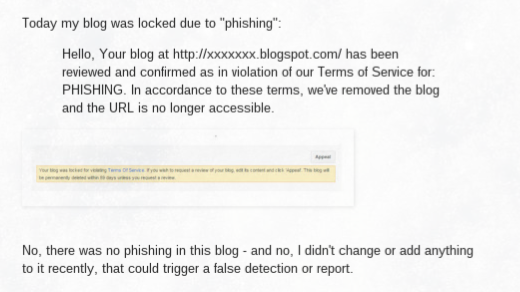
Today my blog was locked due to "phishing":
Hello, Your blog at http://xxxxxxx.blogspot.com/ has been reviewed and confirmed as in violation of our Terms of Service for: PHISHING. In accordance to these terms, we've removed the blog and the URL is no longer accessible.
No, there was no phishing in this blog - and no, I didn't change or add anything to it recently, that could trigger a false detection or report.

In the past, phishing generally would involve gadgets used to gather online identity information - such as third party email collection.

Email collection, in Blogger blogs, is best done using FeedBurner.

Most properly designed Blogger blogs, though, use FeedBurner Email Distribution - and FeedBurner, being part of Google, is hopefully not susceptible to phishing involvement.

Considering phishing as a form of identity theft, one might see a connection between some blogs, and Blogger abuse classification.
Phishing is the attempt to acquire sensitive information such as usernames, passwords, and credit card details (and sometimes, indirectly, money), often for malicious reasons, by masquerading as a trustworthy entity in an electronic communication.

Some blog owners, in an effort to increase traffic, may be incautiously adopting identities of commercial products.

Mentioning commercial products, in user names, is a way to increase blog traffic.

When using social networking platforms, like FaceBook, Google+, and Twitter, a user name which includes a commercial identity may seem like a great way to get attention from the other members. The legal owners of the commercial product, however, may consider this to be a copyright violation, or identity theft.

Each of the terms "copyright violation", "identity theft", and "impersonation" may be included by Blogger abuse classification, or online reviewers, as PHISHING.


Google - and AdSense - may also have a problem with social networking identity.

It's also possible that Google wants to protect themselves - and is requiring the guilty blogs to be classified.

I do note that one of the blogs, recently reported in the forum, appears to have empty AdSense ads - on the same page with FaceBook and Google+ badges, that may impersonate a commercial product. The impersonation - intentional or not - may also violate AdSense prohibited content.
Google ads may not be displayed on websites with content protected by copyright law unless they have the necessary legal rights to display or direct traffic to that content.

Besides being careful to only include original content in the blog, one should also be careful to not infringe on commercial identities in other websites - such as social networking platforms.

---

Some #Blogger blog owners, in an attempt to increase blog traffic - are advertising their blogs using social networking platforms like FaceBook, Google+, and Twitter - and are using the names of commercial products in their user names.

The user names include carefully added words which, to the blog owners, may seem to protect the blogs from complaints by owners of the commercial products. It's possible that Blogger does not see that way - and may be righteously classifying the blogs for copyright violation or identity theft, both of which might be considered phishing.

The Followers Gadget, And Internet Identification

How many of you have used your favourite Internet application recently - and received a convenience login suggestion?
To continue, please tell us who you are!

Login with your FaceBook, Google, or Twitter account.
Many small business Internet services, instead of making you setup one more unknown account, are letting you login, and use their product, based on your FaceBook, Google, or Twitter account.

This is not a magical concept. It requires a lot of work, to make this happen.

The major Internet services, such as FaceBook, Google, and Twitter, act as identification sources for many smaller services.

Letting FaceBook, Google, and Twitter identify us is good, for everybody.

With FaceBook, Google, and Twitter providing identification services, we see a win - win - win situation.
  1. FaceBook, Google, and Twitter get to set the standards for identification - and make the Internet safer for everybody.
  2. The lesser known services can concentrate on their product - and not worry about identification.
  3. The users of the lesser known services have one less account / password to maintain.


I login to AddThis, using my Google account. That's one less account, for me to maintain.


This is called Open Protocol Authorisation - or OAuth. I use OAuth to login to AddThis - and to other services, at various times.

Followers used to use OpenID Authentication - and complicated code.

For many years, Blogger used a similar concept - OpenID authentication - with the Followers gadget. People could Follow our blogs, using a Twitter, Yahoo, AIM, Netlog, or OpenID account - and they could identify their activities (similar to our Blogger / Google+ profiles) using a profile hosted by Orkut, Netlog, Plaxo, or Twitter.

This use of a third party service, for account and / or profile hosting, is not magical. OAuth / OpenID standards or not, each different service has its own peculiarities. Coding, to allow for these peculiarities, makes the Followers gadget more complicated than it should be.

Complicated code is not good. Blogger has to maintain duplicated code to allow for different browsers, operating systems, world wide government bureaucrats, and more. More time spent fixing problems == less time spent improving features.

Followers has shown problems to different people, at various times.

The Followers gadget, for many years, has well known problems.


"Were sorry ...

This gadget is configured incorrectly."

Everyone who uses Followers, on their blogs, has surely seen this notice.


The gadget, on this blog, has shown that error, more than once. Many would be Followers have told me so.


Many of us have tried to surf the Followers gadget, on their favourite blog, and seen this display too.


A lot of people saw the latter, in 2015, when using the gadget on this blog.

Now, Blogger is simplifying Following - and dropping some Followers.

This year, Blogger Engineers are removing excess code in the Followers gadget, to make it more reliable. This requires removal of code which supports OpenID accounts in Twitter, Yahoo, AIM, and Netlog - and profiles hosted in Orkut, Netlog, Plaxo, and Twitter.

Now, Following supports only Blogger / Google / Google+ accounts and profiles. Note that Blogger / Google / Google+ accounts do not have to be GMail.

Removal of the excess code requires removal of the OpenID accounts and profiles. And, we have been seeing our Followers counts drop, since mid December 2015.

It's important to note that anybody "Following" our blogs, using OpenID, can continue to use any email or third party newsfeed subscription - neither of which are affected by the account / profile cleanup. They were not using Reading List to read our blogs, since Reading List requires a Blogger account. And with the Followers gadget broken, no new readers were surfing to our blogs.

I don't like the drop in numbers, any more than the next blog owner. But I also don't like being unable to surf, using the Followers gadget.

So, I'll endure what looks like a 20% drop in Followers count - and be able to use the Followers gadget. And hope that having a working gadget, with less Followers, will still lead to more traffic - more so than having a broken gadget with more Followers. And, move forward.

And, my deepest apologies to those of you who were Following - but are not now - and wanted to find out why you were dropped.

Just use a Blogger / Google account, and Follow again, using a working Followers gadget, or using the Reading List wizard, please. And we'll put this sad story behind us.

Blogger Blogs Displaying Mysterious "SECURITY WARNING" Popup Boxes

This week, we're seeing a few concerned blog owners, in Blogger Help Forum: Something Is Broken, asking about a mysterious SECURITY WARNING popup box, on their blogs.

Like the earlier concern about the transparent boxes covering the blog, this appears to be another broken FaceBook Connect gadget.

The mysterious SECURITY WARNING isn't too hard to resolve.

Generally, the problem will start with a new FaceBook accessory, recently added.

<div id="fb-root"></div>
<script>(function(d, s, id) {
var js, fjs = d.getElementsByTagName(s)[0];
if (d.getElementById(id)) return;
js = d.createElement(s); js.id = id;
js.src = "//connect.facebook.net/id_ID/all.js#xfbml=1";
fjs.parentNode.insertBefore(js, fjs);
}(document, 'script', 'facebook-jssdk'));</script>

<div class="fb-like-box" data-href="http://www.facebook.com/xxxxxxx" data-width="265" data-show-faces="true" data-stream="true" data-header="true"></div>

If you can identify the problem gadget in your blog, you can edit the gadget, and Remove it. Some owners have installed the code in question, in a specific post.

As an alternate solution, you may add CSS which will hide the warning. Using the "Add CSS" wizard in the Template Designer Advanced menu, add the following code:
#fb_xdm_frame_http, #fb_xdm_frame_https
{
display:none !important;
}

As always, after you add or remove the code in question, and save the changes, you will need to clear browser cache and restart the browser, to accurately test success in resolving the problem.

>> Top

Blog Owners Report Mysterious Blogs Added To Their Dashboard Blog List

We are seeing a small but steadily increasing stream of problem reports, in Blogger Help Forum: Something Is Broken, from Blogger blog owners, wondering where these mysterious blogs, being added to their dashboard "My blogs" list, are coming from.
Is anyone else experiencing random blogs being added to their dashboard? I login, and I notice that many blogs have been made - and they're all with names that are just a jumble of letters and numbers, but no posts. All of them lead to the same blog though.


Here's a random list of the names of 7 such blogs, which were recently created in the "blogspot.com" name space. If you wish to examine these blogs, and these have not yet been deleted by the Blogger anti spam processes, I strongly advise that you use a proxy server, or similar isolation technique. Never examine any hacking / spam attack component, unprotected.
yyxfkfgpiy
x24xd2wtu1
4o4fq0rqp9
26djmc3xyh
m9s5tdor2l
h62wo5uthr
bsojvu43gk

Some blog owners are seeing dozens of these mysterious blogs. Adding to the confusion, a couple owners have even thought that their legitimate blogs have been replaced. Fortunately, what is happening is that the legitimate blogs are still there - just not visible in the noise.

When queried for details, many owners report having received, and accepted, an offer involving FaceBook, and the suggestion to "Change your colors". Apparently, if logged in to both Blogger / Google, and FaceBook, this mysterious "FaceBook app" will simply setup quantities of BlogSpot hosted spam blogs, frighteningly reminiscent of blogs created as part of the long ago observed Russian Business Network spam blog farms.

Each blog created has the same initial content - a display, with the offer to "Change your FaceBook colors". The link to accept the offer then leads to a non Google website, which installs the malware, which creates the mysterious spam blogs, in mass quantity. For your examination, here is one example spam blog - which may or may not currently be online, using a proxy server link.
http://anonymouse.org/cgi-bin/anon-www.cgi/http://yyxfkfgpiy.blogspot.com/


We don't yet know what, if anything, is being installed on the computer used in the blogs creation - nor how malicious the virus is, when installed on one's own computer. Our advice is simple - avoid becoming a victim. If you are receiving invitations for this service, it's possible that your FaceBook friends, supposedly sending the invitations, are the current victims. If you ignore the offer, you should be safe.

It's possible, too, that this attack is enabled by the massive attacks of seemingly purposeless spam comments, being published on various blogs.

If you are concerned about this situation, you might want to check all of your blogs for unfamiliar code - then review your current protection, and even consider using Google 2-step verification.

>> Top

Contact Us

24x7 online , we happy to answer you
tamilcypc@gmail.com

Disclaimer

This Blog and its TUT's are intended for educational purposes only, no-one involved in the creation of this TuT may be held responsible for any illegal acts brought about by this Blog or TuT.


Featured Post

Custom Domains And HTTPS Redirection Code