Latest News

Showing posts with label Spam. Show all posts

The CAPTCHA Continues As A Challenge

This month, we are again seeing evidence of recent security changes by Microsoft. We see signs of continued frustration, in the process of publishing comments - and publishing posts, as part of the Import process.

In the process of diagnosing an apparent comment publishing problem, I ventured into the comment publishing experience, yet again.

I temporarily tweaked commenting permissions for this blog, to allow anonymous comments and to require the CAPTCHA.

With CAPTCHA required, I published a test comment to my earlier post in this blog.


I did my best - which was not good enough.


CAPTCHA solving continues, as a challenge.


I entered a test comment, and made appropriate selections.


I got a challenge.

"Select all the food."


I did my best.


Apparently, my best was not enough.

"Select all images with a store front."


I tried again. Not all images here were completely obvious, either.


My second try was successful.


Hmm.

Select all the food.

Zoom in on the fourth image, above - and tell me which pictures, that I did not select, are food? To whom? Will zooming always improve chances of success?

CAPTCHA solving, as spam interdiction, will always lead to frustration.

There will be cultural issues - and resolution problems - with CAPTCHAs. This version of the CAPTCHA beats the one from several years ago - but still will cause frustration.

And need I again point out - will require proper filter tuning, on each computer used. Note that ongoing changes by Microsoft are currently affecting publishing comments - and publishing posts during the Import process.

And our experience may very, depending upon many different details, varying by blog, by computer, and by person. My sympathies to all who must deal with spam - and with spam interdiction.


The CAPTCHA continues to be an unavoidable element in comment publishing and other episodes of #Blogger life. And like life, some episodes are more pleasant than others.

AdSense, And Blogger, Require Quality Content

We see questions about content requirement, in both AdSense Help Forum: Blogger / Host Partners, and in Blogger Help Forum: Get Help with an Issue.
My blog was just deleted, as a spam host! I Don't publish spam!
and
Why can't I get my Earnings button activated? My blog is over a year old, and contains hundreds of posts!!
Neither blog owner publishes a blog which contains blatant unwanted commercial content - or hacking or porn. But neither blog is suited for hosting AdSense ads, either.

As the web becomes saturated with people publishing, without a proper plan for content source or for subject, Google is trying to encourage quality content.

Both AdSense and Blogger want people to publish blogs which are worth reading - because blogs that are worth reading get traffic - and deliver customers who view the ads published by AdSense. And AdSense wants to keep their ecosystem healthy, to encourage quality advertising.


AdSense wants the best content - to encourage the best ads, and the best ad compensation.

Blogger wants original, well written content. This encourages people to read the blog - and tell their friends about it. And more readers encourage more writing by the owner.


Some blog owners publish posts which contain only YouTube videos. This violates both AdSense Program Policy, and YouTube Terms Of Service. YouTube videos may not be used in a monetised blog, as significant content. YouTube specifically forbids
the sale of advertising, sponsorships, or promotions on any page of an ad-enabled blog or website containing Content delivered via the Service, unless other material not obtained from YouTube appears on the same page and is of sufficient value to be the basis for such sales.

If you read through the AdSense Support Forums, you'll find mention details of other problems - not always stated in the references.

  • Ad placement and quantity.
  • Classroom blogs.
  • Diet / health / medications blogs.
  • Get rich quick / MMF / MMH / MMO blogs.
  • Poor grammar.
  • Graphic violence blogs.
  • Job blogs.
  • Mixed content blogs.
  • Scraped / syndicated content.
  • Tech blogs.

Ad placement and quantity.

AdSense has very high standards about how ads are featured on the blog - and how many ads may be present on the blog. The total number of ads - both AdSense and third party - should be limited. And showing ads in popup windows, and other imaginative techniques, is strictly forbidden.

Classroom blogs.

Blogs which provide exam result lists, answers to previous exams, study guides, and / or promote sale of pre written term papers are loosely termed "coursework". This is mentioned, in Prohibited Content: Content that enables dishonest behavior.
  • Sale or distribution of term papers, paper-writing or exam-taking services;
  • Content that promotes fraudulent activity.

AdSense won't finance blogs which encourage people to waste money that is spent for education, on fraudulent activity.

Diet / health / medications blogs.

Health and medical advice must be provided by certified and supervised professionals. Peoples lives depend upon proper medical advice, based on in person diagnosis.

Get rich quick / MMF / MMH / MMO blogs.

Content which provides advice on getting rich is poorly advertised, in a blog which needs AdSense. If the advice is truly useful, the blog owner would be busy using his own advice - instead of telling other people, and trying to get ads to finance his advice.

There is no legitimate product sold, that benefits from ads hosted on a "get rich quick" website.

Poor grammar.

Advertising managers, who use AdSense for brokering their ads, require well written blogs, to host their ads.

Graphic violence blogs.

Content which depicts or encourages violence is not family friendly - and is not desired by AdSense, or by their advertisers.

Job blogs.

AdSense provides ads on sites with original content. Any commercial agency, company or governmental organisation, with jobs available, will have its own website.

A jobs blog is simply content scraped from various commercial agency, company and governmental organisation websites.

Mixed content blogs.

AdSense displays ads, based on content in each page displayed. A blog with ads on the various index pages - such as archive, label, and main page - needs a clear and consistent subject, for ads to be properly assigned.

Scraped / syndicated content.

AdSense requires original content. AdSense policy is based on financial and legal concerns.

Scraping content and passing it off as one’s own is not only wrong, but it also happens to be a serious violation of our policies. AdSense depends on maintaining a balance between user, publisher, and advertiser experience.

Blogger has long provided similar guidelines - but based on content quality.

Spam blogs cause various problems, beyond simply wasting a few seconds of your time when you happen to come across one. They can clog up search engines, making it difficult to find real content on the subjects that interest you. They may scrape content from other sites on the web, using other people's writing to make it look as though they have useful information of their own.

However you discuss it, original content is required, to host ads with any future.

Tech blogs.

There are thousands of various tech advice blogs and websites, all over the Internet - most simply repeating advice from other blogs and websites.

Again, original content is an absolute requirement - for both AdSense and Blogger.

The bottom line.

AdSense sells ad space to advertisers who want to publish quality ads, on quality blogs and websites. They are very careful, to keep their ecosystem clean and well maintained - because that is how you encourage ads which offer the best payment rates.


Both #AdSense and #Blogger, as part of #Google, have consistent standards of quality.

AdSense is the best paying advertising placement service on the Internet. To encourage the best ads, they are very selective of blogs and websites - and only accept the best, into their program.

Is There A Purpose To Referer Spam?

We've been experiencing - and discussing - referer spam, since 2011.

We still see unaware blog owners, asking in Blogger Help Forum: Get Help with an Issue.
When I checked my stats for my blog, and looked at traffic sources, I noticed a link from a different country - and it just seems weird that Russian readers would then go to a US site.

When we explain that they're probably seeing another referer spam attack - and that clicking on the links is not always a good idea, we get a variety of responses. Some want to know if there is a purpose, to this noise.

Referer spam has a variety of purposes - ranging from commercial, to dangerous, to deceptive.


Garbage? Or a purpose?


Here are just 3 examples, from Blogger Help Forum: Get Help with an Issue.

  • Advertise any paying customer.
  • Lead you to a website with hacking content.
  • Attack innocent third parties.

Advertise any paying customer.

This is the commercial possibility. If there's money to be made from publishing informative, interesting, and original content, there is probably lots more money to be made herding innocent third parties to ads on any website needing traffic - and lacking informative, interesting, and original content.

This may even represent a variation of GPT. And with the volume of referer spam that's possible, there are surely enough naive blog owners to make this a very lucrative activity.

Lead you to a website with hacking content.

This is the dangerous possibility. With hacking activity as a possible destination, clicking on a Stats link blindly is like playing "Russian Roulette", with your computer.

And, don't expect the website URL to provide a clue as to the destination. "www.innocous-name.com" could itself be hacked - and might unknowingly serve content from "www.hacking-website.com" - or redirect to "www.hacking-website.com".

Attack innocent third parties.

This is the deceptive possibility.

My blog was a "victim" of referer spam attack, in 2011. I have seen similar referer spam reports, that suggest this is not an unusual use of referer spam.

Protect yourself - if you must investigate your referers.

Surely, there are still actual people surfing - and some referer links are genuine. Eventually, you will want to check out some of the more intriguing URLs, in "Traffic sources".

If you decide to investigate one of the links, copy the text of the link URL - then use a proxy server.

Just don't investigate links, without protection. That's what proxy servers are for.


Some #Blogger blog owners want to know if referer spam has a purpose - or if it is simply random noise. It actually has a variety of purposes - commercial, dangerous, and deceptive.

Blogger Magic - Comment Moderation Settings

If you publish a blog, and want your readers to comment, you need to decide whether to moderate comments.

Comment moderation, applied properly, help you to keep abusive and spam comments off your blog. If you want to publish a blog, and have real people commenting, you need to keep spam comments off the blog. People won't comment, if they have to compete with spam.

If you want to publish a blog, and allow Blogger Hosted comments, you really should moderate. If you don't moderate, prepare to remove spam comments after they are published. Remember that Google+ Hosted comments are moderated by the community.

You setup moderation, for Blogger Hosted comments, from the dashboard Settings - "Posts, comments and sharing" page.

Under "Comments", you have "Comment Moderation", with 3 settings.

  • Always.
  • Sometimes.
  • Never.


Moderation settings are in the Settings - Posts, comments and sharing page.


Moderate Always.

Every comment, published by somebody who is not an administrator or author, will be moderated.

With "Always" or "Sometimes" selected, moderated comments will be sent to each email address listed in "Email moderation requests to".


Select "Always", "Sometimes", or "Never".


You - or whoever is addressed under "Email moderation requests to" - will have the ability to moderate from the email message received. You, or any blog administrator, can moderate from the dashboard Comments - "Awaiting moderation" page.

Moderate Sometimes.

You can selectively moderate comments for older posts, with newer posts not subject to moderation.


If you select "Sometimes", you provide a moderation threshold.


Here, we are set to moderate all posts older than 14 days.


Every post subject to moderation will receive the treatment, selected for "Always". Every newer post, not subject to moderation, will permit any comment to be published immediately.

Moderate Never.

Any comment, submitted to be published, will publish immediately.

Dashboard moderation offers three options.

With every comment listed in the dashboard Comments - "Awaiting moderation" page, you have 3 options.

  • Publish.
  • Delete.
  • Spam.

Once one of these options is chosen, for any comment being moderated, you'll have similar - but not symmetrical - options.

EMail moderation offers similar options.

With each comment moderated by email, you'll have 3 similar options.

  • Publish.
  • Delete.
  • Mark as spam.


Select "Publish", "Delete", or "Mark as spam".


Besides moderation, you can select CAPTCHA verification.

Besides moderation, you can reduce spam, using CAPTCHA verification. If selected, all non administrators and authors will be subject to CAPTCHA verification.

If not selected, anybody commenting anonymously - and not signed in with a Google account - will still be subject to CAPTCHA verification. The "Show word verification" setting applies to comments posted with the publisher properly authenticated.

Right now, the CAPTCHA used is a word puzzle - and has received mixed reviews.

The bottom line.

As a blog owner, you should choose a comment moderation policy - if you allow Blogger Hosted comments.


If you allow #Blogger Hosted comments on your blog, you need to choose a moderation policy. Moderation is essential, to reduce spam, and encourage comments by actual blog readers.

Wording The Blog Title And URL - Same or Unique?

Some blog owners setup a new blog - and want to know if the blog title and URL may - or (alternately) should - be the same.

There is no policy for Blogger, about blog title and URL - either that the "words" in each can, or cannot, be the same. Some SEO experts suggest benefits from having relevant words, in the URL - and some blog owners confuse this advice, as suggesting having identical titles and URLs.

Be wary of advice that references websites, in discussions about blogs. There are subtle, but real, differences between dynamic blogs, and static websites. Rules that may be important for websites may not be relevant, for blogs.

The most obvious differences, between blogs and websites, are found in content - but blog design may have similar differences.


SEO strategies, for a dynamic blog, and a static website, will be different. Dynamic blogs have many exciting opportunities.


I have suggested that it may not be possible to make the blog title and URL the same, in all cases.

  • Most subjects won't be unique. Many blogs will share a subject.
  • The blog URL must be unique. Two blogs cannot share a URL.
  • The blog URL will have restrictions, in characters allowed.

Most subjects won't be unique.

Any popular subject will have many blogs published to that subject. Every blog, about the same subject, will have a different URL.

If a blog is published, to a subject which has no competition, it will be a subject which interests nobody. A blog with no competition will likely have no readers.

The blog URL must be unique.

Two blogs cannot share a URL. One URL == one blog.

That does not mean that title and URL cannot share "words" - just that it's not possible that they will be identical, for all blogs.

There can be only so many ways to mention your favourite, top level movie star, in the title - and there will be even less ways to construct a unique URL. A less famous celebrity, on the other hand, will have less blogs to compete - and less readers also.

The blog URL will have restrictions, in characters allowed.

URLs can use only certain characters.

a sequence of characters beginning with a letter and followed by any combination of letters, digits, plus (+), period (.), or hyphen (-)

That syntax is somewhat limited, compared to characters that may be used in blog titles - and in the blog description and content. Less choice of syntax leads to less possibilities for uniqueness, while providing some clue as to the purpose of the blog.

A Blogger blog is dynamic - and you SEO using content.

Blogger blog content is dynamic. You get more performance, from a blog with regularly published, unique content, that's informative and interesting.

You get less performance, from imaginative naming strategies. Acme does not make an "SEO Kit", for Blogger blogs.


Some #Blogger blog owners worry about the need to publish a blog with the Title and URL containing the same words. Some suggest that having identical words is necessary, others that having identical words is not permitted.

Fortunately, neither possibility is relevant to Blogger / Google Content or TOS regulation. Blogger and Google care about content quality - and prohibit scraping and spam.

Export / Import, And Page / Post Publishing Limits

Not all blog owners understand the connection between page / post import, and spam limitation.

We see the occasional question, in Blogger Help Forum: Get Help with an Issue, about page / post import, and daily publishing limits.
Why I can not import content, to my blogs?
Note that "Automatically publish" is selected, in the blog discussed here.

I've suggested a few times that use of "Automatically publish all imported posts and pages" is a bad idea, when importing many blogs - because it abuses the computer and home Internet connection.

Here, we see another reason for not using "Automatically publish".

Import, with "Automatically publish", will exceed the daily publishing volume.

Blogger limits daily posting volume. Any blog with more than 40 - 50 pages / posts, when it is exported then imported, will be a problem - if "Automatically publish" is selected during "Import".


"Sorry, you have exceeded the maximum number of entries."


If you import, and publish as you import, you will exceed the daily publishing limit. Your import will fail - because you are publishing more than the daily limit.

Without a daily limit, spammers could flood post their blogs.

If this limit was not in place, spammers could flood their blogs with pages and posts, by simply creating multiple blogs with multiple pages / posts, export from each blog, then import to other blogs - and publish while importing.

If Blogger is to control spam, they have to limit page / post publishing. With the daily limit of 50 pages and posts / 24 hours, that is slightly more than 1 page or post every 1/2 hour - allowing for no sleep, or other non blogging activity.

People have to be encouraged to do something, besides publish - or how do you get material, for the blog? If people are going to publish a blog - and do other things besides publish a blog - there has to be a daily limit.

Genuine blog owners have to not spend all their time publishing their blogs.

Blog owners need to be encouraged to publish blogs with informative, interesting, and original content - so people will read the blogs, and search engines will index the blogs. Automated blog content, a favourite way of "bulking up" a blog with spam, has to be discouraged, to give genuine blog owners a chance.

Without a daily limit, people who publish blogs with personal content would be at a disadvantage to spammers who publish pages and posts with automated content. Using Import, with no limits, would be an excellent way to publish spam in a never ending daily activity.

Use "Import & back up" in 3 steps, to avoid the limit block.

  1. Export pages and posts, from one blog.
  2. Import pages and posts, to a second blog.
  3. Publish imported pages and posts, at a limited rate, selectively.

That is the best way for genuine blog owners, to use the Export / Import ("Import & back up") option.


#Blogger has a daily page / post publishing limit, to encourage blog owners to publish blogs with informative, interesting, and original content. Automated page / post publishing is allowed - but subject to a daily limit.

Without a daily limit, spammers would abuse the Blogger infrastructure, with mass produced and scraped content - and Blogger would become one more spam haven.

Buyer Beware - Don't Buy Pre Published Blogs

Don't develop a blog, that's simply designed to host AdSense ads - and avoid pre published blogs, in general.

Blogs and websites that are blatantly designed as ad hosts are classified as "MFA" ("Made For Ads") - and are never accepted as AdSense hosts. AdSense, and Blogger, want blogs with quality content - informative, interesting, and unique.

Legitimate and useful blogs start with content that is important to the blog owner.

Blogger, some time ago, explicitly prohibited sale of blogs.

Either Blogger will delete the blog as spam - or AdSense will classify it as "MFA".

If you buy a blog, "blogspot.com" or custom domain, with content already in place, it will probably contain copyrighted material. If Blogger does not delete / lock it as spam, AdSense will probably classify it as "MFA" - and the blog will never display ads.

Blogger blogs are based on personal interest. When you buy a pre published blog / domain, you're buying somebody else's discarded personal interest.

Most people who sell blogs do so after learning that what they have won't host ads or get traffic. Pre used blogs are frequently subject to disapproval, by AdSense - or DMCA / Spam classification, by Blogger.

If you do the research, you'll find out why the previous owner sold it to you.

You'll probably end up with a disabled AdSense or Blogger account - and doing the research, you'll find out why the previous owner sold it. It's like a "lemon law" car. If the price seems too good to be true, it probably is just that.

You would never, knowingly, buy pre worn underpants. Why would you buy a pre published blog? Start with an available URL, and add your own content. That's how you get content, reputation, and traffic.


#Blogger blogs are supposed to be based on personal experience or interest - using content that's informative, interesting, and unique. Purchasing a previously published blog, with content left in place, violates that principle.

A smart blog owner starts with an empty blog - using an available URL, and adds content.


Diagnosing AdSense Account Problems

AdSense uses various techniques to protect their content quality - and when they take action, they don't always give you a lot of clues about their actions, or warnings before taking action.

Both AdSense and Blogger use fuzzy analysis to classify unacceptable content and practices. Neither AdSense or Blogger can publish definitive policy advice, each time they classify or suspend an account.

AdSense publishes policy guidelines - and prohibited content, to define the limits.

AdSense works best when staying well within the limits.

Like Blogger, AdSense requires blog owners / publishers to stay within the limits.

We want to maintain a strong ecosystem for both advertisers and publishers. As a publisher, you are responsible for maintaining high quality inventory and traffic.

People who stray outside the limits should not expect detailed coaching, which let them determine exactly what limits can't be exceeded.

When you exceed the limits, you may not like the results.


Bad news, seen by some too late.


Dodgy techniques and traffic cause problems with both AdSense and Blogger - and both AdSense and Blogger will take action.

For best results, read and follow required practice.

When an AdSense account is suspended, AdSense provides a Disabled Account FAQ. You can use the FAQ - but you'll do better to read the policies, and stay within the limits.

You can appeal, after correcting a problem - within limits.

You'll find limited support for appealing - even after identified problems are resolved.

Thanks for contacting Google AdSense. According to our records, you already appealed to us twice in the last 30 days. Due to the volume of appeals we receive and as indicated in our help center you can't appeal more than twice per month.

If your previous appeals have been unsuccessful please remember that our actions are the result of careful investigation by our team of dedicated specialists, taking into account the interests of our advertisers, publishers, and users. Though you might be disappointed with our decision, we are unable to reinstate your account.

If you have new information which may have helped us to reinstate your account then you are welcome to submit another appeal next month.

We appreciate your patience and understanding.

An effective appeal requires two definitive details.

  1. Acknowledge what you did wrong.
  2. Describe what you are doing to prevent its recurrence.

The best action will be to read and observe published policies.


Like #Blogger, #AdSense does not provide detailed advice, or advance warning, about unacceptable content or practice. AdSense publishers are simply expected to read their policy documents - and stay well within the limits.

Blogger, And Home / Small Business Blog Clusters

One topic of frustration, occasionally seen in Blogger Help Forum: Get Help with an Issue, involves home based business blogs, that may be victims of their own success.
We are not spam - we are a network of blog owners, in select cities all over the country. I am tired of hearing the apologies, this needs to be resolved.
The blog owner is being quite polite, but insistent.

Blog clusters, whether developed by home / small business owners, or malicious spammers, create problems for all Blogger blog owners. Home / small business blogs are clearly not intentional spam - but their structure makes them easy to mistake for spam blog farms.

Blogger values the creation of blogs with original content. Replicating original content across multiple blogs however, violates the Blogger Spam policy.

Blogger Content: Spam provides a good definition of the Blogger Spam policy.
Spam: Spam takes several forms in Blogger, all of which can result in deletion of your account or blog. Some examples include creating blogs designed to drive traffic to your site or to move it up in search listings, posting comments on other people's blogs just to promote your site or product, and scraping existing content from other sources for the primary purpose of generating revenue or other personal gains.

The most recently observed home / small business blog cluster, which generated traffic in the Spam Review section of the forum, was a USA based coupon sharing club, that had expanded into other areas - such as dining, entertainment and local events.
We are MORE than a coupon group. Our network works with Disney, Nickelodeon, local restaurants, reviews and products and events locally.

Other blog clusters have involved an Australian blog franchise of electronic / tech products and services - and a California / Florida carpet / home cleaning business.

Home / small business blogs can be mistaken for spam blogs.

Each of these three examples appear to have started as home / small businesses, possibly with one blog - and grew exponentially, as franchises. And each of the examples present problems, with automated spam classification.

  • Aggregation of blogs produces unfair advantage, over other small businesses using Blogger.
  • Aggregation of blogs skews spam classification, by tweaking the heuristic spam filters.
  • Aggregation of blogs makes detection of actual spam blog farms more difficult.

These three concerns produce side effects, in the Blogger spam mitigation program - and lead to periodic spurious spam classification of home / small business blog clusters.

As the size of the clusters increase, so does the chance of repeated classification.

  • Blogger policy prevents whitelisting the blogs in the cluster.
  • The more blogs in the cluster, the greater chance that one or more blogs will be classified, at any given time.
  • The more blogs in the cluster, the longer it will take to review a blog, when classified.

Understand your role, in the spam classification / review process.

If you operate a home / small business, which involves blogs clustered on a geographic and / or product - service relationship - and your business is impeded by spurious spam classification, we'll work with you, and try to get your blogs reviewed.

Please, understand that your home / small business may be pushing the limits of the Blogger spam mitigation program. Try to minimise content which replicates through multiple blogs in the cluster - and content which is scraped from various commercial websites.


Some owners / operators of home / small businesses, which use #Blogger as a backbone for their business, produce clusters of blogs, organised on a geographic / product / service basis. Rapid growth of the businesses may lead to blogs which share content too heavily - and may lead to repeated spurious spam classification.

Owners of the blogs should learn to expect occasional spam classification, and try to minimise blog features which lead to spam classification.


Phishing Is A Form Of Identity Theft

We've recently seen a few blog owners, in Blogger Help Forum: Get Help with an Issue, report their blogs being classified for phishing.
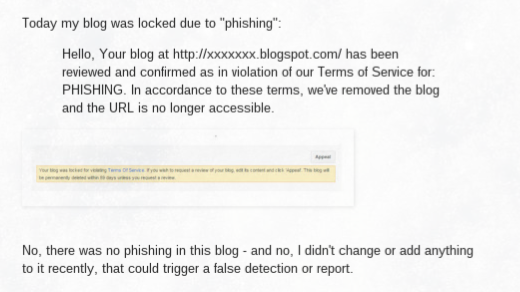
Today my blog was locked due to "phishing":
Hello, Your blog at http://xxxxxxx.blogspot.com/ has been reviewed and confirmed as in violation of our Terms of Service for: PHISHING. In accordance to these terms, we've removed the blog and the URL is no longer accessible.
No, there was no phishing in this blog - and no, I didn't change or add anything to it recently, that could trigger a false detection or report.

In the past, phishing generally would involve gadgets used to gather online identity information - such as third party email collection.

Email collection, in Blogger blogs, is best done using FeedBurner.

Most properly designed Blogger blogs, though, use FeedBurner Email Distribution - and FeedBurner, being part of Google, is hopefully not susceptible to phishing involvement.

Considering phishing as a form of identity theft, one might see a connection between some blogs, and Blogger abuse classification.
Phishing is the attempt to acquire sensitive information such as usernames, passwords, and credit card details (and sometimes, indirectly, money), often for malicious reasons, by masquerading as a trustworthy entity in an electronic communication.

Some blog owners, in an effort to increase traffic, may be incautiously adopting identities of commercial products.

Mentioning commercial products, in user names, is a way to increase blog traffic.

When using social networking platforms, like FaceBook, Google+, and Twitter, a user name which includes a commercial identity may seem like a great way to get attention from the other members. The legal owners of the commercial product, however, may consider this to be a copyright violation, or identity theft.

Each of the terms "copyright violation", "identity theft", and "impersonation" may be included by Blogger abuse classification, or online reviewers, as PHISHING.


Google - and AdSense - may also have a problem with social networking identity.

It's also possible that Google wants to protect themselves - and is requiring the guilty blogs to be classified.

I do note that one of the blogs, recently reported in the forum, appears to have empty AdSense ads - on the same page with FaceBook and Google+ badges, that may impersonate a commercial product. The impersonation - intentional or not - may also violate AdSense prohibited content.
Google ads may not be displayed on websites with content protected by copyright law unless they have the necessary legal rights to display or direct traffic to that content.

Besides being careful to only include original content in the blog, one should also be careful to not infringe on commercial identities in other websites - such as social networking platforms.

---

Some #Blogger blog owners, in an attempt to increase blog traffic - are advertising their blogs using social networking platforms like FaceBook, Google+, and Twitter - and are using the names of commercial products in their user names.

The user names include carefully added words which, to the blog owners, may seem to protect the blogs from complaints by owners of the commercial products. It's possible that Blogger does not see that way - and may be righteously classifying the blogs for copyright violation or identity theft, both of which might be considered phishing.

Jobs Blogs Are Not Desired, In Blogger

We see an occasional hopeful spammer asking, in Blogger Help Forum: Get Help with an Issue, about one more spam blog subject.
Can I publish a blog, and provide job postings?
The would be blog owner has not read the Blogger Content rules.

Jobs blogs are a problem, in Blogger. A jobs website should be published by a Commercial or Government Employment ("Human Resources") agency - and very few commercial or government job agencies operate Blogger blogs, as their website.

Most commercial and government agencies operate their own domains, and websites - and are properly advertised by their domain URLs. Not as "jobsformycountry.blogspot.com".

The few such agencies, which settle for publishing to Blogger, will probably be too small to provide anything interesting.

A jobs blog will be a favourite of many publishers, with little work required.

A jobs blog would be a favourite, of a blog owner, because it requires little effort to publish. You simply bookmark all of the agencies offering jobs, surf to each one periodically, and copy then paste interesting possibilities, into various blog posts.

Google does not want such content. Blogger specifically prohibits it.

Spam blogs cause various problems, beyond simply wasting a few seconds of your time when you happen to come across one. They can clog up search engines, making it difficult to find real content on the subjects that interest you. They may scrape content from other sites on the web, using other people's writing to make it look as though they have useful information of their own. And if an automated system is creating spam posts at an extremely high rate, it can impact the speed and quality of the service for other, legitimate users.

Many blog owners try to make money, with jobs blogs. AdSense won't publish ads on a site with copied content.

Fact: We don’t allow sites with auto-generated or otherwise unoriginal content to participate in the AdSense program. This is to ensure that our users are benefiting from a unique online experience and that our advertisers are partnering with useful and relevant sites.


A jobs blog publisher will be seeing this - a lot.


A blog owner won't have job offerings of his own - anything offered will be copied.

A blog owner who does not represent a commercial or government agency will have no way to generate legitimate job postings. Any postings on a jobs blog will be scraped from an legitimate commercial or government agency website - and the blog will be righteously classified as spam.

And that will leave another forum post.
My blog is locked for SPAM, without any prior warning. This is my favourite blog - how can they do this to me?

---

Jobs blogs are a favourite subject, for many #Blogger blog owners. They require little work - and are guaranteed to generate a lot of traffic, from the hopeful job seekers who have no idea that everything offered on the blog has been scraped from a legitimate commercial or government agency website.

They will receive little respect from the Blogger spam classifier, though. As with all scraped content, they will be righteously classified, and deleted.

Is Affiliate Marketing Allowed, In Blogger?

Anxious blog owners ask the question periodically, in Blogger Help Forum: Get Help with an Issue.
Is affiliate marketing allowed, in Blogger?
And the truth is that there is no prohibition against affiliate marketing, by name.

If the blog content is legal, you can do anything. The question is, can you make a Blogger blog, and use affiliate marketing, and not run afoul of Spam and TOS guidelines?

A description of "affiliate marketing" - or maybe the problems involved - would be a good place to start.

Affiliate marketing networks consist of blogs and websites, linked through ads. The reader, who clicks on an ad in a blog, is redirected to another affiliate blog - randomly selected by the redirector.

Blogger blogs need informative and interesting content, to attract traffic.

A blog, to successfully host ads, needs its own unique content, that both
  • Is interesting or informative, to your readers - and to the search engines.
  • Is relevant to the nature of the products advertised.

Too many blogs that involve affiliate marketing depend upon the affiliate relationship to both provide traffic to, and reward for ads hosted on, the blog. That's where the problem starts.

Ads need to be relevant to subject of the posts - and to the readers.

When you have a network of affiliate blogs and websites, where the only thing common between the blogs and websites is the affiliate relationship, the problem becomes worse.

Blogs that host ads, that are not relevant to the content of the blog, or to the interests of the readers, are considered spam hosts.

As an example, AdSense is a contextual service. AdSense ads are chosen according to content of the posts.

Non contextual ads still need to be relevant to the post content - and this may not be the case, with affiliate ads.

Ads that link blogs with illegal content can also use affiliate techniques.

Some blogs with illegal content can also link to similar blogs. In this case, all blogs are detected, and deleted.


Bookmakers setup blogs which focus on various gambling activities, like sports betting.


Bookmaking is a popular blog topic - and bookmakers have been known to setup affiliate networks - which can be deleted when detected.

Network membership does not provide content - it links to content.

Affiliate marketing network membership, by itself, does not provide content - and blog readers are not cattle, to be shifted from blog to blog, randomly.

If a reader clicks on a link, he expects to be taken to another blog with relevant or similar content, with complementary information - not just complementary ads. Ads are not content - they are, at best, decorations.

Both Blogger Content - and Google Terms Of Service contain details.

If you publish a blog and intend to include affiliate networking, stay well within the limits, described in Content and TOS. If you cross the line, you may not get a warning, in time to save your blog.

---

Some #Blogger blog owners join affiliate marketing networks, to both gain traffic and get paid for providing traffic. They do not care that their readers, clicking on an affiliate ad, may wind up on another blog or website with completely different content - but the same ads.

The affiliate network both compensates for the clicks by the readers, and transports the readers randomly, from blog to blog. To an affiliate redirector, one blog is as good as another - and this makes the affiliate links spam.

FeedBurner, And Blogs Unwisely Deleted Or Renamed

Some blog owners delete or rename a blog, without proper planning - and later regret their action.

Some spammers track blog name availability - particularly with blog names that contain "English" (and some non English) language words. If a spammer discovers that a given blog name has recently become available, he will publish a stub blog to that name - and later, add spammy content.

Why is a spammer interested in recently available names?

A previously unavailable name, now available, has residual value - because it previously had content, and presumably, readers.

If a valuable blog name is made available by the owner, a spammer will take it.

If a blog owner just abandoned a valuable blog name, by deleting or renaming the blog, a spammer is going to make good use of it.

The unwary blog owner will soon get complaints, from former subscribers.

Shortly, the unwary blog owner will see that his blog, recently deleted or renamed, has been re published and is now full of spam. His former readers are now asking why he is filling up their blog feeds with spam. And he has lost control of the blog, that once was his.

Unfortunately, by the time the republished blog name is discovered, the spammer has taken legal control - and is now the rightful owner. And, short of deleting the blog as a TOS violation, Blogger will recognise the spammers right to own a blog that was legally obtained, using a spammer version of "Create blog".

If the unwary blog owner is you, you may be able to correct your mistake.

If a deleted or renamed blog used FeedBurner to distribute a blog feed, it's possible that the remaining readers are subscribed to the FeedBurner feed. This is where you - the formerly unwary blog owner - can correct your mistake.

A hacker / spammer, who now (legally) has control of an abandoned blog, may not have control of the FeedBurner feed, that is feeding from the blog. If you can regain control of the FeedBurner feed, you can redirect it to a different blog.
  1. Setup a stub blog, with one or more posts explaining your mistake.
  2. Edit the FeedBurner feed, to point to the feed from the stub blog.
  3. Publish a post or two, as an apology to your former subscribers.

Setup a stub blog, with one or more posts explaining your mistake.

You cannot do what you should have done originally - publish a stub blog to the abandoned blog name. You can, however, publish a stub blog to any other available and suitable name.

Then add a post, explaining what you did - and why the people reading the new blog (your new stub blog) are (or just previously were) seeing spam, in their bloglists and Reading List.

Edit the FeedBurner feed, to point to the feed from the stub blog.

With a new blog publishing an active feed, edit the FeedBurner feed that is currently re publishing the feed from the spammer owned blog. Change the FeedBurner feed, using "Edit Feed Details", to re publish the feed from your new stub blog.

The current FeedBurner feed, for
The Real Blogger Status, is
http://feeds.feedburner.com /Nitecruzr-Blogging


To change the feed source URL, simply edit the "Original Feed" setting - then click "Save Feed Details".

Publish a post or two, as an apology to your former subscribers.

With your FeedBurner feed now re publishing your new stub blog, publish a post or two explaining what you did. Hopefully, given a couple posts from your (reclaimed) feed that do not contain spam, your former readers may read one of your new posts, and be enlightened.

And the spammer will be none the wiser - until the people who are paying him report that his former spam channel has stopped producing traffic to their website.

---

FeedBurner Feeds, After Deletion / Renaming Of Blogs
FeedBurner Feeds, After Unwise Blog Delete / Rename
FeedBurner, After Blog Unwisely Deleted / Renamed

If you unwisely delete or rename a #Blogger blog, the name that was once yours will have some value to a spammer. If a spammer takes the abandoned blog name, publishes his own spammy content, and distributes it to you former readers, you will be powerless to do anything.

If you are using a FeedBurner feed to distribute the blog feed, however, you can edit the FeedBurner feed, and cancel the spammers channel.

Empty Or New Blogs Can Be Classified As Spam Hosts

We're seeing a few recent reports, in Blogger Help Forum: Something Is Broken, from owners of empty and / or new blogs, about spurious spam classification.

Very few owners of empty or new Blogger blogs understand why their blogs should be classified as possible spam hosts, by the Blogger anti-spam processes. Most blog owners seem to think that only blog content is considered, in spam classification.

Spam classification considers many characteristics of a Blogger blog, in classifying any blog as a possible spam host.

Blog post content is an obvious - but not the only - factor in spam classification. Given previously observed behaviour of spammers, many characteristics of blogs, besides simply the extracted and analysed content, are used in classifying possible spam blogs. Using fuzzy spam classification techniques, one might also consider
  • Accessories and decorations, on the blog.
  • Addresses used, in setting up multiple blogs.
  • Overall behaviour in Google, by the owner.
  • Past posting habits of the owner.
  • Previous classification of similar blogs.

Some spammers obscure their activity, with gratuitous Google activity.

Some spammers are active in multiple Google activities and features. It's possible that some spammers even try to make their spam in Blogger harder to detect, by spreading their activity across other Google services - even when non abusive in other Google services.

Some spammers may not realise that activity in other Google areas can be tracked, and included by Blogger spam classifications processes.

Blog publishers, enjoying similar activities, may be spuriously classified.

Blog owners who use one or more techniques involved in setting up and maintaining spam blog farms may be classified as spammers - and their blogs then classified as possible spam hosts.

The term "blog owner" must itself be considered fuzzily, as some spam blog farms contain blogs owned by multiple Blogger accounts and profiles. Some Blogger accounts, similar to known spammer accounts - even with no blogs owned, or with empty blogs published - may then appear as possible spam hosts.

Empty blogs may still provide clues, which suggest spammy purpose.

Empty blogs, that appear similar to blogs in known spam farms, may themselves be classified as possible spam hosts. Various details such as blog name, blog design, and use of various blog accessories and features, can make a blog appear similar to known spam blogs - with no other content.

As long as spammers exist, some Blogger blogs will be spuriously classified.

Given the need for Google to reduce the volume of spam blogs, fuzzy spam classification might use any of the above details, in classifying any empty or new blog as a possible spam blog. This will, unfortunately, lead to spurious spam blog detection.

The possibility of spurious classification cannot prevent classification, in general.

Given the ability of spammers to publish multiple blogs in the Blogger name space, classifying empty and new blogs is necessary, in making it possible for Google to keep up with spammy activity. This technique enables publishers of genuine blogs to have their blogs viewed as righteous Internet content - not as one more blog, in a sea of spam.

The Mysterious "Deleted blogs" Dashboard Link

Occasionally, we see signs of confusion, in Blogger Help Forum: Something Is Broken.
Where is the "Deleted blogs" link?
or
How can I recover my blog, if there's no link on the dashboard??
These blog owners don't understand that "Deleted blogs" only appears, when there are deleted blogs that can be recovered.

Not all blogs, having vanishing from the dashboard, will be recoverable by the owner.
  • A blog deleted / locked after hacking activity was detected won't be recoverable.
  • A blog owned under another Blogger account won't be recoverable.
  • A blog that does not exist won't be recoverable.
If the Blogger account owns no blogs that are recoverable, there won't be a "Deleted blogs" link on the dashboard.

If the Blogger account owns other blogs, that are not currently deleted, those blogs will be listed. If the Blogger account owns no recoverable blogs, the blog owner sees a monolithic message
You are not an author on any blogs.

In some cases, the blog owner will be advised to clear cache, cookie, and sessions - then restart the browser, and login to Blogger. In other cases, the solution will be to wait 24 to 48 hours, and check again. Just don't waste time looking for a link that may not be there - and try to understand why the link may not be there.

>> Top

Blog Owners, Marking Stats Log Entries As Referer Spam, Won't Accomplish Much

We see the occasional optimistic suggestion in Blogger Help Forum: Something Is Broken, from blog owners tired of the referer spam, in their Stats logs.
Why can't we just tell them which Stats entries are spam?
This is, admittedly, such a simple suggestion - it surely must present part of the final solution.

If one considers the purposes behind referer spam, one can see a problem with having individual blog owners designate specific pageview entries, in their Stats logs, as referer spam.

There are actually multiple purposes for referer spam.

Look carefully at the entries, in your Stats logs. Are all of the websites, which are being advertised by non existent links to your blog, actually spammy? Chances are, if you look closely enough, you'll find one or two which just don't seem to fit the pattern.
  • The volume of hits makes the pageview counts look suspicious.
  • There's no link to your blog, from the websites.
  • Looking closely at the content of the blog or website, it just does not look like the typical referer spam target.

This blog was honoured, as a false target, in October 2011. I have no doubt that other blogs and websites are also the targets of similar, deliberate attacks.

With referer spam used strategically, the spammers could simply adjust the volume of their attacks, to make innocent victims more visible, and more vulnerable to false accusation by the less observant blog owners, who simply want all referer spam stopped.

To guard against referer spam being used strategically, to attack innocent blogs and websites, any designations "This is referer spam!" would have to be complemented by "This is not referer spam!". Ultimately, all Stats pageview entries would have to be verified as "Spam!" or "Not spam!", to prevent referer spam from being successfully used as an attack technique. How many blog owners would want to scan their entire Stats log, daily, and mark all pageview entries as "Spam!" or "Not Spam!"?

Understanding the nature of referer spam, one sees that the only way to effectively combat it is to have Google globally examine all pageview activity for all blogs, over long periods of time, to identify actual referer spam - and to avoid falsely designating innocent third party blogs and websites as being intentional referer spam customers.

>> Top

Consider, Carefully, The Decision To Use A Third Party Commenting System In Your Blog

Not all Blogger blog owners appreciate the features provided, in Blogger native commenting.

Some suggest that third party commenting systems, such as Disqus, provide a superior service. It's possible that, to some, third party commenting systems are more feature rich - but only Blogger native commenting provides one essential feature, in comment moderation.

Blogger commenting is one component, in the global Blogger / Google spam classification and mitigation strategy.

Blogger blog classification, Blogger commenting moderation, and various Google services, all contribute globally to spam detection, and to spam removal, in Google Internet space. Each service both provides input into - and accepts input from - other services.

Third party commenting products, while they may have some interesting design features that Blogger won't include, won't necessarily contribute to the Blogger blog spam classification effort, or to the community commenting moderation process. Nor will they accept input from Blogger blog spam classification, or from the community comment moderation process.

If you, as a blog owner, believe that Disqus - or other non Blogger commenting products - provides more useful service to your blog, you're entitled to use any service, that you can make work, in your blog. It is, after all, your blog - and this is one feature in our blogs which Blogger / Google leave to our discretion.

As with all third party accessories and services, however, you will get limited support, for any problems. If you break your blog, you'll have only yourself (or the provider of the third party service) to support your problems. You may even see the blog deleted or locked, because of suspected malware.

When you use a third party commenting system, there are two details to consider.
  1. Integration of existing comments.
  2. Post template modification.

When you install a third party commenting service, you'll have the service import existing comments into their database. And, you will have to install the necessary code into the post template - and deal with ongoing changes to the post template, in the future.

If, in the future, you want to return to use of Blogger commenting, you'll have both of the above details to consider, in reverse. Third party services, while they may provide importation of Blogger comments into their database, may not provide a reverse service. Nor are they likely to provide easy reversal of post template changes - particularly as the Blogger post template may have been changed after installation of the third party service.

If your blog uses an alternate product like Disqus, right now, you'll probably find it easiest to refresh the post template, to return to Blogger comments. If you have various custom tweaks in the post layout, you may not find this to be a pleasant solution.

If you are contemplating changing your blog, to use Disqus - or another alternate commenting system - you may do well to consider all of these issues, before changing.

>> Top

Blogger Blogs Cannot Be Used As Gateways

We see evidence of confusion, from time to time, in Blogger Help Forum: How Do I?.
How do I move an established blog to WordPress (or any other platform), while retaining the history, reader interest, search engine reputation?
Some blog owners think blog readers are cattle (to be herded from blog to blog) - or monkeys (to be attracted by shiny things).

We've known for some time, that Blogger blogs cannot be used as gateways, with traffic automatically redirected from one blog to another - or from a blog to a non Google website. Use of traffic redirection scripts is a known cause of blogs classified as malware hosts.

If you wish to relocate a Blogger blog in another hosting service, you can always publish your Blogger blog, and a non Google blog / website, as dual hosts, in a non BlogSpot domain.

With your Blogger blog and non Blogger website published to the same domain, you can then combine the two, dynamically. Just remember to add unique content to each, periodically, to retain search engine reputation.
  1. Publish your Blogger blog to a host in your custom domain.
  2. Publish your WordPress (or any other platform) blog to a host in your custom domain.
  3. Combine the two blogs.
  4. Let your readers access either blog, as their choice.
  5. Update both blogs, to retain search engine reputation, regularly.
  6. When the WordPress (or any other platform) blog receives enough reputation and traffic, make the Blogger blog into a stub blog.

Just don't build a maze of blogs and web sites - and don't waste time or money artificially developing traffic. Blogger blog readers are attracted by interesting, unique, and useful content - and are retained by new content, added periodically.

And don't try adding clever code, to shuffle your readers from one blog to another. That could make your blog look like one member in a well planned spam blog farm - and leave you reporting
Help! Blogger just deleted my blog!!
.

Comment Moderation Provides Limited Movement Between Queues

Not every blog owner understands the limited ability to moderate comments - and to correct a moderation decision, previously made in mistake.

We see occasional evidence of confusion in Blogger Help Forum: Something Is Broken.
I deleted a comment by mistake. How do I get the deleted comment back?
and
I marked a comment as "Not Spam" - but now it's not in "Awaiting moderation"!
The ability to move comments, in the moderation queues, is limited - and it's asymmetrical.

There are 3 queues, which are visible from the dashboard Comments wizard.
  1. Published.
  2. Awaiting moderation.
  3. Spam.

Besides the 3 queues, there is a fourth possible state - Oblivion, which is not visible, and from which comments cannot be moved. Some blog owners may confuse Oblivion with a desktop computer standard - "Trash Can". This confusion can cause problems.
  1. The contents of "Trash Can" can be viewed. Comments in Oblivion cannot be viewed.
  2. The contents of "Trash Can" can be recovered. Comments in Oblivion cannot be recovered.

A comment, starting out in the "Awaiting moderation" queue, can be moved in several ways.
  1. Into "Published", using the "Publish" button.
  2. Into Oblivion, using the "Delete" button.
  3. Into "Spam", using the "Spam" button.

A comment, in the "Published" queue, can be moved in two ways.
  1. Into Oblivion, using the "Delete" button.
  2. Into "Spam", using the "Spam" button.

A comment, in the "Spam" queue, can be moved in two ways.
  1. Into "Published", using the "Not spam" button.
  2. Into Oblivion, using the "Delete" button.

It's apparently possible to move comments back and forth, between "Published" and "Spam". Presumably, either movement provides some training of the comment spam filters.
  1. From "Published" to "Spam", using the "Spam" button.
  2. From "Spam" to "Published", using the "Not spam" button.

There is no similar symmetry of movement, for the "Awaiting moderation" or Oblivion states.
  1. A comment in "Awaiting moderation" can be moved into either of the other 3 states - Oblivion, "Published", or "Spam". Once moved, a comment cannot be moved back into "Awaiting moderation".
  2. A comment can be moved into Oblivion, from any of the other 3 states - "Awaiting moderation", "Published", or "Spam". Once moved, a comment cannot be returned from Oblivion.

If you're moderating comments, you need to understand the asymmetry. Once you move a comment, and you recognise a mistake, you cannot always move it back to correct your mistake.

>> Top

Blog Owners, Unable To Request Restore Of A Blog

One of the more intriguing issues, seen in Blogger Help Forum: Something Is Broken, involves people unable to recover control of their blogs.
I recently changed ISPs, and now I can't login to update my blog.

Occasionally, this issue becomes more complicated, because the blog is deleted - and the owner can't request that it be restored, using the automated review request wizard. Sometimes, the would be blog owner may to try to bypass the current blog recovery policy, by claiming special circumstances.
The blog has been deleted. I received no suspicious activity or password change notification emails, or emails of any kind related to my blog.

What is the story here? Can blogs just disappear from the Blogosphere, without the involvement of the blog owners - and be unrecoverable?

Recovery of a deleted blog starts with the requirement that only a blog owner can un delete a deleted blog - and this is where many mysterious disappearances start.

Only the blog owner can initiate hacked blog unlock review.

Since a Blogger blog is the property of the owner, and the owner is allowed to delete a blog any time required, it would not be right to let people who are not the owner un delete a blog - or demand that the blog be un deleted. To enforce this requirement, Blogger added the dashboard based Restore wizard.

Since only the owner will have the deleted blog listed in their dashboard "Deleted Blogs" list, only the owner can request restore of the blog in question.

Dashboard requested restores have multiple purposes.

The dashboard Restore wizard serves blog owners, with blogs deleted under various circumstances.
  • Deleted by the owner.
  • Deleted by Blogger, as a suspected spam host.
  • Deleted by Google, for TOS Violation.
Any deleted blog will appear in a special dashboard list, "Deleted Blogs" or "Locked Blogs" - when it can be recovered. If the blog is not recoverable by the owner, there may not be a link.

Dashboard requested restores may not always be successful.

There are specific cases where a deleted blog may not be recoverable using the recovery wizard.
A blog locked, pending integrity check, cannot be requested for restore.

Dashboard requested restores start with owner requested unlock.

The owner has to first have the owning account unlocked. Similar to the account recovery process, Blogger / Google will require that the owner provide proof of ownership, before the account will be unlocked. Only if the account can be unlocked, security specialists will inspect each blog owned by the account, and verify that each does not contain evidence of tampering by a temporarily successful hacker.

With blog security review in progress, the blog will be offline and invisible.

While a blog is under integrity check, it won't be listed on the dashboard of the owner - either under "Deleted blogs", "Locked blogs", or "My blogs". Neither the owner, nor any third parties, will be able to do anything except wait, patiently.

Blogs found to contain malware can be locked as TOS Violations, with the owner later required to remove the malware found. This requirement will apply for malware installed by the owner (intentionally, or unintentionally), or for malware installed by a hacker.

With blog malware review in progress, the blog will be offline - but visible.

With a blog locked pending malware removal, the owner is given the benefit of the doubt, and allowed to simply remove the malware, no questions asked. In some cases, Blogger may be able to assist by providing specific identification of the malware found - but this won't happen, consistently.

A blog owned under another account must be un deleted by the owner of the other account. Again, only a blog owner can have a blog restored - whether deleted by an owner, or by Blogger / Google.

A blog deleted over 90 days previously cannot be recovered. It won't appear on the dashboard of any (former) owner, since it can't be recovered.
It's dead, Jim.

Either way, you the owner have to wait for review to complete.

The basic rule is simple. If your blog was deleted, and if you're able to un delete it (or request un deletion), you'll have a link on your dashboard. If a blog is not listed on your dashboard, you can't request, with any predictable success, that it be un deleted - any more than you can demand that a non deleted blog be restored to your control.

Contact Us

24x7 online , we happy to answer you
tamilcypc@gmail.com

Disclaimer

This Blog and its TUT's are intended for educational purposes only, no-one involved in the creation of this TuT may be held responsible for any illegal acts brought about by this Blog or TuT.


Featured Post

Custom Domains And HTTPS Redirection Code