Latest News

Showing posts with label AdSense. Show all posts

AdSense, And Blogger, Require Quality Content

We see questions about content requirement, in both AdSense Help Forum: Blogger / Host Partners, and in Blogger Help Forum: Get Help with an Issue.
My blog was just deleted, as a spam host! I Don't publish spam!
and
Why can't I get my Earnings button activated? My blog is over a year old, and contains hundreds of posts!!
Neither blog owner publishes a blog which contains blatant unwanted commercial content - or hacking or porn. But neither blog is suited for hosting AdSense ads, either.

As the web becomes saturated with people publishing, without a proper plan for content source or for subject, Google is trying to encourage quality content.

Both AdSense and Blogger want people to publish blogs which are worth reading - because blogs that are worth reading get traffic - and deliver customers who view the ads published by AdSense. And AdSense wants to keep their ecosystem healthy, to encourage quality advertising.


AdSense wants the best content - to encourage the best ads, and the best ad compensation.

Blogger wants original, well written content. This encourages people to read the blog - and tell their friends about it. And more readers encourage more writing by the owner.


Some blog owners publish posts which contain only YouTube videos. This violates both AdSense Program Policy, and YouTube Terms Of Service. YouTube videos may not be used in a monetised blog, as significant content. YouTube specifically forbids
the sale of advertising, sponsorships, or promotions on any page of an ad-enabled blog or website containing Content delivered via the Service, unless other material not obtained from YouTube appears on the same page and is of sufficient value to be the basis for such sales.

If you read through the AdSense Support Forums, you'll find mention details of other problems - not always stated in the references.

  • Ad placement and quantity.
  • Classroom blogs.
  • Diet / health / medications blogs.
  • Get rich quick / MMF / MMH / MMO blogs.
  • Poor grammar.
  • Graphic violence blogs.
  • Job blogs.
  • Mixed content blogs.
  • Scraped / syndicated content.
  • Tech blogs.

Ad placement and quantity.

AdSense has very high standards about how ads are featured on the blog - and how many ads may be present on the blog. The total number of ads - both AdSense and third party - should be limited. And showing ads in popup windows, and other imaginative techniques, is strictly forbidden.

Classroom blogs.

Blogs which provide exam result lists, answers to previous exams, study guides, and / or promote sale of pre written term papers are loosely termed "coursework". This is mentioned, in Prohibited Content: Content that enables dishonest behavior.
  • Sale or distribution of term papers, paper-writing or exam-taking services;
  • Content that promotes fraudulent activity.

AdSense won't finance blogs which encourage people to waste money that is spent for education, on fraudulent activity.

Diet / health / medications blogs.

Health and medical advice must be provided by certified and supervised professionals. Peoples lives depend upon proper medical advice, based on in person diagnosis.

Get rich quick / MMF / MMH / MMO blogs.

Content which provides advice on getting rich is poorly advertised, in a blog which needs AdSense. If the advice is truly useful, the blog owner would be busy using his own advice - instead of telling other people, and trying to get ads to finance his advice.

There is no legitimate product sold, that benefits from ads hosted on a "get rich quick" website.

Poor grammar.

Advertising managers, who use AdSense for brokering their ads, require well written blogs, to host their ads.

Graphic violence blogs.

Content which depicts or encourages violence is not family friendly - and is not desired by AdSense, or by their advertisers.

Job blogs.

AdSense provides ads on sites with original content. Any commercial agency, company or governmental organisation, with jobs available, will have its own website.

A jobs blog is simply content scraped from various commercial agency, company and governmental organisation websites.

Mixed content blogs.

AdSense displays ads, based on content in each page displayed. A blog with ads on the various index pages - such as archive, label, and main page - needs a clear and consistent subject, for ads to be properly assigned.

Scraped / syndicated content.

AdSense requires original content. AdSense policy is based on financial and legal concerns.

Scraping content and passing it off as one’s own is not only wrong, but it also happens to be a serious violation of our policies. AdSense depends on maintaining a balance between user, publisher, and advertiser experience.

Blogger has long provided similar guidelines - but based on content quality.

Spam blogs cause various problems, beyond simply wasting a few seconds of your time when you happen to come across one. They can clog up search engines, making it difficult to find real content on the subjects that interest you. They may scrape content from other sites on the web, using other people's writing to make it look as though they have useful information of their own.

However you discuss it, original content is required, to host ads with any future.

Tech blogs.

There are thousands of various tech advice blogs and websites, all over the Internet - most simply repeating advice from other blogs and websites.

Again, original content is an absolute requirement - for both AdSense and Blogger.

The bottom line.

AdSense sells ad space to advertisers who want to publish quality ads, on quality blogs and websites. They are very careful, to keep their ecosystem clean and well maintained - because that is how you encourage ads which offer the best payment rates.


Both #AdSense and #Blogger, as part of #Google, have consistent standards of quality.

AdSense is the best paying advertising placement service on the Internet. To encourage the best ads, they are very selective of blogs and websites - and only accept the best, into their program.

Buyer Beware - Don't Buy Pre Published Blogs

Don't develop a blog, that's simply designed to host AdSense ads - and avoid pre published blogs, in general.

Blogs and websites that are blatantly designed as ad hosts are classified as "MFA" ("Made For Ads") - and are never accepted as AdSense hosts. AdSense, and Blogger, want blogs with quality content - informative, interesting, and unique.

Legitimate and useful blogs start with content that is important to the blog owner.

Blogger, some time ago, explicitly prohibited sale of blogs.

Either Blogger will delete the blog as spam - or AdSense will classify it as "MFA".

If you buy a blog, "blogspot.com" or custom domain, with content already in place, it will probably contain copyrighted material. If Blogger does not delete / lock it as spam, AdSense will probably classify it as "MFA" - and the blog will never display ads.

Blogger blogs are based on personal interest. When you buy a pre published blog / domain, you're buying somebody else's discarded personal interest.

Most people who sell blogs do so after learning that what they have won't host ads or get traffic. Pre used blogs are frequently subject to disapproval, by AdSense - or DMCA / Spam classification, by Blogger.

If you do the research, you'll find out why the previous owner sold it to you.

You'll probably end up with a disabled AdSense or Blogger account - and doing the research, you'll find out why the previous owner sold it. It's like a "lemon law" car. If the price seems too good to be true, it probably is just that.

You would never, knowingly, buy pre worn underpants. Why would you buy a pre published blog? Start with an available URL, and add your own content. That's how you get content, reputation, and traffic.


#Blogger blogs are supposed to be based on personal experience or interest - using content that's informative, interesting, and unique. Purchasing a previously published blog, with content left in place, violates that principle.

A smart blog owner starts with an empty blog - using an available URL, and adds content.


A Healthcare Blog Is Not A Suitable AdSense Host

Some blog owners publish blogs, with subjects completely unsuitable for AdSense ads - which would produce legal liability if endorsed by AdSense / Google.

One completely unsuitable subject, for AdSense, is healthcare and medical advice.

Healthcare is not a suitable blog subject, to host AdSense ads, for several reasons.

  • Medical advice needs to be given by certified professionals.
  • Blogs and websites published by medical professionals do not need ads.
  • Google does not want legal exposure, from endorsing uncertified medical advice.

Medical advice needs to be given by certified professionals.

Healthcare and medical advice needs to be dispensed by certified medical professionals - based on individual and regular medical examinations, provided in person. Medical advice, on anonymous blogs and websites, should not be trusted.

Be skeptical. Things that sound too good to be true often are. You want current, unbiased information based on research.

Certified medical professionals are (indirectly) well paid, by their patients - and have no need to publish blogs and websites that cannot provide reliable results, financed by ads. And their time is better spent, caring for their patients - not publishing blogs of dubious future.

No experienced medical professional will provide anonymous advice, using a blog or website. They know that proper medical procedure requires direct, in person examination and conversation.

Blogs and websites published by medical professionals do not need ads.

Blogs and websites, published by reliable and well known medical institutions - like any company blog or website - do not need ads, to supplement income. Medical institutions, like medical professionals, are financed (directly, or indirectly) by the patients in their care.

Non certified professionals - and outright amateurs - cannot provide adequate medical advice, anonymously. Medical subjects are extremely complex, requiring constant recertification - and no uncertified amateur can ever know enough to reliably advise anybody.

Google does not want legal exposure, from endorsing uncertified medical advice.

For AdSense and Google to endorse a blog, published by someone of unknown reliability, to provide medical advice, they would be opening themselves to tremendous liability. The medical profession is open to enough legal danger - even with advice and care dispensed in person, by certified professionals, and subject to endless peer and supervisory review.

Google does not need the legal risk. AdSense explicitly identifies Healthcare-related content as a prohibited blog and website subject.

To comply with local laws and regulations related to the promotion of healthcare and medicines, Google prohibits ads on pages that contain certain healthcare-related content

Blogs that publish healthcare and medical related articles will never display AdSense ads. If you want to publish a Blogger blog, with AdSense ads, you will need to choose a different subject for your blog.


Some #Blogger blog owners publish blogs containing health and medical advice - and try to host AdSense ads on their blogs. They do not realise that AdSense has no intention of providing ads, for blogs which provide unknown and unreliable medical advice.

https://productforums.google.com/forum/#!category-topic/adsense/partner-sites-eg-youtube/FQwlKSJ3c8c


A Computer / Tech Blog Is Not A Good AdSense Host

Some blog owners do not understand why ads do not display, on their blogs.

We see a frequent complaint, in AdSense Help Forum: Blogger, YouTube, Partner sites.

I installed ads to my blog - but the ads are not showing. It has been several months already - and I have received no feedback, from AdSense.

Too frequently, the blogs in question turn out to be computer / tech blogs - many offering free downloads of various commercial products.

Many computer / tech blogs do not get AdSense ads, even if approved - for several good reasons.

  • Too many blogs, applying for AdSense, are tech blogs.
  • Too many tech blogs copy content from other blogs and websites.
  • Too many tech blogs offer downloads, and provide possible copyright violations.

Too many blogs, applying for AdSense, are tech blogs.

There's no market for more tech blogs, because there are too many tech blogs, already.

AdSense puts ads on blogs and websites that are relevant to the product being advertised. Relevant blogs and websites bring relevant traffic - and customers - to the ads displayed, and sell more product.

To get ads, a blog needs informative, interesting, and unique content. With the marketplace for tech blogs saturated, it is unlikely that any relevant blog will have content that is significantly more informative, interesting, and unique than the general population.

Even if approved to host ads, that does not guarantee that any blog will show ads at any time - or on all pages. Ads are placed when available, on the best blogs to host them.

Too many tech blogs copy content from other blogs and websites.

Content copied from other blogs and websites produces little traffic - and sells less product.

AdSense is going to put ads on blogs and websites with unique content, because blogs and websites with unique content get more traffic. And blogs and websites with more traffic sell more product.

Too many tech blogs offer downloads, and provide possible copyright violations.

AdSense won't put ads on blogs and websites which present possible DMCA violations. There is no system, right now, to identify what content, offered for download, is being offered by the content producer - so downloadable content, in general, is suspicious.

If AdSense was to place ads on a blog which offers downloads as significant portions of blog content, they would be placing Google in potential legal jeopardy, for content which is a problem with DMCA action.

The bottom line.

In short, if you publish a computer / tech blog, you may have to come up with an imaginative twist to your content, if you hope to host AdSense content.


Some owners of #Blogger blogs which deal with computer / technical subjects don't understand why their blogs - even having been approved for #AdSense ads - don't show ad content. They don't understand that ads are not always available, for all approved blogs.

Disable AdSense Gadgets, On Static Pages

One problem with AdSense, that some blog owners have reported, is that AdSense ads are not permitted on pages with very little AdSense relevant content.

Unfortunately for some blog owners, the responsibility for preventing this is left to the blog owner.

Blogs with static pages, and AdSense gadgets in the sidebar, are a problem here. Static pages with little blog relevant content - such as label indexes, expanded owner profiles, special gadgets like Followers displays - cause problems with the AdSense ad classifier - and can cause blogs to lose ads.

As an AdSense publisher, the blog owner is expected to ensure that ads are not displayed on unsuitable blog pages.

Fortunately, it's not difficult to block AdSense ads from static pages. Just add a CSS rule with a "static page" conditional, to block display of each AdSense gadget.

<b:if cond='data:blog.pageType == "static_page"'>

If you want to block gadget "AdSense1" from displaying on all static pages, that's a simple CSS rule, added using "Add CSS".

Note that I wrote this to selectively block AdSense gadgets from displaying - but you can use it with any gadget, that you need to block. AdSense is simply one gadget that needs to be selectively displayed.


<b:if cond='data:blog.pageType == "static_page"'>
<style>
#AdSense1 {display: none !important;}
</style>
</b:if>


As always, be aware that the blank line above and below the code, as displayed here, is not intended to be decorative. Any time you add CSS rules, the blank line is required, to separate each CSS rule - and make each rule operational.

If the blog publishes actual blog content on some static pages, conditionals will be a bit more complicated. This is one more reason why static pages are not typically used for blog content.


Owners of #Blogger blogs with AdSense ads, that use static pages without AdSense relevant content, need to block ads from displaying on such pages. Failure to display ads selectively can cause problems with ads on the blog.

Fortunately, a simple CSS rule can be used, to block ads from static pages.

https://productforums.google.com/d/topic/blogger/7ANVOrQuvIo/discussion

https://productforums.google.com/d/topic/blogger/-p6mdLF2B08/discussion


Hosted AdSense Accounts, And Blogger

Some Blogger blog owners are confused by the ability to use AdSense, with various Google and non Google services.

I monetized my YouTube videos - but when I try to sign up for AdSense, it says I need a website. So I went to Blogger to make one - but it says that I now have to buy a domain. How do I start?

The blog owner has an AdSense account - but it's Hosted by YouTube. And you can't use a YouTube Hosted AdSense account, with native Blogger.

In general, hosted accounts are useful only under the service that hosts them - and only "blogspot" published Blogger blogs can be used with a Blogger hosted account.

Rules for Blogger, and for non Blogger, content are complicated. Each service has different standards.

  • An AdMob hosted account is good, only with AdMob, on a mobile computer.
  • A Blogger hosted account is good, for a Blogger blog, when published to "blogspot.com".
  • A YouTube hosted account is good, only with a YouTube channel.

These are rules which affect Blogger published content. Rules for Non Blogger published content are not symmetrical.

AdMob Hosted AdSense Accounts.

If you want to use a Blogger blog with a AdMob hosted account, you have to fully activate your AdSense account.

Blogger Hosted AdSense Accounts.

With a Blogger hosted account, you can only use a blog published to "blogspot.com". To use a Blogger custom domain published blog, you have to upgrade your Blogger hosted account.

YouTube Hosted AdSense Accounts.

With a YouTube hosted account, you have to upgrade your YouTube hosted account, to monetise a Blogger blog.

Interestingly, if you start with an approved and verified Blogger hosted account on a properly qualified blog, you can use that account to monetise a YouTube channel. You just can't go from YouTube to Blogger so easily.

Fully Activated AdSense for Content.

To upgrade to AdSense for Content, you need a properly qualified top level domain website - and a verified address with an AdSense PIN.

  • Blogger custom domain published blog.
  • Non Google hosted top level domain published website.

You need to plan any upgrade, carefully.

As I have observed previously, standards for publishing to an AdSense for Content account are much higher, than for a hosted account. You need to plan any upgrade, for a Blogger blog using a custom domain - or when you're using any other AdSense account.

The end result here is that AdSense Help Forum: Blogger, YouTube, Partner sites will not go away, from lack of questions. The online forums will always be needed, for answering AdSense hosting and upgrade questions.


Some #Blogger blog owners, enjoying successful AdSense use with AdMob, YouTube, or other hosted accounts, want to add AdSense ads to their Blogger blogs. They do not always understand the complications involved, in the upgrade.


https://productforums.google.com/forum/#!category-topic/adsense/partner-sites-eg-youtube/jB3MjTjNl_A

https://productforums.google.com/forum/#!category-topic/blogger/G3cdbaKFSyM

http://blogging.nitecruzr.net/2016/03/you-cant-use-hosted-non-blogger-adsense.html


Diagnosing AdSense Account Problems

AdSense uses various techniques to protect their content quality - and when they take action, they don't always give you a lot of clues about their actions, or warnings before taking action.

Both AdSense and Blogger use fuzzy analysis to classify unacceptable content and practices. Neither AdSense or Blogger can publish definitive policy advice, each time they classify or suspend an account.

AdSense publishes policy guidelines - and prohibited content, to define the limits.

AdSense works best when staying well within the limits.

Like Blogger, AdSense requires blog owners / publishers to stay within the limits.

We want to maintain a strong ecosystem for both advertisers and publishers. As a publisher, you are responsible for maintaining high quality inventory and traffic.

People who stray outside the limits should not expect detailed coaching, which let them determine exactly what limits can't be exceeded.

When you exceed the limits, you may not like the results.


Bad news, seen by some too late.


Dodgy techniques and traffic cause problems with both AdSense and Blogger - and both AdSense and Blogger will take action.

For best results, read and follow required practice.

When an AdSense account is suspended, AdSense provides a Disabled Account FAQ. You can use the FAQ - but you'll do better to read the policies, and stay within the limits.

You can appeal, after correcting a problem - within limits.

You'll find limited support for appealing - even after identified problems are resolved.

Thanks for contacting Google AdSense. According to our records, you already appealed to us twice in the last 30 days. Due to the volume of appeals we receive and as indicated in our help center you can't appeal more than twice per month.

If your previous appeals have been unsuccessful please remember that our actions are the result of careful investigation by our team of dedicated specialists, taking into account the interests of our advertisers, publishers, and users. Though you might be disappointed with our decision, we are unable to reinstate your account.

If you have new information which may have helped us to reinstate your account then you are welcome to submit another appeal next month.

We appreciate your patience and understanding.

An effective appeal requires two definitive details.

  1. Acknowledge what you did wrong.
  2. Describe what you are doing to prevent its recurrence.

The best action will be to read and observe published policies.


Like #Blogger, #AdSense does not provide detailed advice, or advance warning, about unacceptable content or practice. AdSense publishers are simply expected to read their policy documents - and stay well within the limits.

Financial Advice Blogs Do Not Need AdSense

We see unhappy blog owners, in AdSense Help Forum: Blogger / Host Partners, asking about the ads which they should have, on their blogs.

Please let me know why ads are not showing, on the blog - or how much time it will take more in showing ads.

Sometimes, the answer(s) are simple - but will not satisfy the owner.

Not all blogs are suitable, as AdSense ad hosts.

Financial advice blogs are not suitable, to host AdSense ads.

One example of unsuitability involves commercial and financial experts. Some blogs offer financial advice - and the owners would like to add ads to their blogs.

The reference AdSense Help: Prohibited content provides no reference, to financial blogs. The problem with financial blogs, that will not display ads, involves conflicting interest.

Ads hosted by a financial advice blog would be for services of a competitor.

If ads were to be displayed, on a financial expert blog, they would be for competing financial advice services. No ad manager, however, would pay for his clients ads to be hosted on a website belonging to a competitor.

In order for ads to be meaningful, on a financial advice blog, the financial expert would have to be making very little money. This would conflict with the business strategy of any financial expert.

Anybody who needs income from ads, to support a financial advice blog, does not make enough money - and therefore is not worth paying for advice. And nobody will pay for ads, from would be customers of someone who publishes a blog with bogus advice.

Anybody who publishes a blog with financial advice does not make enough money.

Any successful financial expert makes far more money, from providing advice, than income from any website which hosts AdSense ads. Anybody who can successfully provide financial advice is much better off spending more time providing more financial advice directly, to qualified customers.

Nobody who has enough money to interest a successful financial adviser is going to be surfing the web, looking for advertisements selling financial advice. This consideration, too, is going to prevent any web savvy ad manager from paying any clients ads to being hosted on a website owned by somebody publishing dodgy financial advice.

There is simply no market, for websites providing financial advice, in hosting AdSense content. Pure and simple.


Some financial advice experts would like to finance their websites, using AdSense ads hosted on #Blogger blogs. They do not consider that there is no market for AdSense hosted financial advice ads - because anybody who sees an income improvement, from AdSense, is not making enough money from financial expertise - and is not worth paying for advice.

Some bX Codes Caused By Zero Alpha ("rgba") Value

We're seeing a few reports of bX codes, that are not solved by simply resetting the template - and do not involve the mysterious "500 Internal Server Error".

In some cases, the blog owner may see a bX code when trying to use "Configure Blog Posts", or another Layout gadget wizard. If the blog itself can be viewed, and Template HTML Editor is usable, the bX error may come from use of a "0" Alpha color setting.

Blogger Engineering is aware of the problem, and has suggested that a fix is being developed. While we await the necessary fix, we may need to work around the problem.

The suggestion by Blogger Engineering is that we use a "Transparent" option, instead of "0" alpha value.

It seems that this issue is triggered by color variables with a value that has zero alpha, e.g. 'rgba(0, 0, 0, 0)'.

Some gadgets, and template sections, have the "transparent" selection in their color setup. Not all have this option, however. Some template CSS rules are not so easily edited.

The problem here is the "rgba" 4th value of "0" - ie, the "alpha" "0" value. The simplest solution is to change the "0" to a non zero value - without changing the "rgb" values.

The simplest solution, to get "Configure Blog Posts" or any other affected gadget usable, may be to use Template Editor, and change the values, directly. Look at every CSS rule, that has an "rgba" setting - and look for a 4th value of "0".

  • For "rgba(0, 0, 0, 0)" - Change to "rgba(0, 0, 0, .1)".
  • For "rgba(255, 255, 0, 0)" - Change to "rgba(255, 255, 0, .1)".
  • For "rgba(255, 255, 255, 0)" - Change to "rgba(255, 255, 255, .1)".

A transparency setting of ".1" should be visually close to "0" - and should get the blog in question back online and updatable. And after Blogger Engineering fixes their gadget / template editor code, to accept the "0" value - and if the ".1" creates a noticeably unacceptable condition - this can be corrected, when necessary.

It's possible that this error, being seen, is part of a larger problem. You may need a persistent solution.


Some #Blogger bX codes, being seen in the forums right now, do not appear to involve terminal template corruption, and the mysterious "500 Internal Server Error". Some bX codes can be easily corrected, when they involve a "0 alpha" value (a CSS color rule involving an "rgba" setting).

When the Template Editor is usable, a simple search and replace for "rgba(nn, nn, nn, 0)" to "rgba(nn, nn, nn, .1)" may be sufficient to correct the error.

With AdSense, Ads Are Not Based On The Minimum

One sign of confusion, in AdSense Help Forum: Blogger / Host Partners, involves new blog publishers, who want to immediately add ads, after starting their blogs - and need reassurance, about how soon they will be seeing income.
What is the actual qualification level, for AdSense?
This is a question, from somebody who probably does not understand the AdSense approval process.

If AdSense is run properly, final approval is not based on any fixed minimum. There are too many different blog / website subjects, and advertising targets, to have a consistent minimum across all product lines.

I've seen too many blogs with very little content - significantly below the often stated "minimum" of 50 posts, 100 - 200 words / post, showing ads - to believe that there really is one common minimum qualification level.

Some of the experienced helpers in the forum seem to suggest a very restrictive "qualification level".

100 posts, 500 to 1,000 words / post.

There are more blogs that will never get ads - even after being given approval.

Qualification is based on supply vs demand, for each blog subject.

My suspicion is that the qualification level is based on what ads are being sold (by the ad managers) vs what blogs and websites are being offered for ads (by the owners).

It would make no sense to qualify a blog about automobiles, based on current standards for selling ads about bicycles.

  • At any time, these may be more blogs about bicycles, than about automobiles.
  • Automobiles cost more than bicycles, so it's likely that one automobile ad click is worth more than one bicycle ad click.
  • Next month, there may be more advertisers selling ads about bicycles (in San Francisco), than about automobiles (in Los Angeles).


Approval is based on blog and post size - ads are sold, based on a variety of details.


Qualification is based on a combination of details.

At minimum, I would bet eligibility for ads is based on a combination of metrics - including current demand.

  • Post count.
  • Post length.
  • Post subject.
  • Blog language.
  • Blog location.
  • Demand for ads of a given language, location, and subject.

If a given ad manager is prepared to pay for 5 blogs about automobiles in Los Angeles, the best 5 blogs, based on current metrics, will be "qualified". This week, some blogs with 50 posts may be chosen to host ads.

Next month, with the Tour de France scheduled for San Francisco, there will be more market for ads about bicycles there. With more ad managers paying for ads about bicycles in San Francisco, blogs about automobiles in Los Angeles will have less demand.

Automotive blogs may be chosen based on 75 posts / blog and 200 words average / post - and some blogs about bicycling in San Francisco, being more in demand, may be chosen with 25 posts / blog and 100 words average / post.

Work on your blog more - and your blog will host ads sooner.

To anybody asking

What post count, post length, traffic level is required, for qualification?

I would suggest a different approach.

Work on your blog - and don't spend time asking about qualification level.

What you need, to make serious bucks, is going to be more that mere qualification level. And ad managers want to pay for ads hosted on blogs that will be in business longer, and deliver relevant traffic consistently - because that's where more paying customers originate.

And blogs that make more money have owners who are better motivated to publish more - and stay in business longer.

Better / more content --> More earnings --> Better future --> Preferred for ads

That's your qualification levels.


Some #Blogger blog owners want to host AdSense ads on their blogs - with their blogs immature, and lacking content. They ask about qualification levels, rather than look at how valuable their blog may be (or not) for hosting ads of a given subject.

They ignore the concept of supply and demand - even though that's very likely as important as blog subject - or size.

Plan The Custom Domain Upgrade, With AdSense

Too many blog owners take their Blogger blogs, successfully hosting AdSense ads using a Blogger Hosted account, and decide to get a non BlogSpot URL.

Having survived the challenge of getting the custom domain published blog working, they settle back and look for lots more traffic, because of the new non BlogSpot URL - and more income, from AdSense. Then, they discover harsh reality.

Not only do they not get lots more income, their ads are now blank.

When AdSense is involved with a Blogger blog, a custom domain upgrade becomes more than a mere formality, or technical challenge.

When AdSense is involved, a custom domain upgrade is exponentially difficult.

Besides the challenge of getting the domain setup correctly, one has the suspense of getting AdSense approval, for the new domain.

You do need to start with a Blogger blog, published to "blogspot.com", and applying for Blogger Hosted AdSense. Starting with a custom domain published blog, and applying for AdSense for Content, is not a good idea.

A verified address, with an AdSense PIN, is a specific requirement.

Note that if you haven't already verified your address via a Personal Identification Number (PIN), then you'll need to do this before you can apply to show ads on your own site. Learn more about PIN verification.

With the PIN being a requirement, you'll need to have earned at least $10 (or non USA equivalent) from the ads already - which you'll only get with a properly qualified Blogger Hosted account.

Getting AdSense working, on a custom domain published blog, requires AdSense For Content - and AdSense For Content is more selective, when approving blogs to host ads.

Work on your blog - and don't stop adding content.

I constantly advise blog owners

When your blog is successfully reviewed, ads will become visible. Until then, work on the blog. You will need a lot more content - and traffic - than what is required to simply make ads appear.

A blog, to become eligible to apply, needs lots of content - and you are wasting time asking

How much content do I need?

To be actually approved for Hosted AdSense, a blog needs more content than simply to be eligible. And, to be approved for AdSense For Content, a blog needs still more content.

And after all of that, a blog needs even more content, to get traffic, and to make money.

Make the content informative, interesting, and unique. And well written.

So, stop asking, and start publishing - and don't stop. Remember that what you publish must be informative, and interesting to your readers - and it must be original;. AdSense requires unique content, that's well written - and useful to your readers.

And make sure that the domain is properly setup, and remains online.

And, for the unique content to be read by AdSense, if you're going to publish to a custom domain, make sure that the domain is properly setup. You do not want a refusal because the blog appears to be offline.

Setup Search Console - and watch reports, daily. A Search Console report, warning you of a problem, could provide the difference between approval and rejection, from AdSense.

And learn the policies, regulations, and rules.

And learn the rules of AdSense Accounts. Read these references, as you would a bible. Learn them, before applying.


Finally, plan the upgrade and approval process - and allow for the ads outage.

Be aware that the approval process will examine your blog even more critically than the Hosted AdSense approval. And hopefully, with the blog at least 6 to 12 months older, there will be more content to be examined, than when you applied for Hosted AdSense.

Allow for 2 to 4 weeks of no ads, while the blog is examined again. Don't start this process, then post anxiously, in AdSense Help Forum: Blogger / Host Partners.
How long does it take? My family is hungry and we need the income!
That will not speed up the approval by even one day.

So plan the upgrade, and be patient.


Too many #Blogger blog owners, enthusiastic about their new blog now showing AdSense ads, decide that the road to riches lies with an immediate upgrade to a non BlogSpot URL - which will get them more traffic, and even more ad income.

Having upgraded and gotten the domain setup correctly - and seeing more traffic - they discover that the blog is now not serving ads. Upon asking for advice in AdSense Support, they find that they must wait another 2 to 4 weeks - and even so, it is not certain that they will ever see ads, again.

With Only A Blogger Blog, Do Not Apply To AdSense

Some blog owners are becoming confused by the AdSense activation process, and are applying directly to AdSense.

If you apply directly to AdSense, you will be applying for an AdSense For Content account. AdSense For Content requires a properly qualified top level domain website.

If you have a fully qualified top level domain website - or a Blogger blog already published to a custom domain, again, fully qualified - you can add a Blogger blog published to BlogSpot, as an additional ad host. If, like many Blogger blog owners, your blog is your first step in Internet activity, you cannot accomplish anything by applying directly to AdSense.

With a Blogger blog published to BlogSpot, you need a Blogger Hosted AdSense account.

Blogger Hosted AdSense accounts are only available from the Earnings page.

You get a Hosted account by using the Blogger dashboard Earnings page - when the Earnings page becomes active.

When your blog is eligible to apply for a Blogger Hosted AdSense account, using the Earnings page, you may get misleading advice from AdSense.


"Congratulations!

Your Google AdSense application has been approved. You'll soon begin to see relevant ads appear on (your blog)."


AdSense has a two step approval process - and this is the first step.

When you receive the congratulations, do not immediately begin spending the money. This notice is currently being sent to many blog owners - some with completely unsuitable blogs, who will never see ads.

If you apply directly to AdSense, and are instructed to install ad code - don't.

In some cases, you may apply directly to AdSense - and you may be instructed to install ad code, available from the AdSense website. This will bring you no close to seeing ads, on the blog.

AdSense For Content ads will not appear, on a Blogger blog published to BlogSpot - again unless the account is already fully approved, based on a properly qualified top level domain website.

If you have a properly qualified top level domain website, you are probably not wasting time reading this. You are either working on your blog and / or website - or are somewhere else, spending the mega bucks.

When your blog is eligible to host ads, Blogger will activate the Earnings dashboard page - and you can use the automated ad installation. You don't need to hand install AdSense ads, on a Blogger blog - and you gain nothing by doing so.

If you just setup your Blogger blog, leave it published to BlogSpot.

A new Blogger blog, published immediately to a custom domain, will not fast track eligibility for ads. AdSense For Content requirements are more stringent than Hosted AdSense accounts.

Leave your Blogger blog published to BlogSpot - until it is full and properly approved, and ads appear, using Blogger Hosted AdSense. Then read about, understand, and plan for your blog to undergo the AdSense account upgrade process.

---

Some #Blogger blog owners, eager to begin hosting AdSense ads, grow impatient from inability to use the Blogger dashboard Earnings page to setup their blog with ads. They apply directly to AdSense, hoping to speed up the ads activation process.

Normally, they will receive advice from AdSense that they should apply through Blogger (and the Earnings page) - but some receive instructions about installing ads from the AdSense website. Having installed the ads, they wait in vain for the ad content to immediately appear.

With AdSense, Congratulations Is Only The Beginning

We have a few blog owners, reporting in Blogger Help Forum: Get Help with an Issue, who are unaware of the AdSense approval process.
I was approved for AdSense - but my ads are not showing up. What is wrong?
This blog owner is apparently unaware of the two stage AdSense approval process.

Eligibility gives a blog owner the ability to place ad code on the blog. Actual ad content will appear later - after the blog has received final approval, and after the AdSense crawler has chosen ads for the blog.

AdSense offers congratulations, when a blog is eligible to apply to host ads.


This notice is the beginning, and is based on eligibility to apply.

Many blog owners are getting this notice - with blogs completely unsuitable to host AdSense ads.


AdSense explains the approval process in detail, in AdSense Help: Can't see my ads troubleshooter
Have you received an approval email saying that your account has been fully approved and ads should start to show on the pages of your site?

We have a two-step approval process for all accounts in AdSense.

The first step in the process is a preliminary check on your site and your account details. After you pass this step, you get AdSense account access and can place AdSense ad code directly onto your site.

The second step in the application process requires that you implement the ad code onto your site. Please note that blank ads will be served at this stage. Once you've started generating ad impressions, your site will be re-reviewed by our specialists. When you're approved at this second and final stage, you'll begin to see live ads appear on your site.

I've seen suggestions that email is sent, when final approval for ads is issued. Note that email will be received only if you provided an active and valid email address.

"Congratulations" encourages you to install ad code - ads are not a done deal.

Congratulations are being received, for some blogs with insufficient content - and others with completely unsuitable content.
The blog has insufficient content. Only a dozen posts, none over 200 words each. And, it's another tech blog, with content scraped from other blogs and websites.

Also, your command of the English language is not all that good - and this is an important requirement, with AdSense.

"Congratulations" is only the start of the activation process.

This notice is only part of the AdSense activation process. After ad code is installed, the blog is reviewed for suitability, and the AdSense crawler then chooses ads based on the content.

And activation is only a start, to making money.

Your blog needs far more content, than what is required for eligibility - or even for having ads appear, on the blog. Don't look for a consistent minimum qualification level, for hosting ads.

---

Some #Blogger blog owners receive a congratulatory AdSense notice - and think that they will immediately be seeing ads, and receiving payments.

They do not understand that eligibility to apply only means the start of the approval - and later ad selection - process. And even with ads appearing, they will need more content, to make AdSense a worthwhile blog feature.

AdSense Is A Contextual Ad Hosting Service

AdSense requires content - substantial amounts of text content - in a supported language.

The term "contextual" means that the ads, which display on each different blog, are chosen to match the subject in the posts. This assures the ad companies, which pay for the ads hosted on the blogs, that their ads will be seen by people who appreciate the products.

With the ads carefully chosen, AdSense can confidently charge appropriately - and the blog owner can be paid to host the ads.

The blog content is analysed, by the AdSense crawler, as it reads the posts.

The AdSense crawler automatically decides what ads to show, on each blog page.

The crawler, which is similar to a search engine bot, has to be able to read the content.

  • Textual content is required.
  • Supported languages are required.
  • Photo blogs can't qualify.
  • JavaScript based templates won't show ads.
  • Ads may be displayed day by day - or week by week.

Textual content is required.

The crawler decides what the blog is about, by examining the text in the posts. The posts need to have some minimum amount of text, to make this work.

Supported languages are required.

AdSense ads are designed to be read by people, in their native language. Blogs written in all languages of the world won't have ads - because AdSense does not work with ad companies which sell products for people of all languages.

Only blogs primarily written in supported languages can host AdSense ads.
Please also be aware that placing the AdSense code on pages with content primarily in an unsupported language is not permitted by the AdSense program policies.

Blogs written in Bengali cannot legally show AdSense ads, right now.


If an AdSense publisher uses a legally acquired account from another website, to show ads on a blog written in Bengali, the account will be revoked - and it's a lifetime revocation.

And what ever language you write, the blog must have proper composition, grammar, and spelling.

The minimum age for AdSense publishers is 18 years - partially because you need to have ability to write clearly, in your chosen language. Posts written by a pre teen are not accepted, for blogs hosting AdSense ads.

Photo blogs can't qualify.

The crawler can't read photos. However intriguing or scenic a photo blog may be, it's not going to be approved, to host AdSense ads.

You can include photos, on any suitable blog - but photos cannot substitute for text.

JavaScript based templates won't show ads.

This is a known problem, with the Blogger supplied dynamic templates.

Third party, JavaScript based templates will present a similar problem. Templates that provide numbered pages, and similar features, are JavaScript based. Important post content, hidden behind JavaScript, cannot be read by the crawler.

Similar to JavaScript based templates, some blog owners have added "call to action" / social networking content - JavaScript based popup windows, with "Like my blog!", "Subscribe to my blog!", and similar demands. Here, too, the AdSense crawler will be unable to read the blog.

Ads may be displayed day by day - or week by week.

Just because ads do not display today, that does not mean that they won't display tomorrow - or next week. Conversely, just because ads do display today, does not imply that they will be there tomorrow - or next week.

Ads are displayed when they are available. If your blog shows ads for a given product this week, next week those ads may be discontinued - or they may be displayed on a more interesting or relevant blog next week.

The bottom line.

If you want to host AdSense supplied ads, on your blog, you have to read and heed all AdSense Policies. This is one more requirement, in activating ads on your blog.

And right now, some blog owners may be receiving a congratulatory notice, when approval is yet to be determined.

---

Some #Blogger blog owners want to use AdSense to make money with their blog - but they overlook the basic necessities of being an AdSense publisher. Besides the age / content volume issues which are easy enough to define, there is the need for AdSense to be able to properly choose ads to be shown on the blog.

The AdSense crawler, which is a robotic process similar to any search engine, determines the ads to show - if it can crawl the blog and find useful details.

Phishing Is A Form Of Identity Theft

We've recently seen a few blog owners, in Blogger Help Forum: Get Help with an Issue, report their blogs being classified for phishing.
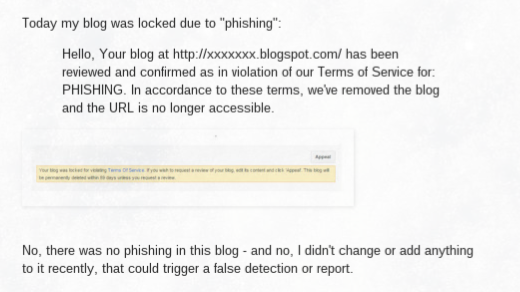
Today my blog was locked due to "phishing":
Hello, Your blog at http://xxxxxxx.blogspot.com/ has been reviewed and confirmed as in violation of our Terms of Service for: PHISHING. In accordance to these terms, we've removed the blog and the URL is no longer accessible.
No, there was no phishing in this blog - and no, I didn't change or add anything to it recently, that could trigger a false detection or report.

In the past, phishing generally would involve gadgets used to gather online identity information - such as third party email collection.

Email collection, in Blogger blogs, is best done using FeedBurner.

Most properly designed Blogger blogs, though, use FeedBurner Email Distribution - and FeedBurner, being part of Google, is hopefully not susceptible to phishing involvement.

Considering phishing as a form of identity theft, one might see a connection between some blogs, and Blogger abuse classification.
Phishing is the attempt to acquire sensitive information such as usernames, passwords, and credit card details (and sometimes, indirectly, money), often for malicious reasons, by masquerading as a trustworthy entity in an electronic communication.

Some blog owners, in an effort to increase traffic, may be incautiously adopting identities of commercial products.

Mentioning commercial products, in user names, is a way to increase blog traffic.

When using social networking platforms, like FaceBook, Google+, and Twitter, a user name which includes a commercial identity may seem like a great way to get attention from the other members. The legal owners of the commercial product, however, may consider this to be a copyright violation, or identity theft.

Each of the terms "copyright violation", "identity theft", and "impersonation" may be included by Blogger abuse classification, or online reviewers, as PHISHING.


Google - and AdSense - may also have a problem with social networking identity.

It's also possible that Google wants to protect themselves - and is requiring the guilty blogs to be classified.

I do note that one of the blogs, recently reported in the forum, appears to have empty AdSense ads - on the same page with FaceBook and Google+ badges, that may impersonate a commercial product. The impersonation - intentional or not - may also violate AdSense prohibited content.
Google ads may not be displayed on websites with content protected by copyright law unless they have the necessary legal rights to display or direct traffic to that content.

Besides being careful to only include original content in the blog, one should also be careful to not infringe on commercial identities in other websites - such as social networking platforms.

---

Some #Blogger blog owners, in an attempt to increase blog traffic - are advertising their blogs using social networking platforms like FaceBook, Google+, and Twitter - and are using the names of commercial products in their user names.

The user names include carefully added words which, to the blog owners, may seem to protect the blogs from complaints by owners of the commercial products. It's possible that Blogger does not see that way - and may be righteously classifying the blogs for copyright violation or identity theft, both of which might be considered phishing.

Jobs Blogs Are Not Desired, In Blogger

We see an occasional hopeful spammer asking, in Blogger Help Forum: Get Help with an Issue, about one more spam blog subject.
Can I publish a blog, and provide job postings?
The would be blog owner has not read the Blogger Content rules.

Jobs blogs are a problem, in Blogger. A jobs website should be published by a Commercial or Government Employment ("Human Resources") agency - and very few commercial or government job agencies operate Blogger blogs, as their website.

Most commercial and government agencies operate their own domains, and websites - and are properly advertised by their domain URLs. Not as "jobsformycountry.blogspot.com".

The few such agencies, which settle for publishing to Blogger, will probably be too small to provide anything interesting.

A jobs blog will be a favourite of many publishers, with little work required.

A jobs blog would be a favourite, of a blog owner, because it requires little effort to publish. You simply bookmark all of the agencies offering jobs, surf to each one periodically, and copy then paste interesting possibilities, into various blog posts.

Google does not want such content. Blogger specifically prohibits it.

Spam blogs cause various problems, beyond simply wasting a few seconds of your time when you happen to come across one. They can clog up search engines, making it difficult to find real content on the subjects that interest you. They may scrape content from other sites on the web, using other people's writing to make it look as though they have useful information of their own. And if an automated system is creating spam posts at an extremely high rate, it can impact the speed and quality of the service for other, legitimate users.

Many blog owners try to make money, with jobs blogs. AdSense won't publish ads on a site with copied content.

Fact: We don’t allow sites with auto-generated or otherwise unoriginal content to participate in the AdSense program. This is to ensure that our users are benefiting from a unique online experience and that our advertisers are partnering with useful and relevant sites.


A jobs blog publisher will be seeing this - a lot.


A blog owner won't have job offerings of his own - anything offered will be copied.

A blog owner who does not represent a commercial or government agency will have no way to generate legitimate job postings. Any postings on a jobs blog will be scraped from an legitimate commercial or government agency website - and the blog will be righteously classified as spam.

And that will leave another forum post.
My blog is locked for SPAM, without any prior warning. This is my favourite blog - how can they do this to me?

---

Jobs blogs are a favourite subject, for many #Blogger blog owners. They require little work - and are guaranteed to generate a lot of traffic, from the hopeful job seekers who have no idea that everything offered on the blog has been scraped from a legitimate commercial or government agency website.

They will receive little respect from the Blogger spam classifier, though. As with all scraped content, they will be righteously classified, and deleted.

Hosted AdSense Accounts, And Custom Domains

We periodically see the query, from confused blog owners, in AdSense Help Forum: Blogger / Host Partners, or maybe in Blogger Help Forum: Get Help with an Issue.
Why does my blog not show ads, any more? It worked fine, until I changed my blog to my private domain!
The blog owner does not know about the rules of Hosted AdSense accounts, vs AdSense for Content.

If you start a Blogger blog, you will probably get an AdSense account by using the Blogger dashboard Earnings page, and qualifying the blog.

An AdSense account setup under Blogger can only be used with "blogspot.com".

An AdSense account setup under Blogger (or other content services) is called a Hosted account. A Hosted AdSense account can only be used with the service under which it was setup.

A Blogger Hosted account can be used only with Blogger blogs published to "blogspot.com". If you want to use a custom domain published Blogger blog with AdSense, you need AdSense For Content - a full AdSense account.

You can have only one AdSense account. You have to upgrade your Blogger Hosted account, to AdSense for Content, to show ads anywhere other than "blogspot.com".


You can only use blogs published to "blogspot.com", with a Blogger Hosted account.


To use AdSense outside "blogspot.com", you need Full AdSense For Content.

To upgrade to Full AdSense, you need a full domain - ie, a blog published to a custom domain - or a non Google hosted top level domain website. Blogs published to sub domains of a third party service, such as "blogspot.com", do not qualify for AdSense For Content.

If you already have your own top level domain website, hosting AdSense for Content ads, then you never setup a Blogger blog using a Hosted account - and you are probably not reading here.

Remember:

  1. You can have only one AdSense account.
  2. You can only use blogs published to "blogspot.com", with a Blogger Hosted account.
  3. You need a top level domain website, or a Blogger custom domain published blog, to qualify for AdSense For Content.

If you are upgrading your Blogger blog to a custom domain, you need to go through the Hosted to Full upgrade process. This will cause your AdSense ads to stop, for 2 to 4 weeks.

  1. Learn the rules - and examine blog content, before you start.
  2. Upgrade your Blogger blog, to a properly setup custom domain.
  3. Get the custom domain working.
  4. Apply for the AdSense account upgrade.
  5. Get preliminary approval.
  6. Install AdSense for Content ads.
  7. Wait for full approval.

Learn the rules - and examine blog content, before you start.

You'll want to start the AdSense Upgrade with some expectation of success. AdSense for Content standards are significantly more selective, than Hosted AdSense.

Do not start this project, until the blog has an established Hosted Account.

Become intimately familiar with eligibility to participate, with program policies, and with prohibited content - before you start.

Then, go over the blog - and improve or remove what does not belong.

Upgrade your Blogger blog, to a properly setup custom domain.

If AdSense is to qualify your blog, under your new domain URL, the domain URL has to work. This requires righteous DNS addresses.

Get the custom domain working.

Given a properly setup domain, publish the blog to the proper domain URL. Then, redirect the domain root to the published URL.

Finally wait, as Blogger completes the domain migration.

Apply for the AdSense account upgrade.

Once you have a working Blogger blog, successfully using your new non "blogspot.com" URL, start the AdSense upgrade.

Get preliminary approval.

You will get email from AdSense, instructing you to upgrade your ad content.

Install AdSense for Content ads.

From the AdSense dashboard, generate the AdSense For Content ads, and install them on the blog.

You won't be using the Blogger "AdSense" gadget - that is for Hosted AdSense. You have to get the code for the ads from the AdSense dashboard wizard.

When you install the ads, load the code into new "HTML" gadgets - don't edit into the template.

Wait for full approval.

Inform AdSense that your new ads are in place. Then wait, as your blog is thoroughly examined. Again, allow 2 to 4 weeks for review.

---

Some #Blogger blog owners publish blogs, with AdSense providing ads in the blogs. Then, they decide to upgrade a blog, to use a custom domain URL.

Not everybody knows, before the ads stop appearing, that AdSense for custom domain published blogs is not the same as AdSense for native Blogger blogs.

Contact Us

24x7 online , we happy to answer you
tamilcypc@gmail.com

Disclaimer

This Blog and its TUT's are intended for educational purposes only, no-one involved in the creation of this TuT may be held responsible for any illegal acts brought about by this Blog or TuT.


Featured Post

Custom Domains And HTTPS Redirection Code